Shadow Call – Fake Call Maker
Aggiornata
Versione corrente
1.0.1
Offerta da

Non devi più preoccuparti dei sovraccarichi durante l'utilizzo di Shadow Call – Fake Call Maker sul tuo cellulare, liberati dal piccolo schermo e goditi dell'App su uno schermo molto più grande. D'ora in poi, sperimenta la tua App a schermo intero con tastiera e mouse. MEmu ti offre tutte le sorprendenti funzioni che ti aspettavi: installazione rapida e impostazione semplice, controlli intuitivi, niente più limitazioni di batteria, dati mobili e chiamate fastidiose. Il MEmu 9 nuovo di zecca è la prima scelta per utilizzare Shadow Call – Fake Call Maker sul tuo computer. Codificato con il nostro assorbimento, il gestore multi-istanza consente di aprire 2 o più account contemporaneamente. E soprattutto, il nostro esclusivo motore di emulazione può sbloccare il pieno potenziale del tuo PC, rendendo tutto liscio e piacevole.
Mostra altro
Goditi un'esperienza straordinaria con Shadow Call – Fake Call Maker su PC con MEmu Play. È un potente emulatore Android gratuito che ti offre migliaia di app Android per la versione desktop. Divertiti a connetterti con gli amici e a perfezionare il tuo lavoro con maggiore efficienza! Need a believable fake call to exit an awkward situation, protect your privacy, or just stay in control of your time?
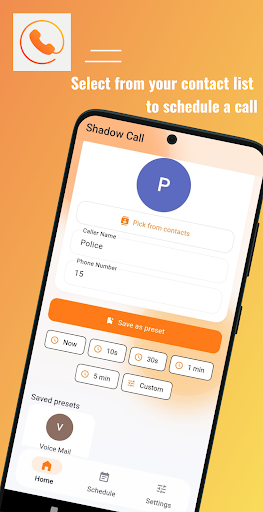
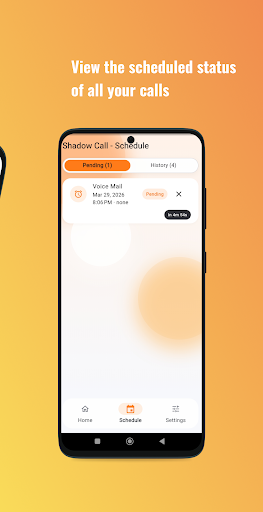
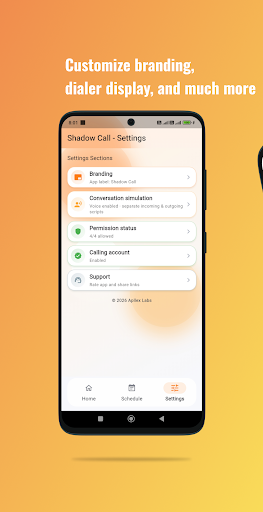
Need a believable fake call to exit an awkward situation, protect your privacy, or just stay in control of your time? Shadow Call makes it happen — with real telecom-style incoming call behavior, custom caller identities, and realistic audio playback.
REALISTIC FAKE INCOMING CALLS
Shadow Call uses Android Telecom integration to trigger call screens that look and feel like real incoming calls — not a simple popup. Whether you need to slip out of a meeting, avoid an unwanted conversation, or create a convincing interruption, Shadow Call delivers.
FAKE CALL AUDIO & SOUND SIMULATION
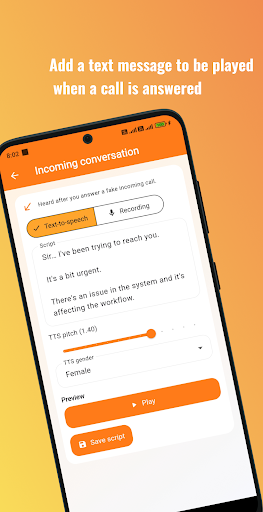
Record your own audio clips or use text-to-speech to create sounds that play during your fake call — making the "other person" feel real. Customize what the caller sounds like and make every call scenario believable.
⏱ ONE-TAP SCHEDULING
Trigger a fake call instantly or schedule one in advance:
• Now
• 10 seconds
• 30 seconds
• 1 minute
• 5 minutes
• Custom delay
CUSTOM CALLER PROFILES
Set up a fake caller with a name, phone number, and optional photo. Save multiple profiles as presets and switch between them in seconds — perfect for repeated use without re-entering details.
SCHEDULE MANAGEMENT
View all your pending and past calls in one place. Cancel scheduled calls anytime. Full call history so you always know what ran.
CALL BEHAVIOR CONTROLS
Fine-tune how each call behaves:
• Vibration on ring
• Auto-answer timer
• Auto-hangup timer
DIALER & OUTGOING CALL SIMULATION
Includes a realistic dialpad and outgoing call UI — ideal for situations where you need to appear to be making a call, not just receiving one.
CONTACT SUGGESTIONS
Pull from your contacts (with permission) for quick caller setup — no manual typing needed.
WORKS AFTER REBOOT
Scheduled alarms are restored after device restart, so your planned fake calls stay on track even if your phone restarts.
CUSTOM APP LABEL
Rename the calling account label to keep things discreet and match your personal branding preferences.
— — —
WHO IS SHADOW CALL FOR?
• People who need a polite escape from awkward social situations
• Anyone who values personal privacy on the go
• Professionals managing back-to-back meetings and calls
• Users who want scheduled interruptions for focus or safety
Shadow Call is a privacy tool for personal use. It does not connect to real phone networks, VoIP services, or cloud systems.
— — —
PERMISSIONS USED
Shadow Call requests permissions needed to deliver a realistic experience: phone, contacts, exact alarm scheduling, notifications, foreground service, and call log. Denying some permissions may limit features but the app will still function.
Download Shadow Call and take control of when — and with whom — you appear to be on the phone.
Mostra altro

1. Scarica il programma di installazione di MEmu e completa l'installazione

2. Avvia il Memu e apri il Google Play sulla homepage

3. Cerca Shadow Call – Fake Call Maker in Google Play
Install
4. Scarica e installa Shadow Call – Fake Call Maker
5. Al termine dell'installazione, fai clic sull'icona per avviar

6. Divertiti giocando a Shadow Call – Fake Call Maker su PC con MEmu
MEmu App Player è il miglior emulatore Android gratuito, utilizzato da 50 milioni di persone per ottenere un'esperienza di gioco Android superba. La tecnilogia di virtualizzazione MEmu ti permette di giocare a migliaia di giochi Android con semplicità sul tuo computer, anche i giochi con la grafica più esigente.
Schermo più grande con una grafica migliore; Lunga durata, senza limitazione di batteria o dati mobili.
Supporto completo per mappa di tastiera per un controllo preciso di tastiera e mouse o gamepad.
Multipli account di gioco o attività su un singolo PC contemporaneamente con il gestore di multi istanza.
Use Shadow Call – Fake Call Maker on PC by following steps: