Cyworld
Aggiornata
Versione corrente
8.7.2
Offerta da

Non devi più preoccuparti dei sovraccarichi durante l'utilizzo di Cyworld sul tuo cellulare, liberati dal piccolo schermo e goditi dell'App su uno schermo molto più grande. D'ora in poi, sperimenta la tua App a schermo intero con tastiera e mouse. MEmu ti offre tutte le sorprendenti funzioni che ti aspettavi: installazione rapida e impostazione semplice, controlli intuitivi, niente più limitazioni di batteria, dati mobili e chiamate fastidiose. Il MEmu 9 nuovo di zecca è la prima scelta per utilizzare Cyworld sul tuo computer. Codificato con il nostro assorbimento, il gestore multi-istanza consente di aprire 2 o più account contemporaneamente. E soprattutto, il nostro esclusivo motore di emulazione può sbloccare il pieno potenziale del tuo PC, rendendo tutto liscio e piacevole.
Mostra altro
Scarica Cyworld su PC con MEmu Android Emulator. Divertiti giocando sul grande schermo. We sincerely believe that Cyworld, a home of your memories belongs not just to the company but to all of us.

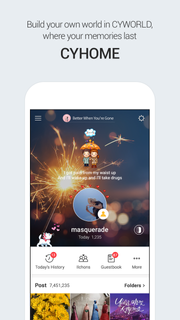
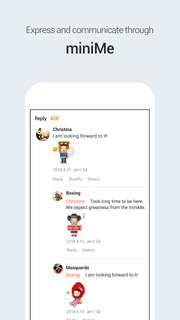
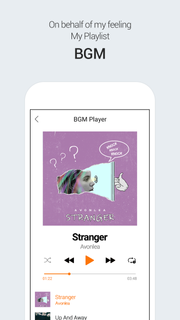
We sincerely believe that Cyworld, a home of your memories belongs not just to the company but to all of us. You can keep your precious memories in the forms of image, video, etc. Keep your past and present memories on Cyworld. 1. Timeline which reflects your interests- Timeline is the first page you encounter. You can check your friend’s postings and videos in one scroll. Click the ‘following’ ‘friend recommendation’ and ‘group’ tabs to see their updates on your timeline! 2. Cyhome, a home for your precious memories - We kept all your memories intact at Cyhome from photos and diaries to texts, BGMs and videos. Today History service takes you back to the good old times. 3. Original Mini Me- You can now enjoy Mini Me on mobile platforms. Express many different emotions including joy, sad, love and happy via your Mini Me. We have even added Avatar with Voice function! 4. BGM to express your mood- You may have forgotten your old music playlists but Cyworld hasn’t! Enjoy the music you once loved on Cyworld. 5. ‘Find Friend’ with detailed search function- Look for your friends such as their date of birth and gender. We also recommend friends for you. 6. Improved video function- Record videos either short or long. upload it onto Cyworld right away. It will enrich your memories. *CYWORLD WEB: http://www.cyworld.com/
Mostra altro

1. Scarica il programma di installazione di MEmu e completa l'installazione

2. Avvia il Memu e apri il Google Play sulla homepage

3. Cerca Cyworld in Google Play
Install
4. Scarica e installa Cyworld
5. Al termine dell'installazione, fai clic sull'icona per avviar

6. Divertiti giocando a Cyworld su PC con MEmu
MEmu App Player è il miglior emulatore Android gratuito, utilizzato da 50 milioni di persone per ottenere un'esperienza di gioco Android superba. La tecnilogia di virtualizzazione MEmu ti permette di giocare a migliaia di giochi Android con semplicità sul tuo computer, anche i giochi con la grafica più esigente.
Schermo più grande con una grafica migliore; Lunga durata, senza limitazione di batteria o dati mobili.
Supporto completo per mappa di tastiera per un controllo preciso di tastiera e mouse o gamepad.
Multipli account di gioco o attività su un singolo PC contemporaneamente con il gestore di multi istanza.
Use Cyworld on PC by following steps: