
Cyworld
अपडेट किया गया
वर्तमान वर्शन
8.7.2
संसाधन

Cyworld पर अपनी मोबाइल डेटा सीमा पार करने को अलविदा कहें और छोटी स्क्रीन की सीमाओं से मुक्त होकर बड़े डिस्प्ले के लाभों का अनुभव करें। अब, आप अपने कीबोर्ड और माउस का उपयोग करके फुल-स्क्रीन मोड में टॉपर्स क्लैन की शक्ति का अनुभव कर सकते हैं। MEmu Play में वे सभी बेहतरीन सुविधाएँ हैं जिनकी आप अपेक्षा करते हैं: त्वरित इंस्टॉलेशन और आसान सेटअप, सहज नियंत्रण, बैटरी की आवश्यकता नहीं, और कोई डेटा या कॉल समय सीमा नहीं। नया MEmu 9 आपके कंप्यूटर पर Cyworld का उपयोग करने के लिए सबसे अच्छा विकल्प है। हमारा मालिकाना मल्टी-इंस्टेंस मैनेजर एक साथ दो या अधिक खातों को चलाने का समर्थन करता है। इससे भी महत्वपूर्ण बात यह है कि हमारा अनूठा इम्यूलेशन इंजन आपके कंप्यूटर के प्रदर्शन का पूरा उपयोग करता है, जिससे एक सहज और निर्बाध अनुभव मिलता है।
और दिखाएं
डाउनलोड करें Cyworld पीसी पर MEmu एंड्रॉयड एमुलेटर के साथ बड़े पर्दे पर खेलने का आनंद लें। We sincerely believe that Cyworld, a home of your memories belongs not just to the company but to all of us.

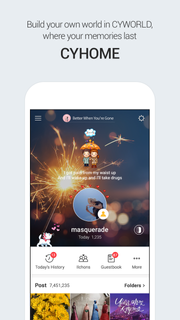
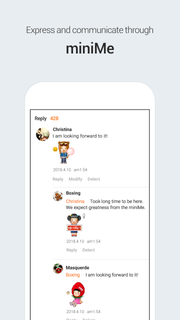
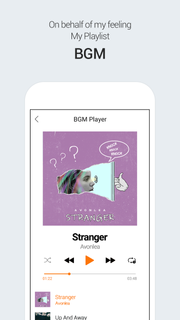
We sincerely believe that Cyworld, a home of your memories belongs not just to the company but to all of us. You can keep your precious memories in the forms of image, video, etc. Keep your past and present memories on Cyworld. 1. Timeline which reflects your interests- Timeline is the first page you encounter. You can check your friend’s postings and videos in one scroll. Click the ‘following’ ‘friend recommendation’ and ‘group’ tabs to see their updates on your timeline! 2. Cyhome, a home for your precious memories - We kept all your memories intact at Cyhome from photos and diaries to texts, BGMs and videos. Today History service takes you back to the good old times. 3. Original Mini Me- You can now enjoy Mini Me on mobile platforms. Express many different emotions including joy, sad, love and happy via your Mini Me. We have even added Avatar with Voice function! 4. BGM to express your mood- You may have forgotten your old music playlists but Cyworld hasn’t! Enjoy the music you once loved on Cyworld. 5. ‘Find Friend’ with detailed search function- Look for your friends such as their date of birth and gender. We also recommend friends for you. 6. Improved video function- Record videos either short or long. upload it onto Cyworld right away. It will enrich your memories. *CYWORLD WEB: http://www.cyworld.com/
और दिखाएं

1. MEmu इंस्टॉलर को डाउनलोड करें और इंस्टॉलेशन को पूरा करें

2. MEmu शुरू करें फिर होमपेज पर Google Play खोलें

3. Google Play में Cyworld खोजें
Install
4. Cyworld डाउनलोड कर इंस्टॉल करें
5. इंस्टॉल पूरा होने पर आइकन दबाएं

6. MEmu का उपयोग करके अपने कंप्यूटर पर Cyworld का अनुभव करें
MEmu Play सबसे बेहतरीन मुफ़्त Android एमुलेटर है और 5 करोड़ लोग पहले ही इसके शानदार Android ऐप अनुभव का आनंद ले चुके हैं। MEmu 9 वर्चुअलाइज़ेशन तकनीक आपको अपने PC पर हज़ारों Android ऐप्स, यहाँ तक कि सबसे ज़्यादा ग्राफ़िक्स वाले ऐप्स भी, आसानी से चलाने की सुविधा देती है।
असीमित बैटरी या मोबाइल डेटा के साथ बेहतर ग्राफिक्स के साथ बड़ी स्क्रीन; लंबी अवधि।
कीबोर्ड और माउस या गेमपैड के उत्तम नियंत्रण के लिए संपूर्ण कीमैपिंग का समर्थन करता हैं।
एक ही पीसी पर मल्टी-इंस्टेंस मैनेजर के साथ एक समय में कई गेम खाते या कार्य कर सकते हैं।
Use Cyworld on PC by following steps: