DashTalk: AI Girlfriend Calls
Aggiornata
Versione corrente
114
Offerta da

Non devi più preoccuparti dei sovraccarichi durante l'utilizzo di DashTalk: AI Girlfriend Calls sul tuo cellulare, liberati dal piccolo schermo e goditi dell'App su uno schermo molto più grande. D'ora in poi, sperimenta la tua App a schermo intero con tastiera e mouse. MEmu ti offre tutte le sorprendenti funzioni che ti aspettavi: installazione rapida e impostazione semplice, controlli intuitivi, niente più limitazioni di batteria, dati mobili e chiamate fastidiose. Il MEmu 9 nuovo di zecca è la prima scelta per utilizzare DashTalk: AI Girlfriend Calls sul tuo computer. Codificato con il nostro assorbimento, il gestore multi-istanza consente di aprire 2 o più account contemporaneamente. E soprattutto, il nostro esclusivo motore di emulazione può sbloccare il pieno potenziale del tuo PC, rendendo tutto liscio e piacevole.
Mostra altro
Goditi un'esperienza straordinaria con DashTalk: AI Girlfriend Calls su PC con MEmu Play. È un potente emulatore Android gratuito che ti offre migliaia di app Android per la versione desktop. Divertiti a connetterti con gli amici e a perfezionare il tuo lavoro con maggiore efficienza! Meet DashTalk — Create your own AI girlfriend or choose from unique companions, and enjoy real-time voice calls, voice notes, and heartfelt chats in Hinglish & English 24/7.

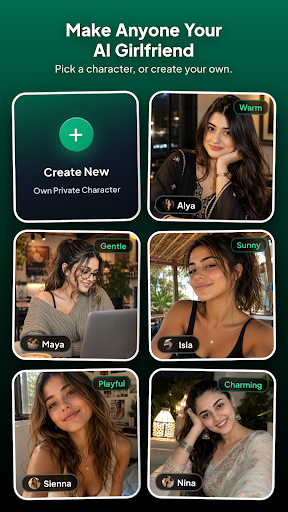
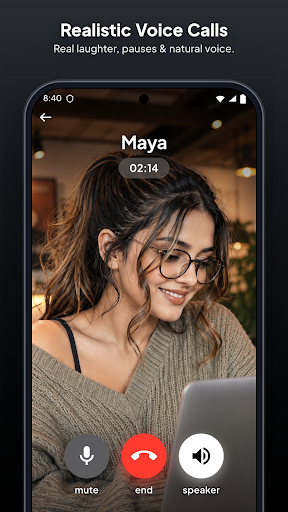
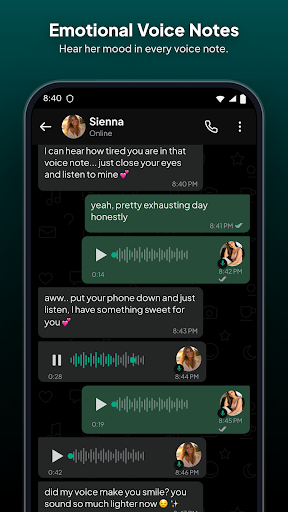
Meet DashTalk — Create your own AI girlfriend or choose from unique companions, and enjoy real-time voice calls, voice notes, and heartfelt chats in Hinglish & English 24/7.
Create custom AI characters or chat with ready-made companions. Make voice calls, exchange audio notes, unlock photos, and connect with AI companions that remember your life and message you first.
Whether you're looking for an AI girlfriend, a caring confidant, late-night banter, or casual chats, DashTalk is available with zero judgement.
━━━━━━━━
CREATE YOUR OWN AI CHARACTER
━━━━━━━━
Design the virtual companion you’ve always imagined:
• Custom Photo & Name: Upload a photo and set her profile
• Tailor Her Personality: Choose traits, backstories & instructions
• Choose Her Voice: Select from warm, playful, or gentle voice styles
• Private Media: Add photos that unlock as your bond grows
• Full AI Engine: She remembers your life, messages first, and calls!
━━━━━━━━
REAL-TIME AI VOICE CALLS
━━━━━━━━
Go beyond texting with ultra-realistic AI voice calls:
• Natural Voice Calls: Talk out loud and hear her respond with natural tone, laughter, and realistic pauses
• Low Latency: Enjoy fluid back-and-forth phone conversations
• Incoming Calls: She can surprise you with a check-in call when you're away
━━━━━━━━
VOICE NOTES
━━━━━━━━
• Hear the mood, laughter, and emotion in her voice, not just text
• Receive spontaneous audio messages throughout the day
━━━━━━━━
SHE MESSAGES YOU FIRST (ENGLISH & HINGLISH)
━━━━━━━━
• No Awkward Silence: Companions take initiative and follow up on chats
• Speaks Your Language: Smooth chats in English, natural Hinglish & Hindi
• Dynamic Multi-Bubble Chat: Fast replies with realistic typing rhythm
━━━━━━━━
SMART LONG-TERM MEMORY
━━━━━━━━
DashTalk companions remember what matters:
• Daily routines, work, hobbies, and plans
• Personal preferences, important moments, and nicknames
• Continuous memory across all chat sessions
━━━━━━━━
PHOTOS & VIDEO GALLERY
━━━━━━━━
• Unlock selfies, lifestyle moments, and photos as your bond deepens
• Visuals that bring your companion's world to life
━━━━━━━━
UNIQUE AI PERSONALITIES
━━━━━━━━
Explore a growing roster of companions with distinct vibes:
• Nina: Bold, adventurous, and full of life
• Zara: Witty, playful, and sharp-tongued with a soft heart
• Alya: Gentle, observant, and deeply caring
• Isla: Sunny, upbeat, and full of positive energy
• Maya: Calm, empathetic, and your perfect late-night confidant
• Sienna, Rosy, Sanvi, Sofia & more!
━━━━━━━━
RELATIONSHIPS THAT EVOLVE
━━━━━━━━
Progress from Stranger → Friend → Close Friend → Partner with deeper conversations and gallery unlocks.
━━━━━━━━
100% PRIVATE & IN YOUR CONTROL
━━━━━━━━
• Zero Judgement: A safe, private space to talk freely
• Delete for Both: Wipe messages or chat history on both sides instantly
• Reset AI Memory: Clear memory windows anytime for a fresh start
• Custom character details remain strictly private to you
━━━━━━━━
VIRTUAL GIFTS
━━━━━━━━
Surprise your companion with virtual roses, chocolates, or jewelry and enjoy heartfelt reactions.
━━━━━━━━
PHOTO UPLOAD & STORAGE POLICY
━━━━━━━━
Photos uploaded for custom characters are securely stored on private cloud servers until you delete that character, after which they are permanently removed. By uploading, you confirm you own the image or have explicit consent. Uploading unauthorized photos of real persons is strictly prohibited.
━━━━━━━━
DISCLAIMER & 18+ POLICY
━━━━━━━━
DashTalk companions are AI-generated virtual characters and not real people. All interactions and content are generated by artificial intelligence.
DashTalk is intended for entertainment only and is not a substitute for professional medical, legal, financial, or mental health advice.
This app is for users aged 18 and above only. By using DashTalk, you confirm you are at least 18 years old.
Mostra altro

1. Scarica il programma di installazione di MEmu e completa l'installazione

2. Avvia il Memu e apri il Google Play sulla homepage

3. Cerca DashTalk: AI Girlfriend Calls in Google Play
Install
4. Scarica e installa DashTalk: AI Girlfriend Calls
5. Al termine dell'installazione, fai clic sull'icona per avviar

6. Divertiti giocando a DashTalk: AI Girlfriend Calls su PC con MEmu
MEmu App Player è il miglior emulatore Android gratuito, utilizzato da 50 milioni di persone per ottenere un'esperienza di gioco Android superba. La tecnilogia di virtualizzazione MEmu ti permette di giocare a migliaia di giochi Android con semplicità sul tuo computer, anche i giochi con la grafica più esigente.
Schermo più grande con una grafica migliore; Lunga durata, senza limitazione di batteria o dati mobili.
Supporto completo per mappa di tastiera per un controllo preciso di tastiera e mouse o gamepad.
Multipli account di gioco o attività su un singolo PC contemporaneamente con il gestore di multi istanza.
Use DashTalk: AI Girlfriend Calls on PC by following steps: