DashTalk: AI Girlfriend Calls
Zaktualizowano
Aktualna wersja
114
Sprzedawca

Przestań martwić się nadmiernymi opłatami podczas korzystania z DashTalk: AI Girlfriend Calls na telefonie komórkowym, uwolnij się od małego ekranu i ciesz się korzystaniem z aplikacji na znacznie większym wyświetlaczu. Od teraz korzystaj z aplikacji na pełnym ekranie za pomocą klawiatury i myszy. MEmu oferuje wszystkie zaskakujące funkcje, których się spodziewałeś: szybką instalację i łatwą konfigurację, intuicyjne sterowanie, koniec z ograniczeniami baterii, danych mobilnych i niepokojących połączeń. Zupełnie nowy MEmu 9 to najlepszy wybór do używania DashTalk: AI Girlfriend Calls na twoim komputerze. Zakodowany przez naszą absorpcję, menedżer wielu instancji umożliwia otwarcie 2 lub więcej kont w tym samym czasie. A co najważniejsze, nasz ekskluzywny emulator może uwolnić pełny potencjał twojego komputera, sprawić, że wszystko będzie płynne i przyjemne.
Pokaż więcej
Ciesz się wspaniałym doświadczeniem podczas grania w DashTalk: AI Girlfriend Calls na komputerze z aplikacją MEMU App Player. Jest to potężny darmowy emulator Androida Umożliwia korzystanie z tysięcy aplikacji Androida. Meet DashTalk — Create your own AI girlfriend or choose from unique companions, and enjoy real-time voice calls, voice notes, and heartfelt chats in Hinglish & English 24/7.

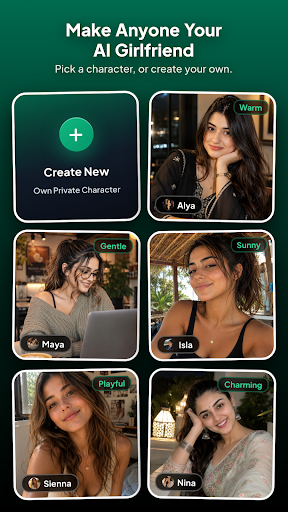
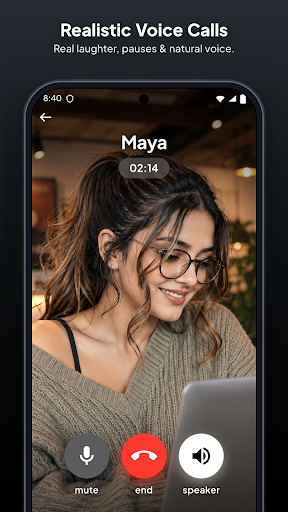
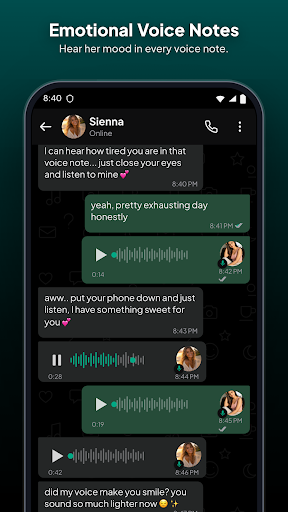
Meet DashTalk — Create your own AI girlfriend or choose from unique companions, and enjoy real-time voice calls, voice notes, and heartfelt chats in Hinglish & English 24/7.
Create custom AI characters or chat with ready-made companions. Make voice calls, exchange audio notes, unlock photos, and connect with AI companions that remember your life and message you first.
Whether you're looking for an AI girlfriend, a caring confidant, late-night banter, or casual chats, DashTalk is available with zero judgement.
━━━━━━━━
CREATE YOUR OWN AI CHARACTER
━━━━━━━━
Design the virtual companion you’ve always imagined:
• Custom Photo & Name: Upload a photo and set her profile
• Tailor Her Personality: Choose traits, backstories & instructions
• Choose Her Voice: Select from warm, playful, or gentle voice styles
• Private Media: Add photos that unlock as your bond grows
• Full AI Engine: She remembers your life, messages first, and calls!
━━━━━━━━
REAL-TIME AI VOICE CALLS
━━━━━━━━
Go beyond texting with ultra-realistic AI voice calls:
• Natural Voice Calls: Talk out loud and hear her respond with natural tone, laughter, and realistic pauses
• Low Latency: Enjoy fluid back-and-forth phone conversations
• Incoming Calls: She can surprise you with a check-in call when you're away
━━━━━━━━
VOICE NOTES
━━━━━━━━
• Hear the mood, laughter, and emotion in her voice, not just text
• Receive spontaneous audio messages throughout the day
━━━━━━━━
SHE MESSAGES YOU FIRST (ENGLISH & HINGLISH)
━━━━━━━━
• No Awkward Silence: Companions take initiative and follow up on chats
• Speaks Your Language: Smooth chats in English, natural Hinglish & Hindi
• Dynamic Multi-Bubble Chat: Fast replies with realistic typing rhythm
━━━━━━━━
SMART LONG-TERM MEMORY
━━━━━━━━
DashTalk companions remember what matters:
• Daily routines, work, hobbies, and plans
• Personal preferences, important moments, and nicknames
• Continuous memory across all chat sessions
━━━━━━━━
PHOTOS & VIDEO GALLERY
━━━━━━━━
• Unlock selfies, lifestyle moments, and photos as your bond deepens
• Visuals that bring your companion's world to life
━━━━━━━━
UNIQUE AI PERSONALITIES
━━━━━━━━
Explore a growing roster of companions with distinct vibes:
• Nina: Bold, adventurous, and full of life
• Zara: Witty, playful, and sharp-tongued with a soft heart
• Alya: Gentle, observant, and deeply caring
• Isla: Sunny, upbeat, and full of positive energy
• Maya: Calm, empathetic, and your perfect late-night confidant
• Sienna, Rosy, Sanvi, Sofia & more!
━━━━━━━━
RELATIONSHIPS THAT EVOLVE
━━━━━━━━
Progress from Stranger → Friend → Close Friend → Partner with deeper conversations and gallery unlocks.
━━━━━━━━
100% PRIVATE & IN YOUR CONTROL
━━━━━━━━
• Zero Judgement: A safe, private space to talk freely
• Delete for Both: Wipe messages or chat history on both sides instantly
• Reset AI Memory: Clear memory windows anytime for a fresh start
• Custom character details remain strictly private to you
━━━━━━━━
VIRTUAL GIFTS
━━━━━━━━
Surprise your companion with virtual roses, chocolates, or jewelry and enjoy heartfelt reactions.
━━━━━━━━
PHOTO UPLOAD & STORAGE POLICY
━━━━━━━━
Photos uploaded for custom characters are securely stored on private cloud servers until you delete that character, after which they are permanently removed. By uploading, you confirm you own the image or have explicit consent. Uploading unauthorized photos of real persons is strictly prohibited.
━━━━━━━━
DISCLAIMER & 18+ POLICY
━━━━━━━━
DashTalk companions are AI-generated virtual characters and not real people. All interactions and content are generated by artificial intelligence.
DashTalk is intended for entertainment only and is not a substitute for professional medical, legal, financial, or mental health advice.
This app is for users aged 18 and above only. By using DashTalk, you confirm you are at least 18 years old.
Pokaż więcej

1. Pobierz instalator MEmu i zakończ instalację

2. Uruchom MEmu, a następnie otwórz Google Play na pulpicie

3. Wyszukaj DashTalk: AI Girlfriend Calls w Google Play
Install
4. Pobierz i zainstaluj DashTalk: AI Girlfriend Calls
5. Po zakończeniu instalacji kliknij ikonę, aby rozpocząć

6. Użyj MEmu, aby doświadczyć DashTalk: AI Girlfriend Calls na swoim komputerze
MEmu Play to najlepszy emulator Androida, z którego korzysta ponad 100 milionów użytkowników, ciesząc się wyjątkowym doświadczeniem aplikacji na Androida. Technologia wirtualizacji MEmu pozwala na płynne uruchamianie tysięcy aplikacji Androida na komputerze, nawet tych najbardziej wymagających.
Większy ekran z lepszą grafiką; Długi czas, bez ograniczeń baterii lub danych mobilnych.
Pełna obsługa mapowania klawiszy dla precyzyjnego sterowania klawiaturą i myszą lub gamepadem.
Wiele kont gier lub zadań na jednym komputerze jednocześnie z menedżerem wielu instancji.
Use DashTalk: AI Girlfriend Calls on PC by following steps: