
FCTV33
Aggiornata
Versione corrente
1.0.1
Offerta da

Non devi più preoccuparti dei sovraccarichi durante l'utilizzo di FCTV33 sul tuo cellulare, liberati dal piccolo schermo e goditi dell'App su uno schermo molto più grande. D'ora in poi, sperimenta la tua App a schermo intero con tastiera e mouse. MEmu ti offre tutte le sorprendenti funzioni che ti aspettavi: installazione rapida e impostazione semplice, controlli intuitivi, niente più limitazioni di batteria, dati mobili e chiamate fastidiose. Il MEmu 9 nuovo di zecca è la prima scelta per utilizzare FCTV33 sul tuo computer. Codificato con il nostro assorbimento, il gestore multi-istanza consente di aprire 2 o più account contemporaneamente. E soprattutto, il nostro esclusivo motore di emulazione può sbloccare il pieno potenziale del tuo PC, rendendo tutto liscio e piacevole.
Mostra altro
Goditi un'esperienza straordinaria con FCTV33 su PC con MEmu Play. È un potente emulatore Android gratuito che ti offre migliaia di app Android per la versione desktop. Divertiti a connetterti con gli amici e a perfezionare il tuo lavoro con maggiore efficienza! FCTV33 is a fast, clean football app for fans who want everything about the game in one place.
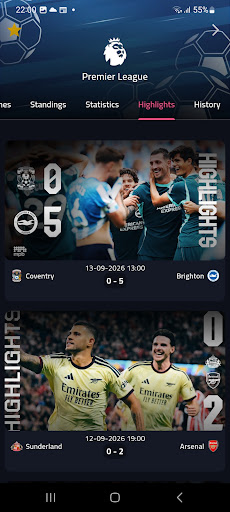
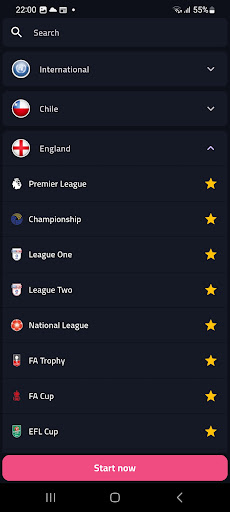
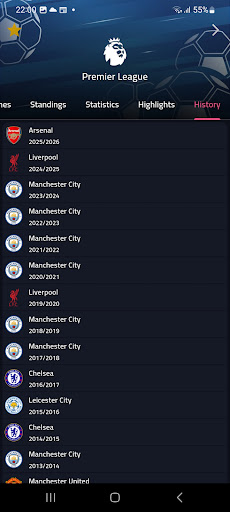
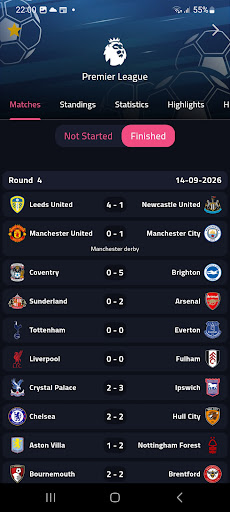
FCTV33 is a fast, clean football app for fans who want everything about the game in one place. Follow live scores, lineups, match statistics, league tables, transfers and highlights from football competitions around the world.
LIVE SCORES & FIXTURES
• Live football scores and results for today's matches
• Browse fixtures and past results by date
• Pin your favorite leagues to the top and sort matches your way
• Pull to refresh for the latest score updates
MATCH CENTER
• Starting lineups and substitutes
• Match events: goals, yellow and red cards, penalties and substitutions
• Detailed team statistics: possession, shots, corners and more
• Head-to-head (H2H) record between both teams
• Kick-off time, venue and TV channel information when available
LEAGUES & STANDINGS
• Full league tables and team standings
• Top scorers and top player statistics
• Past winners of each competition
• Explore competitions by country
TEAMS & PLAYERS
• Team fixtures, results and squads
• Player profiles and career transfer history
• Latest football transfers
HIGHLIGHTS & NEWS
• Watch match highlight videos
• Read football news in your language
FAST SEARCH
Find any team, player or competition in seconds.
MADE FOR EVERY FAN
• Available in 17 languages: English, Arabic, French, Spanish, Portuguese, German, Italian, Turkish, Russian, Dutch, Polish, Swedish, Danish, Norwegian, Japanese, Chinese and Hindi
• Choose your time zone so every kick-off time is correct for you
• Light and dark mode
• Lightweight design that loads quickly
Whether you follow one club or every league, FCTV33 keeps you close to the match with live scores, lineups, stats and standings in a simple, modern app.
FCTV33 is an independent app. It is not affiliated with, endorsed by or connected to any league, club, federation or broadcaster. All names and logos belong to their respective owners. FCTV33 does not stream live matches.
Mostra altro

1. Scarica il programma di installazione di MEmu e completa l'installazione

2. Avvia il Memu e apri il Google Play sulla homepage

3. Cerca FCTV33 in Google Play
Install
4. Scarica e installa FCTV33
5. Al termine dell'installazione, fai clic sull'icona per avviar

6. Divertiti giocando a FCTV33 su PC con MEmu
MEmu App Player è il miglior emulatore Android gratuito, utilizzato da 50 milioni di persone per ottenere un'esperienza di gioco Android superba. La tecnilogia di virtualizzazione MEmu ti permette di giocare a migliaia di giochi Android con semplicità sul tuo computer, anche i giochi con la grafica più esigente.
Schermo più grande con una grafica migliore; Lunga durata, senza limitazione di batteria o dati mobili.
Supporto completo per mappa di tastiera per un controllo preciso di tastiera e mouse o gamepad.
Multipli account di gioco o attività su un singolo PC contemporaneamente con il gestore di multi istanza.
Use FCTV33 on PC by following steps: