FlyToGo
Aggiornata
Versione corrente
1.1.13
Offerta da

Non devi più preoccuparti dei sovraccarichi durante l'utilizzo di FlyToGo sul tuo cellulare, liberati dal piccolo schermo e goditi dell'App su uno schermo molto più grande. D'ora in poi, sperimenta la tua App a schermo intero con tastiera e mouse. MEmu ti offre tutte le sorprendenti funzioni che ti aspettavi: installazione rapida e impostazione semplice, controlli intuitivi, niente più limitazioni di batteria, dati mobili e chiamate fastidiose. Il MEmu 9 nuovo di zecca è la prima scelta per utilizzare FlyToGo sul tuo computer. Codificato con il nostro assorbimento, il gestore multi-istanza consente di aprire 2 o più account contemporaneamente. E soprattutto, il nostro esclusivo motore di emulazione può sbloccare il pieno potenziale del tuo PC, rendendo tutto liscio e piacevole.
Mostra altro
Goditi un'esperienza straordinaria con FlyToGo su PC con MEmu Play. È un potente emulatore Android gratuito che ti offre migliaia di app Android per la versione desktop. Divertiti a connetterti con gli amici e a perfezionare il tuo lavoro con maggiore efficienza! FlyToGo is an innovative application, designed for pilots, passengers and travel enthusiasts.
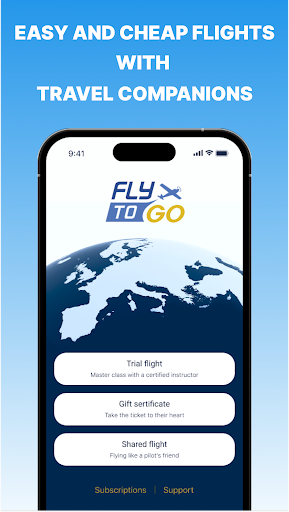
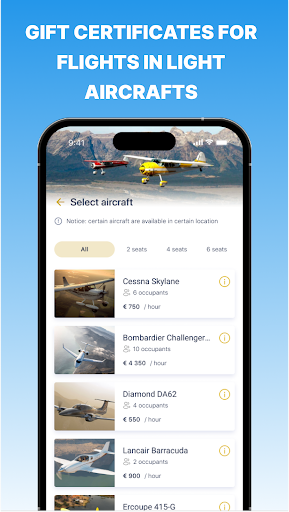
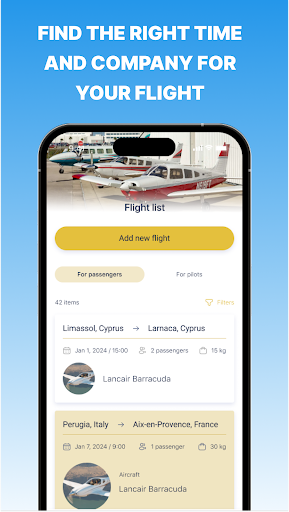
FlyToGo is an innovative application, designed for pilots, passengers and travel enthusiasts. This unique platform allows you to search for travel companions for shared flights for pilots and passengers in light aircrafts, flights as a pilot’s friend, flights with a certified instructor, gift certificates for flights and sightseeing tours.
Whether you're a pilot looking for a passengers to share your journey, or a passenger seeking an easy and fast way to fly and travel with a pilot on his plane, our application has you covered. You can easily search for and connect with fellow flight enthusiasts, place a flight offer with the desired dates or select from a flights list that have already been posted by other users. Also there is a chat between pilot and passenger for easy and fast communication. The main goal and benefit for you is that the passenger and pilot share the cost of the flight among themselves.
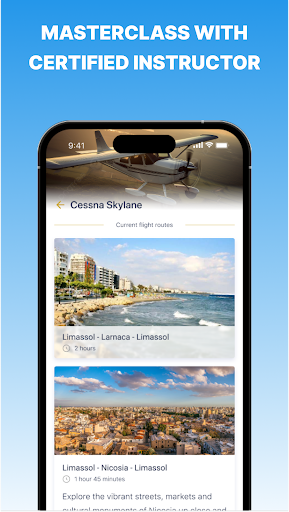
Our application also provides a unique opportunity for travelers to book a flight with a certified pilot. Experience the thrill of a trial flight under the guidance of a licensed instructor, giving you a first-hand look at what it's like to fly an aircraft. You can choose any of the presented routes or suggest your own. You can also choose different types of aircraft, with the number of seats you need for you and your family and friends.
In addition to shared flights and trial flights, our application also offers the chance to buy a gift certificate. This is the perfect present for you, your friends and relatives, allowing them to experience the joy of flight firsthand. You will have the opportunity to choose any certificate design, write a congratulation or wish, download it or print it. You receive full manager support when booking flights and purchasing gift certificates. The certificate is valid for 6 months from the date of purchase, so you can plan your flight at any convenient time.
For those interested in sightseeing, our application offers excursions over Cyprus and Italy. Take a trip in a plane and enjoy breathtaking views of these beautiful countries from the air. This is not just a flight, but a master class in sightseeing, offering a unique perspective on these popular travel destinations, where you can sit at the helm and gain experience in controlling an airplane.
Mostra altro

1. Scarica il programma di installazione di MEmu e completa l'installazione

2. Avvia il Memu e apri il Google Play sulla homepage

3. Cerca FlyToGo in Google Play
Install
4. Scarica e installa FlyToGo
5. Al termine dell'installazione, fai clic sull'icona per avviar

6. Divertiti giocando a FlyToGo su PC con MEmu
MEmu App Player è il miglior emulatore Android gratuito, utilizzato da 50 milioni di persone per ottenere un'esperienza di gioco Android superba. La tecnilogia di virtualizzazione MEmu ti permette di giocare a migliaia di giochi Android con semplicità sul tuo computer, anche i giochi con la grafica più esigente.
Schermo più grande con una grafica migliore; Lunga durata, senza limitazione di batteria o dati mobili.
Supporto completo per mappa di tastiera per un controllo preciso di tastiera e mouse o gamepad.
Multipli account di gioco o attività su un singolo PC contemporaneamente con il gestore di multi istanza.
Use FlyToGo on PC by following steps: