GCash
Aggiornata
Versione corrente
5.83.0
Offerta da

Non devi più preoccuparti dei sovraccarichi durante l'utilizzo di GCash sul tuo cellulare, liberati dal piccolo schermo e goditi dell'App su uno schermo molto più grande. D'ora in poi, sperimenta la tua App a schermo intero con tastiera e mouse. MEmu ti offre tutte le sorprendenti funzioni che ti aspettavi: installazione rapida e impostazione semplice, controlli intuitivi, niente più limitazioni di batteria, dati mobili e chiamate fastidiose. Il MEmu 9 nuovo di zecca è la prima scelta per utilizzare GCash sul tuo computer. Codificato con il nostro assorbimento, il gestore multi-istanza consente di aprire 2 o più account contemporaneamente. E soprattutto, il nostro esclusivo motore di emulazione può sbloccare il pieno potenziale del tuo PC, rendendo tutto liscio e piacevole.
Mostra altro
Scarica GCash su PC con MEmu Android Emulator. Divertiti giocando sul grande schermo. SEND MONEY IN REAL-TIME.
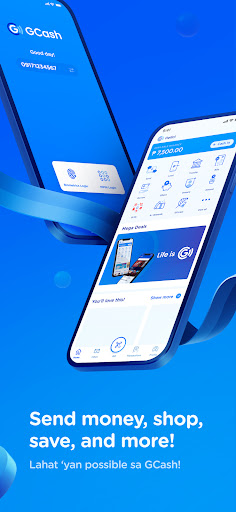
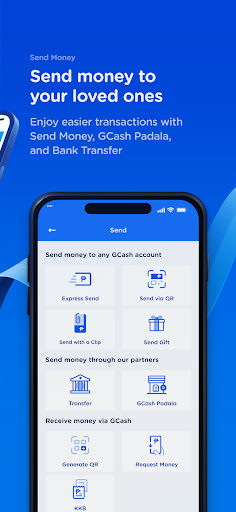
SEND MONEY IN REAL-TIME
• Free GCash-to-GCash transactions
• Send to multiple GCash accounts via Send to Many
• Transfer funds to other e-wallets & banks such as Maya, BPI, BDO, Unionbank, Landbank, Metrobank, Chinabank, and more
• Save bank account details for future transfers
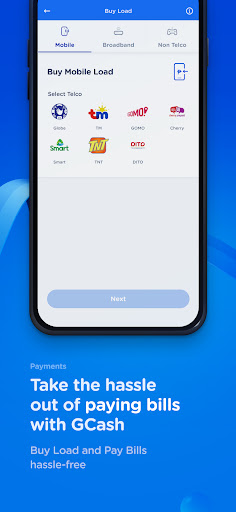
BUY LOAD ANYTIME, ANYWHERE
• Available for all networks
• Get GCash-exclusives for Globe & TM
• Prepaid broadband, TV channel packages, and prepaid health insurance available
PAY BILLS & FEES TO 400+ BILLERS
• Settle bills in advance or past due anytime, anywhere
• Set payments reminders and save recurring billers
• GCredit accepted by select billers
PAY EASILY EVERYWHERE YOU GO
• Scan to Pay via GCash QR or QRPh at 70,000+ merchants nationwide, and in select international merchants via Alipay+ QR
• Pay with the GCash Card in 200+ countries and territories
• Pay Online securely and instantly on e-commerce platforms, and get up to P20k coverage in case of scams with Online Shopping Protect
• Link directly to the Play Store to pay for subscriptions, games, movies, and more
KAYA TODAY WITH ACCESSIBLE LENDING
• Up to P50k credit limit and only 0.17% daily interest with GCredit
• GLoan up to P125k and as low as 1.59% monthly interest
• GGives up to P125k with zero downpayment, pay in installments up to 24 months
• Borrow Load of P50 and P99 load promos for any network, pay in 14 days at 0% interest (as low as P10 processing fee)
MANAGE YOUR WEALTH EASILY
• GSave - easy application, no minimum deposit, maintaining balance, or transfer fees
• GStocks - easy application, wide selection of PH companies, and no Cash In fees
• GFunds - expert wealth management, easy application, investment style assessment, and wide selection of investment funds for as low as P50
• GCrypto - easy application, diverse cryptocurrencies starting at P200, and no Cash In fees
BE EXTRA READY & PROTECTED WITH INSURANCE
• Health Insurance for as low as P79. Up to P1.2M coverage
• Get Travel Insurance in 5 minutes for as low as P350. Up to P2.5M coverage
• Bill Protection of up to P3.6M, 30-day coverage
• Scam Protection for only P30 for 30 days. Up to P15k coverage
CASH IN ONLINE & OFFLINE
• In-app: partner banks or online banking with Instapay
• Over-the-counter: Cebuana Lhuillier, Villarica, Touchpay, and more
PLANT REAL TREES BY COLLECTING GREEN ENERGY
• Earn and collect Energy Points to plant real trees in various Philippine forests
8F W Global Center, 9th Avenue cor., 30th St., Taguig City, Metro Manila Philippines
Mostra altro

1. Scarica il programma di installazione di MEmu e completa l'installazione

2. Avvia il Memu e apri il Google Play sulla homepage

3. Cerca GCash in Google Play
Install
4. Scarica e installa GCash
5. Al termine dell'installazione, fai clic sull'icona per avviar

6. Divertiti giocando a GCash su PC con MEmu
MEmu App Player è il miglior emulatore Android gratuito, utilizzato da 50 milioni di persone per ottenere un'esperienza di gioco Android superba. La tecnilogia di virtualizzazione MEmu ti permette di giocare a migliaia di giochi Android con semplicità sul tuo computer, anche i giochi con la grafica più esigente.
Schermo più grande con una grafica migliore; Lunga durata, senza limitazione di batteria o dati mobili.
Supporto completo per mappa di tastiera per un controllo preciso di tastiera e mouse o gamepad.
Multipli account di gioco o attività su un singolo PC contemporaneamente con il gestore di multi istanza.
Use GCash on PC by following steps: