GCash
Aktualisiert
Aktuelle Version
5.83.0
Angeboten von

Machen Sie sich keine Sorgen mehr über überhöhte Gebühren, wenn Sie GCash auf Ihrem Mobiltelefon verwenden, befreien Sie sich von dem winzigen Bildschirm und genießen Sie die Nutzung der App auf einem viel größeren Display. Von nun an können Sie Ihre App mit Tastatur und Maus im Vollbildmodus nutzen. MEmu bietet Ihnen all die überraschenden Funktionen, die Sie erwartet haben: schnelle Installation und einfache Einrichtung, intuitive Steuerung, keine Einschränkungen mehr durch Batterie, mobile Daten und störende Anrufe. Der brandneue MEmu 9 ist die beste Wahl für die Nutzung von GCash auf Ihrem Computer. Mit unserer Absorption kodiert, ermöglicht der Multi-Instanz-Manager die Eröffnung von 2 oder mehr Konten zur gleichen Zeit. Und das Wichtigste, unsere exklusive Emulations-Engine kann das volle Potenzial Ihres PCs freisetzen und alles reibungslos und angenehm gestalten.
Mehr anzeigen
Laden Sie Play GCash auf dem PC mit MEmu Android Emulator. Viel Spaß beim Spielen auf großmundieren. SEND MONEY IN REAL-TIME.
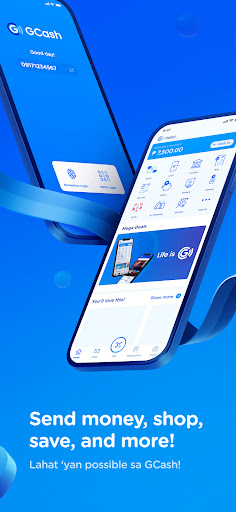
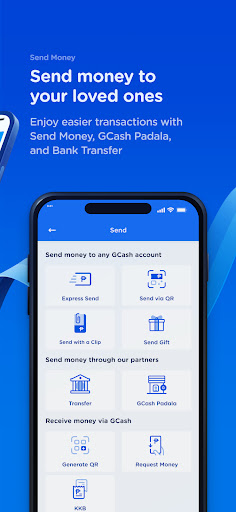
SEND MONEY IN REAL-TIME
• Free GCash-to-GCash transactions
• Send to multiple GCash accounts via Send to Many
• Transfer funds to other e-wallets & banks such as Maya, BPI, BDO, Unionbank, Landbank, Metrobank, Chinabank, and more
• Save bank account details for future transfers
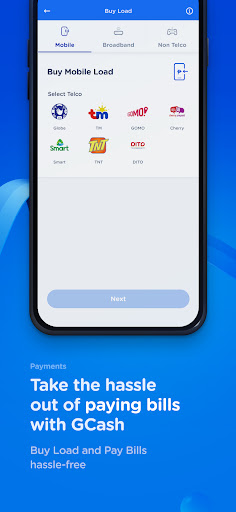
BUY LOAD ANYTIME, ANYWHERE
• Available for all networks
• Get GCash-exclusives for Globe & TM
• Prepaid broadband, TV channel packages, and prepaid health insurance available
PAY BILLS & FEES TO 400+ BILLERS
• Settle bills in advance or past due anytime, anywhere
• Set payments reminders and save recurring billers
• GCredit accepted by select billers
PAY EASILY EVERYWHERE YOU GO
• Scan to Pay via GCash QR or QRPh at 70,000+ merchants nationwide, and in select international merchants via Alipay+ QR
• Pay with the GCash Card in 200+ countries and territories
• Pay Online securely and instantly on e-commerce platforms, and get up to P20k coverage in case of scams with Online Shopping Protect
• Link directly to the Play Store to pay for subscriptions, games, movies, and more
KAYA TODAY WITH ACCESSIBLE LENDING
• Up to P50k credit limit and only 0.17% daily interest with GCredit
• GLoan up to P125k and as low as 1.59% monthly interest
• GGives up to P125k with zero downpayment, pay in installments up to 24 months
• Borrow Load of P50 and P99 load promos for any network, pay in 14 days at 0% interest (as low as P10 processing fee)
MANAGE YOUR WEALTH EASILY
• GSave - easy application, no minimum deposit, maintaining balance, or transfer fees
• GStocks - easy application, wide selection of PH companies, and no Cash In fees
• GFunds - expert wealth management, easy application, investment style assessment, and wide selection of investment funds for as low as P50
• GCrypto - easy application, diverse cryptocurrencies starting at P200, and no Cash In fees
BE EXTRA READY & PROTECTED WITH INSURANCE
• Health Insurance for as low as P79. Up to P1.2M coverage
• Get Travel Insurance in 5 minutes for as low as P350. Up to P2.5M coverage
• Bill Protection of up to P3.6M, 30-day coverage
• Scam Protection for only P30 for 30 days. Up to P15k coverage
CASH IN ONLINE & OFFLINE
• In-app: partner banks or online banking with Instapay
• Over-the-counter: Cebuana Lhuillier, Villarica, Touchpay, and more
PLANT REAL TREES BY COLLECTING GREEN ENERGY
• Earn and collect Energy Points to plant real trees in various Philippine forests
8F W Global Center, 9th Avenue cor., 30th St., Taguig City, Metro Manila Philippines
Mehr anzeigen

1. Laden das MEmu-Installationsprogramm herunter und beenden die Installation

2. MEmu starten und Google Play auf der Homepage öffnen

3. Suchen GCash in Google Play
Install
4. Herunterladen und Installieren GCash
5. Klicken nach Abschluss der Installation auf das Symbol, um es zu starten

6. Verwenden Sie MEmu, um GCash auf Ihrem PC zu nutzen
MEmu Play ist aktuell der beste kostenlose Android-Emulator und bietet 50 Millionen Nutzern ein überragendes Android-App-Erlebnis. Dank der Virtualisierungstechnologie von MEmu können Sie Tausende von Android-Apps problemlos auf Ihrem Computer nutzen, selbst solche mit hohen Grafikanforderungen.
BGrößeres Bild mit besserer Grafik; Keine unterbrechungen, keine sorgen um Akku
Komplette Tastenbelegung unterstützt mit Maus und Tastatur oder Controller
Mit dem „Multi-Instance-Manager“ können Sie mehrere Spielkonten oder Spiele gleichzeitig auf einem PC ausführen.
Use GCash on PC by following steps: