OnelapFit
Aggiornata
Versione corrente
1.9.2
Offerta da

Non devi più preoccuparti dei sovraccarichi durante l'utilizzo di OnelapFit sul tuo cellulare, liberati dal piccolo schermo e goditi dell'App su uno schermo molto più grande. D'ora in poi, sperimenta la tua App a schermo intero con tastiera e mouse. MEmu ti offre tutte le sorprendenti funzioni che ti aspettavi: installazione rapida e impostazione semplice, controlli intuitivi, niente più limitazioni di batteria, dati mobili e chiamate fastidiose. Il MEmu 9 nuovo di zecca è la prima scelta per utilizzare OnelapFit sul tuo computer. Codificato con il nostro assorbimento, il gestore multi-istanza consente di aprire 2 o più account contemporaneamente. E soprattutto, il nostro esclusivo motore di emulazione può sbloccare il pieno potenziale del tuo PC, rendendo tutto liscio e piacevole.
Mostra altro
Scarica OnelapFit su PC con MEmu Android Emulator. Divertiti giocando sul grande schermo. OnelapFit è una piattaforma di servizi di gestione dei dati di ciclismo one-stop per gli appassionati di ciclismo e l'applicazione della gestione del computer da bicicletta.
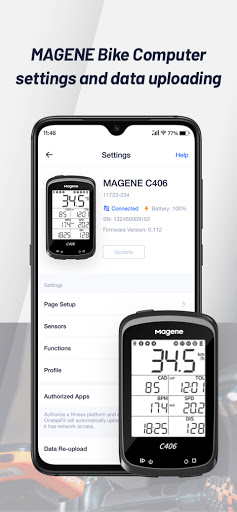
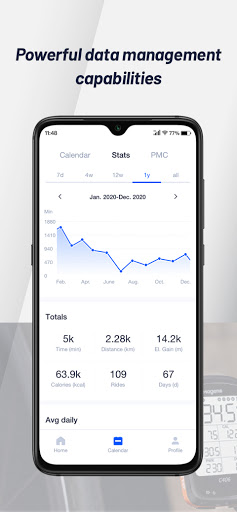
OnelapFit è una piattaforma di servizi di gestione dei dati di ciclismo one-stop per gli appassionati di ciclismo e l'applicazione della gestione del computer da bicicletta.
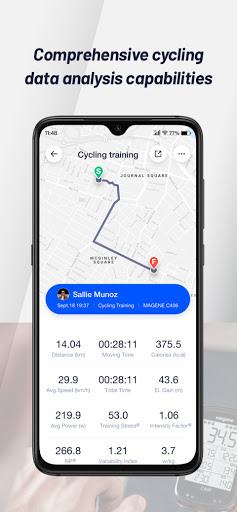
Sia che tu partecipi a gare online o completi l'allenamento quotidiano o l'allenamento all'aperto, registreremo ogni tua corsa e forniremo un'analisi rigorosa dei dati e una gestione professionale delle prestazioni che ti aiuteranno a raggiungere i tuoi obiettivi di allenamento. Saremo presenti in ogni fase del percorso per testimoniare la tua crescita.
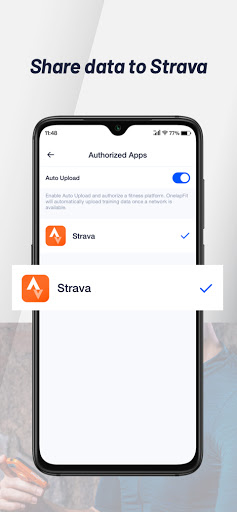
Prendi in considerazione l'utilizzo del nostro computer da bicicletta MAGENE o Onelap durante il ciclismo. Dopo ogni sessione di ciclismo, puoi visualizzare e analizzare i tuoi dati su OnelapFit e condividerli con Strava.
Onelapfit può collegare il computer della bicicletta al telefono cellulare e fornire la funzione di notifica dei messaggi. Può sincronizzare le notifiche SMS e telefoniche nel telefono cellulare con il computer della bicicletta per la visualizzazione, in modo da ricordare tempestivamente la notifica del messaggio sul telefono cellulare durante la guida
OnelapFit offre le seguenti funzionalità
– Vetrina ufficiale dell'evento e domanda di registrazione
– Statistiche e analisi dei record di ciclismo
– Condivisione dei dati su una piattaforma di terze parti
– Impostazioni del Bike Computer MAGENE e caricamento e gestione dei dati
– [Notifica messaggio] fornisce agli utenti un promemoria messaggio durante la guida, inclusi telefono, SMS, e-mail, ecc. Vengono forniti solo promemoria e le risposte non sono supportate.
Mostra altro

1. Scarica il programma di installazione di MEmu e completa l'installazione

2. Avvia il Memu e apri il Google Play sulla homepage

3. Cerca OnelapFit in Google Play
Install
4. Scarica e installa OnelapFit
5. Al termine dell'installazione, fai clic sull'icona per avviar

6. Divertiti giocando a OnelapFit su PC con MEmu
MEmu App Player è il miglior emulatore Android gratuito, utilizzato da 50 milioni di persone per ottenere un'esperienza di gioco Android superba. La tecnilogia di virtualizzazione MEmu ti permette di giocare a migliaia di giochi Android con semplicità sul tuo computer, anche i giochi con la grafica più esigente.
Schermo più grande con una grafica migliore; Lunga durata, senza limitazione di batteria o dati mobili.
Supporto completo per mappa di tastiera per un controllo preciso di tastiera e mouse o gamepad.
Multipli account di gioco o attività su un singolo PC contemporaneamente con il gestore di multi istanza.
Use OnelapFit on PC by following steps: