ThemeKit - Icons & Widgets
Aggiornata
Versione corrente
1.0.7
Offerta da

Non devi più preoccuparti dei sovraccarichi durante l'utilizzo di ThemeKit - Icons & Widgets sul tuo cellulare, liberati dal piccolo schermo e goditi dell'App su uno schermo molto più grande. D'ora in poi, sperimenta la tua App a schermo intero con tastiera e mouse. MEmu ti offre tutte le sorprendenti funzioni che ti aspettavi: installazione rapida e impostazione semplice, controlli intuitivi, niente più limitazioni di batteria, dati mobili e chiamate fastidiose. Il MEmu 9 nuovo di zecca è la prima scelta per utilizzare ThemeKit - Icons & Widgets sul tuo computer. Codificato con il nostro assorbimento, il gestore multi-istanza consente di aprire 2 o più account contemporaneamente. E soprattutto, il nostro esclusivo motore di emulazione può sbloccare il pieno potenziale del tuo PC, rendendo tutto liscio e piacevole.
Mostra altro
Goditi un'esperienza straordinaria con ThemeKit - Icons & Widgets su PC con MEmu Play. È un potente emulatore Android gratuito che ti offre migliaia di app Android per la versione desktop. Divertiti a connetterti con gli amici e a perfezionare il tuo lavoro con maggiore efficienza! Customize your Home Screen like never before.
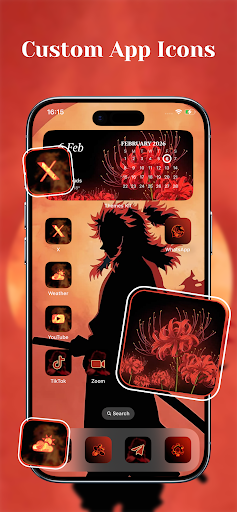
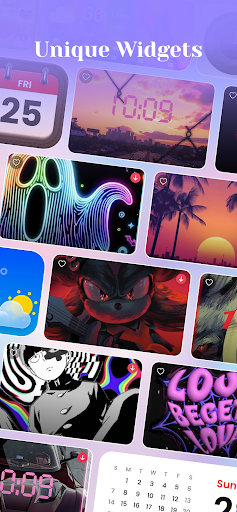
Customize your Home Screen like never before.
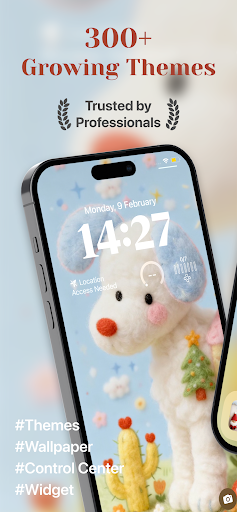
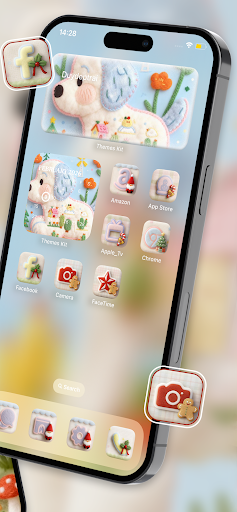
ThemeKit helps you personalize your iPhone with thousands of themes, icon packs, widgets, and wallpapers. Whether your style is minimal, aesthetic, cute, dark, or colorful, ThemeKit gives you everything you need to transform your Home Screen and Lock Screen in just a few taps.
From beautifully designed widgets to fully matched themes, ThemeKit is your all-in-one customization toolkit.
Unlimited Themes
Explore thousands of ready-to-use themes created by designers and users from around the world. Each theme is carefully crafted with matching widgets, icons, and wallpapers, allowing you to apply a complete look instantly.
New themes are added regularly, so your screen always feels fresh and unique.
Powerful Widgets
ThemeKit offers a wide variety of widgets for both Home Screen and Lock Screen. Customize fonts, colors, layouts, and content to perfectly match your style.
Widgets include clocks, weather, calendar, photos, quotes, countdowns, battery information, and more.
Icon Packs and Wallpapers
Change your app icons easily with a large collection of icon packs in different styles and aesthetics. Apply icon packs quickly or save them to your gallery for manual setup using Shortcuts.
Discover high-quality wallpapers designed to perfectly match your themes and widgets.
ThemeKit - Icons & Widgets uses the Accessibility Service API only to help users apply theme-related features more conveniently, such as opening app settings, assisting with widget/icon setup, and improving navigation inside supported theme customization flows.
This permission is used strictly for user-initiated actions. ThemeKit does not collect, read, store, or share any personal or sensitive data through the Accessibility Service API.
Mostra altro

1. Scarica il programma di installazione di MEmu e completa l'installazione

2. Avvia il Memu e apri il Google Play sulla homepage

3. Cerca ThemeKit - Icons & Widgets in Google Play
Install
4. Scarica e installa ThemeKit - Icons & Widgets
5. Al termine dell'installazione, fai clic sull'icona per avviar

6. Divertiti giocando a ThemeKit - Icons & Widgets su PC con MEmu
MEmu App Player è il miglior emulatore Android gratuito, utilizzato da 50 milioni di persone per ottenere un'esperienza di gioco Android superba. La tecnilogia di virtualizzazione MEmu ti permette di giocare a migliaia di giochi Android con semplicità sul tuo computer, anche i giochi con la grafica più esigente.
Schermo più grande con una grafica migliore; Lunga durata, senza limitazione di batteria o dati mobili.
Supporto completo per mappa di tastiera per un controllo preciso di tastiera e mouse o gamepad.
Multipli account di gioco o attività su un singolo PC contemporaneamente con il gestore di multi istanza.
Use ThemeKit - Icons & Widgets on PC by following steps: