Watch Faces - Pujie
Aggiornata
Versione corrente
6.5.6f
Offerta da

Non devi più preoccuparti dei sovraccarichi durante l'utilizzo di Watch Faces - Pujie sul tuo cellulare, liberati dal piccolo schermo e goditi dell'App su uno schermo molto più grande. D'ora in poi, sperimenta la tua App a schermo intero con tastiera e mouse. MEmu ti offre tutte le sorprendenti funzioni che ti aspettavi: installazione rapida e impostazione semplice, controlli intuitivi, niente più limitazioni di batteria, dati mobili e chiamate fastidiose. Il MEmu 9 nuovo di zecca è la prima scelta per utilizzare Watch Faces - Pujie sul tuo computer. Codificato con il nostro assorbimento, il gestore multi-istanza consente di aprire 2 o più account contemporaneamente. E soprattutto, il nostro esclusivo motore di emulazione può sbloccare il pieno potenziale del tuo PC, rendendo tutto liscio e piacevole.
Mostra altro
Scarica Watch Faces - Pujie su PC con MEmu Android Emulator. Divertiti giocando sul grande schermo. Pujie Watch Faces is the ultimate watch face design application for Wear OS watches.
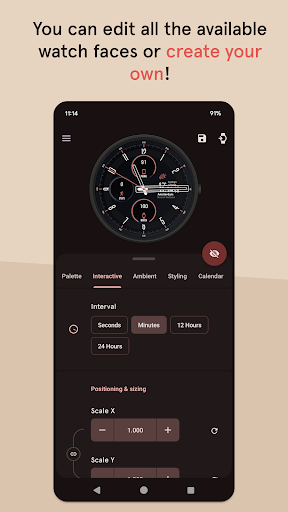
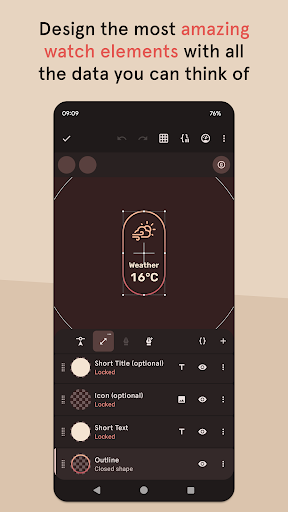
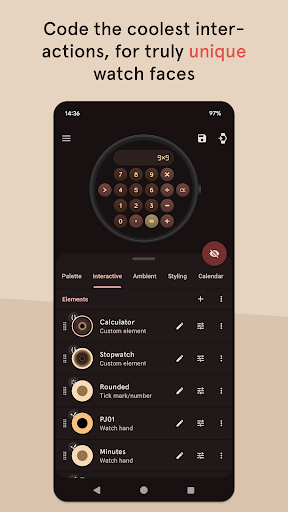
Pujie Watch Faces is the ultimate watch face design application for Wear OS watches. With Pujie, you can take full control of your watch face design by customizing everything from the watch hands, complications, and base plates to the smallest details.
Sharing your unique designs with other users is easy and fun, and you can discover new designs from users all over the world. With Pujie Watch Faces, your watch will always be a reflection of your personal style.
For the advanced user, Pujie offers the ability to automate your watch elements, unlocking endless possibilities for customization. For more modest users, you can easily change the colors of elements or add simple elements like a digital clock in your favorite font.
Upgrade your wrist game today and experience the power of Pujie.
This version has the same functionality as the paid premium version, except you have to purchase the premium features inside the app, some features are free, like the complete watch face designer and a set of free to try watch faces and watch elements
→ ONLINE
https://pujie.io
Tutorials:
https://pujie.io/help/tutorials
Cloud Library:
https://pujie.io/library
Documentation:
https://pujie.io/documentation
→ SMART WATCH COMPATIBILITY
Pujie Watch Faces is fully compatible with all WearOS 2.x, 3.x & 4.x devices.
This includes the following devices:
• Samsung Galaxy Watch 4, 5 & 6
• Google Pixel Watch
• Fossil smartwatches
• Mobvoi TicWatch Series
• Oppo Watch
• TAG Heuer Connected
• Diesel & Montblanc watches
• And many more!
→ INTERACTIVE WATCH FACE / LAUNCHER
Pujie Watch Faces allows you to assign custom actions to a huge number of possible tap targets. The Tap drawer, a panel with 6 tap targets and all your custom elements make up to unlimited assignable tap targets! It's a watch face and launcher in one!
Choose from:
• The Calendar, Fitness, Weather view or The Tap Drawer
• Any installed watch or phone app or shortcut
• Tasker tasks!
• Watch or phone actions (volume, play/pause music, etc)
→ DESIGN
Design your own watch elements (watch hands, backgrounds, complications, custom elements) with the included watch element designer! Pujie Watch Faces has the most advanced watch face maker, supporting true vector graphics and images.
→ CLOUD LIBRARY
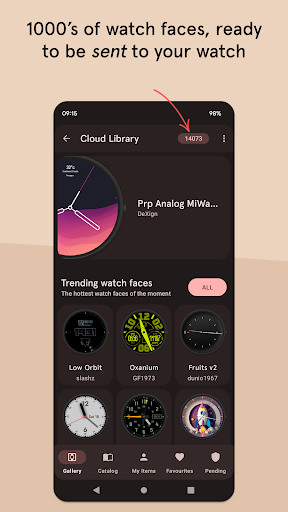
The cloud library is an online social library of watch faces and watch parts. You can use it to safely store your creations and share them with others.
Read more:
https://pujie.io/library
→ WIDGET
Even when you don't own a smartwatch you can use Pujie Watch Faces. Use the same app to create a home screen clock widget!
→ KEY FEATURES
All settings are available using the Pujie Watch Faces phone app. Some settings are available from the configuration menu on the watch.
• 20+ watch faces to get you started
• Choose from 1500+ fonts
• Design your own watch elements
• Animated
• Tasker integration (variables & tasks)
• Start any watch or phone app
• Square, rectangular and round watches
• Calendar integration!
• Weather data, Celsius or Fahrenheit
• Phone and smartwatch battery status
• Multiple time zones
• Share your watch faces with others
• And much more
→ SUPPORT
!! Please don't rate us 1-star, just contact us. We respond mighty fast !!
https://pujie.io/help
How do I install the watch face?
1 Wear OS 2.x & Wear OS 3.x: Download the watch app from the Play Store on the watch.
2. Long press your watch and choose Pujie Watch Faces as your watch face, or select it using the WearOS app.
How do I activate a widget?
1. Long press your home screen or go to the widget section in the app drawer (depends on your launcher)
2. Choose Pujie Watch Faces.
3. Design a new style, or choose one of your designs
4. Place and re-size to your liking
Mostra altro

1. Scarica il programma di installazione di MEmu e completa l'installazione

2. Avvia il Memu e apri il Google Play sulla homepage

3. Cerca Watch Faces - Pujie in Google Play
Install
4. Scarica e installa Watch Faces - Pujie
5. Al termine dell'installazione, fai clic sull'icona per avviar

6. Divertiti giocando a Watch Faces - Pujie su PC con MEmu
MEmu App Player è il miglior emulatore Android gratuito, utilizzato da 50 milioni di persone per ottenere un'esperienza di gioco Android superba. La tecnilogia di virtualizzazione MEmu ti permette di giocare a migliaia di giochi Android con semplicità sul tuo computer, anche i giochi con la grafica più esigente.
Schermo più grande con una grafica migliore; Lunga durata, senza limitazione di batteria o dati mobili.
Supporto completo per mappa di tastiera per un controllo preciso di tastiera e mouse o gamepad.
Multipli account di gioco o attività su un singolo PC contemporaneamente con il gestore di multi istanza.
Use Watch Faces - Pujie on PC by following steps: