Weather App: Live Radar
Aggiornata
Versione corrente
1.1.0
Offerta da

Non devi più preoccuparti dei sovraccarichi durante l'utilizzo di Weather App: Live Radar sul tuo cellulare, liberati dal piccolo schermo e goditi dell'App su uno schermo molto più grande. D'ora in poi, sperimenta la tua App a schermo intero con tastiera e mouse. MEmu ti offre tutte le sorprendenti funzioni che ti aspettavi: installazione rapida e impostazione semplice, controlli intuitivi, niente più limitazioni di batteria, dati mobili e chiamate fastidiose. Il MEmu 9 nuovo di zecca è la prima scelta per utilizzare Weather App: Live Radar sul tuo computer. Codificato con il nostro assorbimento, il gestore multi-istanza consente di aprire 2 o più account contemporaneamente. E soprattutto, il nostro esclusivo motore di emulazione può sbloccare il pieno potenziale del tuo PC, rendendo tutto liscio e piacevole.
Mostra altro
Scarica Weather App: Live Radar su PC con MEmu Android Emulator. Divertiti giocando sul grande schermo. Weather App: Live Radar app boasts a range of features, including local weather, up to 120 hours of detailed weather forecasting, up to 40-days of advanced weather details, minute-level rainfall forecasting, weather radars for different locations, timely weather alerts, and a beautiful weather widget and notification bar for easy accessibility.
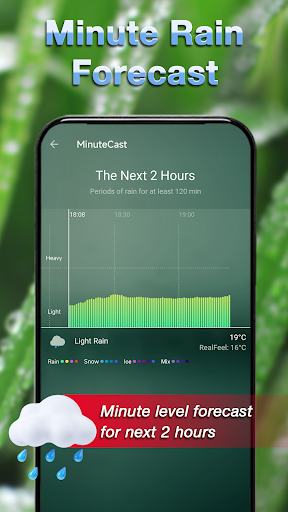
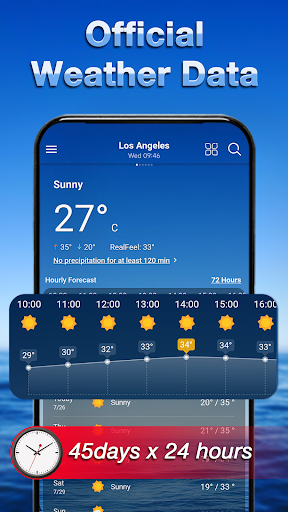
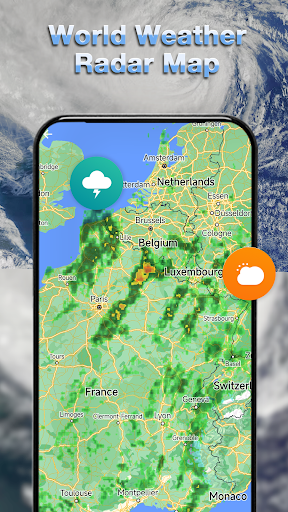
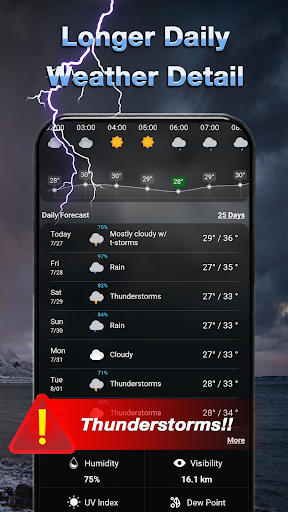
Weather App: Live Radar app boasts a range of features, including local weather, up to 120 hours of detailed weather forecasting, up to 40-days of advanced weather details, minute-level rainfall forecasting, weather radars for different locations, timely weather alerts, and a beautiful weather widget and notification bar for easy accessibility.
With the Weather app, you can easily view weather conditions for your current location and track detailed local and global weather forecasts with accurate temperature readings in both Celsius and Fahrenheit. Plus, get additional information such as sunrise and sunset times according to your city's time zone.
The Weather App also provides details on atmospheric pressure, visibility distance, humidity, precipitation in different units, dew point, wind speed and direction, and probability of rain in 24 hours, giving you all the critical information you need to make informed decisions about your day.
And that's not all! Our app also offers air quality information to help you track your health and make informed decisions.
With its sleek design and comprehensive features, the Weather app is the perfect tool for anyone looking to stay up-to-date on the latest weather conditions and forecasts, whether at home or on the go. So why wait? Download our app today and never be caught off guard by the weather again!
⚡ FEATURES
⚡ Real-time Weather: Hourly & Daily weather forecast:
Contains all detail info about weather
⚡ Accurate forecast: Live weather data and weather radar maps
⚡ Worldwide cities access: local weather and global weather, accurate track of the world's thousands of cities.
⚡ Units Of Measurement:
Temperature in Fahrenheit/Celsius, Wind speed in km/h, mi/h, Pressure in atm, bar, hPa, kPa, Pa, and Visibility in km/mile
⚡ Nice to plan your travel and holidays. Include daily life weather index: Feels like temperature, Humidity, pressure, wind force and wind direction, dew point, air quality, and UV alerts.
⚡ Support multiple languages, include mainly world common languages.
⚡ Sunrise, sunset times and astronomy seeing prediction. You can prepare for a beautiful sunrise/sunset trip.
⚡ Multiple Weather widgets for minimal weather info.
⚡ Weather Alerts: You can receive whatever terrible weather alerts for Lightning detector, flash warning. And check the Rain risk, Storm risk and snow risk.
Haven't got your own weather app? Try this Weather and get your forecast now!
Mostra altro

1. Scarica il programma di installazione di MEmu e completa l'installazione

2. Avvia il Memu e apri il Google Play sulla homepage

3. Cerca Weather App: Live Radar in Google Play
Install
4. Scarica e installa Weather App: Live Radar
5. Al termine dell'installazione, fai clic sull'icona per avviar

6. Divertiti giocando a Weather App: Live Radar su PC con MEmu
MEmu App Player è il miglior emulatore Android gratuito, utilizzato da 50 milioni di persone per ottenere un'esperienza di gioco Android superba. La tecnilogia di virtualizzazione MEmu ti permette di giocare a migliaia di giochi Android con semplicità sul tuo computer, anche i giochi con la grafica più esigente.
Schermo più grande con una grafica migliore; Lunga durata, senza limitazione di batteria o dati mobili.
Supporto completo per mappa di tastiera per un controllo preciso di tastiera e mouse o gamepad.
Multipli account di gioco o attività su un singolo PC contemporaneamente con il gestore di multi istanza.
Use Weather App: Live Radar on PC by following steps: