What to Wear
Aggiornata
Versione corrente
1.02.01
Offerta da

Non devi più preoccuparti dei sovraccarichi durante l'utilizzo di What to Wear sul tuo cellulare, liberati dal piccolo schermo e goditi dell'App su uno schermo molto più grande. D'ora in poi, sperimenta la tua App a schermo intero con tastiera e mouse. MEmu ti offre tutte le sorprendenti funzioni che ti aspettavi: installazione rapida e impostazione semplice, controlli intuitivi, niente più limitazioni di batteria, dati mobili e chiamate fastidiose. Il MEmu 9 nuovo di zecca è la prima scelta per utilizzare What to Wear sul tuo computer. Codificato con il nostro assorbimento, il gestore multi-istanza consente di aprire 2 o più account contemporaneamente. E soprattutto, il nostro esclusivo motore di emulazione può sbloccare il pieno potenziale del tuo PC, rendendo tutto liscio e piacevole.
Mostra altro
Scarica What to Wear su PC con MEmu Android Emulator. Divertiti giocando sul grande schermo. The "What to Wear" app is your new innovative approach to using weather forecasts!
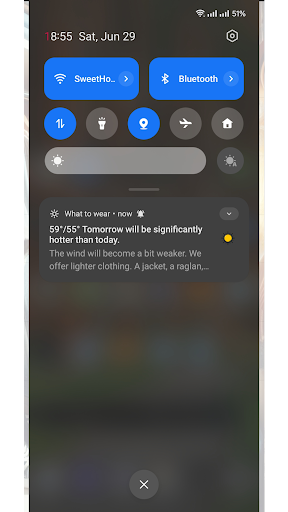
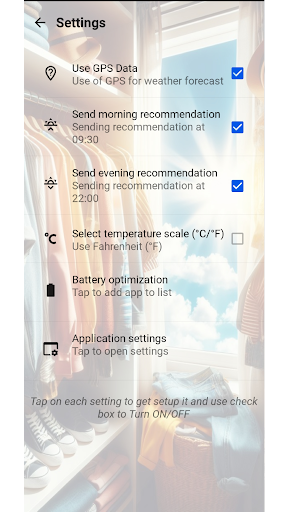
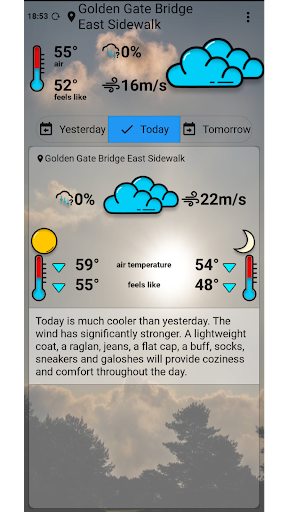
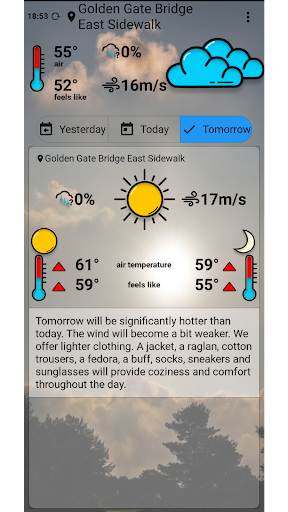
The "What to Wear" app is your new innovative approach to using weather forecasts! Unlike other apps, we focus on providing information that truly helps you decide what clothes to wear.
If you often ask questions like "What should I wear today?" "How should I dress my child?" "How can I stay warm today?" "Should I take an umbrella?" etc., this app will definitely help you get answers.
Main Advantages:
Personalized Recommendations: We show the weather forecast and suggest clothing options tailored specifically for you.
Research and Analysis: Based on extensive research, we offer the most suitable clothing options to ensure you always feel comfortable.
Ease of Use: An intuitive interface and user-friendly design help you quickly find the necessary information.
Unique Features:
Averaged Values: We don't aim to show you hourly weather. Instead, we analyze the weather conditions hourly during the day and night and show optimized averaged values.
Automatic Reminders: Set up automatic recommendations twice a day to understand the weather situation just by reading a notification without even opening the app.
Look Back: A key feature is the ability to look back at "yesterday" to understand how clothing recommendations and weather forecasts have changed. This can help you choose even more comfortable clothes for the current day.
App Interface:
Top Section: Shows the weather values for the current hour.
Main Section: Displays average values for day and night and provides clothing recommendations for such weather conditions. This analysis is available for yesterday, today, and tomorrow.
Notification Settings: In the settings, you can set up notifications and their sending time.
Download "What to Wear" and forget about the worries of choosing clothes! Get accurate recommendations and enjoy each day, regardless of the weather.
Mostra altro

1. Scarica il programma di installazione di MEmu e completa l'installazione

2. Avvia il Memu e apri il Google Play sulla homepage

3. Cerca What to Wear in Google Play
Install
4. Scarica e installa What to Wear
5. Al termine dell'installazione, fai clic sull'icona per avviar

6. Divertiti giocando a What to Wear su PC con MEmu
MEmu App Player è il miglior emulatore Android gratuito, utilizzato da 50 milioni di persone per ottenere un'esperienza di gioco Android superba. La tecnilogia di virtualizzazione MEmu ti permette di giocare a migliaia di giochi Android con semplicità sul tuo computer, anche i giochi con la grafica più esigente.
Schermo più grande con una grafica migliore; Lunga durata, senza limitazione di batteria o dati mobili.
Supporto completo per mappa di tastiera per un controllo preciso di tastiera e mouse o gamepad.
Multipli account di gioco o attività su un singolo PC contemporaneamente con il gestore di multi istanza.
Use What to Wear on PC by following steps: