Weather Radar Home
Aggiornata
Versione corrente
1.1.14
Offerta da

Non devi più preoccuparti dei sovraccarichi durante l'utilizzo di Weather Radar Home sul tuo cellulare, liberati dal piccolo schermo e goditi dell'App su uno schermo molto più grande. D'ora in poi, sperimenta la tua App a schermo intero con tastiera e mouse. MEmu ti offre tutte le sorprendenti funzioni che ti aspettavi: installazione rapida e impostazione semplice, controlli intuitivi, niente più limitazioni di batteria, dati mobili e chiamate fastidiose. Il MEmu 9 nuovo di zecca è la prima scelta per utilizzare Weather Radar Home sul tuo computer. Codificato con il nostro assorbimento, il gestore multi-istanza consente di aprire 2 o più account contemporaneamente. E soprattutto, il nostro esclusivo motore di emulazione può sbloccare il pieno potenziale del tuo PC, rendendo tutto liscio e piacevole.
Mostra altro
Scarica Weather Radar Home su PC con MEmu Android Emulator. Divertiti giocando sul grande schermo. Weather Radar Home offers real-time radar, precipitation, temperature, air pressure, and more.
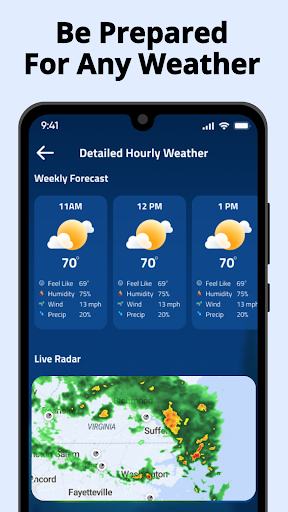
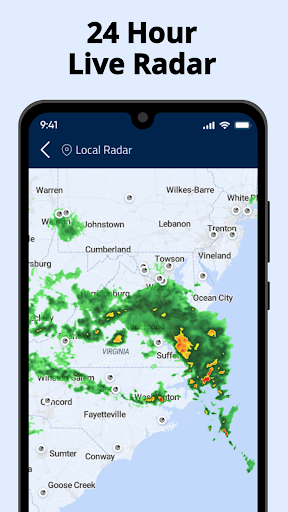
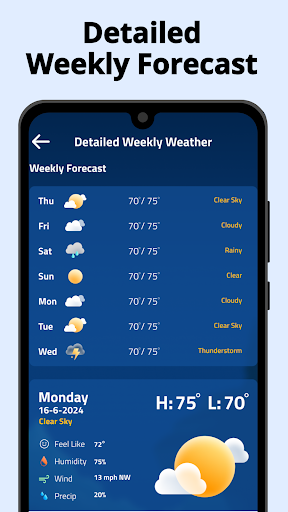
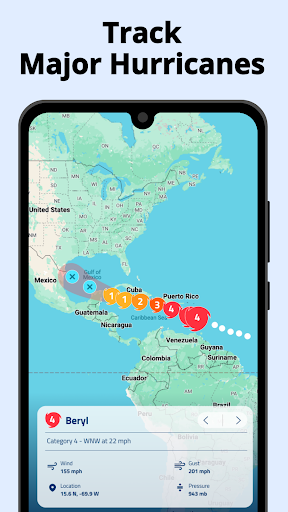
Weather Radar Home offers real-time radar, precipitation, temperature, air pressure, and more. Access accurate weather maps worldwide with multi-layer radar completely free. Stay ahead of the weather with customizable widgets and an intuitive interface, ensuring you're always prepared for any conditions.
Key Features:
Accurate US Radar Data: Detect rain, snow, mixed precipitation, and air pollution.
Customizable Radar Maps: Track rainfall movement and overlay various weather layers.
Global & Local Updates: Get detailed weather, temperature, UV index, and news.
Weather Alerts: Receive real-time notifications for severe weather conditions.
Hourly & Daily Forecasts: Plan your day with precise weather predictions.
Air Quality Index: Monitor air pollution levels and stay informed.
Prepare for Storms:
Prepare for rain or snow with hourly and daily forecasts.
View radar, wind patterns, and more with various weather radar layers.
Save multiple locations for weather updates in the places you care about.
Detailed Weather Information:
7-day local weather forecast.
Hourly detailed intra-day forecast.
Current temperatures and temperature forecast.
Pressure, wind speed, wind direction, humidity, sunrise and sunset times.
Chance of rain.
Pollen index.
Air pollution index.
Fires and hot spots.
Temperature forecast map.
Convenience at Your Fingertips:
Easily access all weather information on your minus-one screen. Simply set Weather Radar Home as your home screen app and swipe right to see all relevant weather data. Our app features global radar coverage, allowing you to track weather conditions anywhere in the world.
Always stay ahead of bad weather with Weather Radar Home. This app also includes weather news, utilities, and more, delivering maximum utility to your Android phone.
Additional Features:
Real-time Radar Maps: View live radar maps with weather overlays.
Weather Widgets: Customize your home screen with weather widgets for quick access.
Weather News: Stay updated with the latest weather-related news and articles.
Weather Alerts & Notifications: Get instant alerts for severe weather conditions in your area.
Customizable Interface: Personalize your launcher with various themes and layouts.
About Android Launchers:
Android Launcher apps allow customization of your home screen, app drawer, and gestures. Our Weather Launcher integrates weather forecasts directly into your launcher, providing real-time updates as part of your interface. It offers a unique combination of functionality and practicality, standing out against competitors.
Comprehensive Weather Data:
Weather Radar Home is designed to provide users with all the weather information they need in one place. From current conditions to long-term forecasts, this app covers it all. You can easily monitor temperature changes, track storm movements, and stay informed about potential weather hazards.
Why Choose Weather Radar Home?
User-Friendly Interface: Navigate through weather data with ease.
Comprehensive Coverage: Access weather information for any location worldwide.
Reliable Data: Trust our accurate and up-to-date weather reports.
Custom Alerts: Set custom notifications for specific weather conditions.
Global Reach: Get weather updates no matter where you are.
Stay Informed & Prepared:
With Weather Radar Home, you'll never be caught off guard by the weather.
Optimize Your Android Experience:
Not only does Weather Radar Home enhance your weather tracking capabilities, but it also optimizes your Android experience. Customize your device with our launcher, making it both functional and visually appealing. Enjoy the best of both worlds with a launcher that meets your aesthetic and practical needs.
Terms and Conditions: Terms & Conditions
Privacy Policy: Privacy Policy
Mostra altro

1. Scarica il programma di installazione di MEmu e completa l'installazione

2. Avvia il Memu e apri il Google Play sulla homepage

3. Cerca Weather Radar Home in Google Play
Install
4. Scarica e installa Weather Radar Home
5. Al termine dell'installazione, fai clic sull'icona per avviar

6. Divertiti giocando a Weather Radar Home su PC con MEmu
MEmu App Player è il miglior emulatore Android gratuito, utilizzato da 50 milioni di persone per ottenere un'esperienza di gioco Android superba. La tecnilogia di virtualizzazione MEmu ti permette di giocare a migliaia di giochi Android con semplicità sul tuo computer, anche i giochi con la grafica più esigente.
Schermo più grande con una grafica migliore; Lunga durata, senza limitazione di batteria o dati mobili.
Supporto completo per mappa di tastiera per un controllo preciso di tastiera e mouse o gamepad.
Multipli account di gioco o attività su un singolo PC contemporaneamente con il gestore di multi istanza.
Use Weather Radar Home on PC by following steps: