Webview Kiosk
Aggiornata
Versione corrente
0.26.19
Offerta da

Non devi più preoccuparti dei sovraccarichi durante l'utilizzo di Webview Kiosk sul tuo cellulare, liberati dal piccolo schermo e goditi dell'App su uno schermo molto più grande. D'ora in poi, sperimenta la tua App a schermo intero con tastiera e mouse. MEmu ti offre tutte le sorprendenti funzioni che ti aspettavi: installazione rapida e impostazione semplice, controlli intuitivi, niente più limitazioni di batteria, dati mobili e chiamate fastidiose. Il MEmu 9 nuovo di zecca è la prima scelta per utilizzare Webview Kiosk sul tuo computer. Codificato con il nostro assorbimento, il gestore multi-istanza consente di aprire 2 o più account contemporaneamente. E soprattutto, il nostro esclusivo motore di emulazione può sbloccare il pieno potenziale del tuo PC, rendendo tutto liscio e piacevole.
Mostra altro
Goditi un'esperienza straordinaria con Webview Kiosk su PC con MEmu Play. È un potente emulatore Android gratuito che ti offre migliaia di app Android per la versione desktop. Divertiti a connetterti con gli amici e a perfezionare il tuo lavoro con maggiore efficienza! Webview Kiosk is a free and open-source Android application for secure, kiosk-style web browsing.
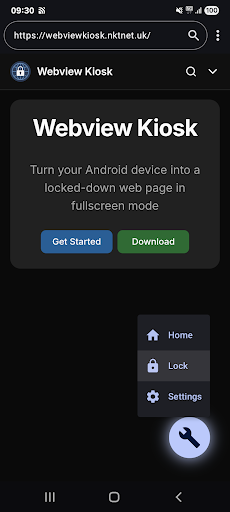
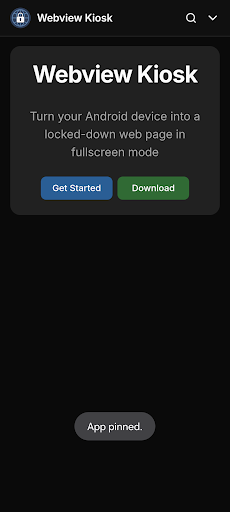
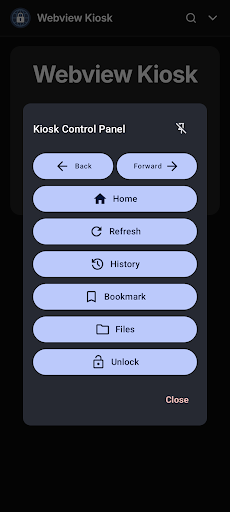
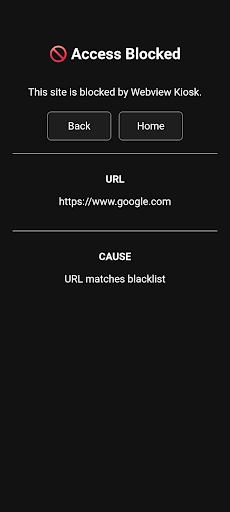
Webview Kiosk is a free and open-source Android application for secure, kiosk-style web browsing.
It can function as digital signage, a kid-friendly restricted browser, an immersive web reader, an interactive sign-up form, a home assistant dashboard, or simply a wall clock.
Designed for small businesses and device owners who are looking for a simple and standalone Kiosk solution.
Key Features
Core / Standalone
- Lock Task Mode (Pin): prevent access to your device's home screen, apps and status bar
- Secure Settings: configurations are protected by biometrics, device credentials or custom password
- URL Filtering: use regular expressions to control web access through a URL blacklist and whitelist
- Export/Import: backup and restore user settings in Base64 or JSON format
- Local files: display images, audio, video, HTML or PDF (using Mozilla's PDF.js) in kiosk mode
- Default Launcher: use as the home app and launch other apps in lock task mode (kiosk)
- JS Scripts: supports NFC (Near Field Communication), Eruda console, Dark Reader and custom scripts
Remote Management / Enterprise
1. MQTT (Message Queuing Telemetry Transport)
- Monitor events, update settings, execute commands and build custom automations using the API
- Requires an MQTT broker (e.g. Mosquitto, EMQX, HiveMQ, or their HomeAssistant integrations)
2. UnifiedPush
- Send commands and update settings via a decentralised push notification system
- Requires a distributor application (e.g. sunup, ntfy, gCompat-UP)
3. Managed Configurations (App Restrictions)
- For fully-managed (company-owned) devices, settings can be remotely configured via an MDM/EMM provider
- Advanced users using a device policy controller (e.g. Test DPC or OwnDroid) can also enforce configurations locally
For more details, visit https://webviewkiosk.nktnet.uk
Permissions
- INTERNET: for general web browsing
- ACCESS_NETWORK_STATE: to refresh web pages when network connectivity is restored
- CAMERA: (optional) for use with web apps that requires photo/video capture
- RECORD_AUDIO: (optional) for use with web apps that requires audio capture
- MODIFY_AUDIO_SETTINGS: for routing audio (microphone will not work without this)
- ACCESS_FINE_LOCATION: (optional) for web apps that needs precise geolocation
- ACCESS_COARSE_LOCATION: (optional) for web apps that needs approximate geolocation
- NFC: for reading and writing NFC tags using the device's NFC hardware
- INSTALL_SHORTCUT: for adding home screen launcher shortcuts on Android 7.1 and below
- QUERY_ALL_PACKAGES: to find launchable apps, device owners and lock task packages
- POST_NOTIFICATIONS: (optional) for lock task mode (kiosk) launches and MQTT
- FOREGROUND_SERVICE: for persistent notification and management with lock task and MQTT
- FOREGROUND_SERVICE_SPECIAL_USE: provides a return mechanism for opening apps in kiosk
- USE_BIOMETRIC: replaces USE_FINGERPRINT from Android 9.0 onwards
- USE_FINGERPRINT: use fingerprint hardware when accessing settings or unlocking kiosk
- WAKE_LOCK: to optionally wake the screen when receiving MQTT commands
- WRITE_EXTERNAL_STORAGE: for downloading files in Android 9.0 and below
- API (Dhizuku): to request shared device owner privileges
Contact
Questions/Feature Requests
- https://github.com/nktnet1/webview-kiosk/discussions
Bugs/Issues
- https://github.com/nktnet1/webview-kiosk/issues
Other
- support@webviewkiosk.nktnet.uk
Alternatives
- Fully Kiosk Browser Lockdown (feature-rich, but not a free kiosk solution)
- Web Kiosk (developed by Screenlite)
- FreeKiosk (developed by Rushb-fr)
- Kite AOS (developed by andrew-malitchuk)
Mostra altro

1. Scarica il programma di installazione di MEmu e completa l'installazione

2. Avvia il Memu e apri il Google Play sulla homepage

3. Cerca Webview Kiosk in Google Play
Install
4. Scarica e installa Webview Kiosk
5. Al termine dell'installazione, fai clic sull'icona per avviar

6. Divertiti giocando a Webview Kiosk su PC con MEmu
MEmu App Player è il miglior emulatore Android gratuito, utilizzato da 50 milioni di persone per ottenere un'esperienza di gioco Android superba. La tecnilogia di virtualizzazione MEmu ti permette di giocare a migliaia di giochi Android con semplicità sul tuo computer, anche i giochi con la grafica più esigente.
Schermo più grande con una grafica migliore; Lunga durata, senza limitazione di batteria o dati mobili.
Supporto completo per mappa di tastiera per un controllo preciso di tastiera e mouse o gamepad.
Multipli account di gioco o attività su un singolo PC contemporaneamente con il gestore di multi istanza.
Use Webview Kiosk on PC by following steps: