OpenWeather
Aggiornata
Versione corrente
1.2.3
Offerta da

Non devi più preoccuparti dei sovraccarichi durante l'utilizzo di OpenWeather sul tuo cellulare, liberati dal piccolo schermo e goditi dell'App su uno schermo molto più grande. D'ora in poi, sperimenta la tua App a schermo intero con tastiera e mouse. MEmu ti offre tutte le sorprendenti funzioni che ti aspettavi: installazione rapida e impostazione semplice, controlli intuitivi, niente più limitazioni di batteria, dati mobili e chiamate fastidiose. Il MEmu 9 nuovo di zecca è la prima scelta per utilizzare OpenWeather sul tuo computer. Codificato con il nostro assorbimento, il gestore multi-istanza consente di aprire 2 o più account contemporaneamente. E soprattutto, il nostro esclusivo motore di emulazione può sbloccare il pieno potenziale del tuo PC, rendendo tutto liscio e piacevole.
Mostra altro
Scarica OpenWeather su PC con MEmu Android Emulator. Divertiti giocando sul grande schermo. Un approccio scientifico ma semplice alle previsioni del tempo.
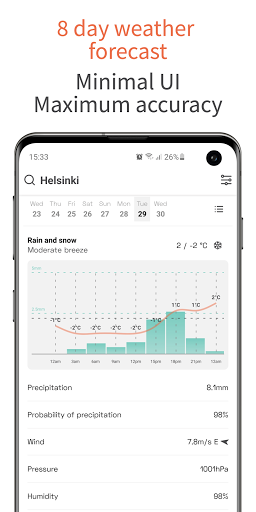
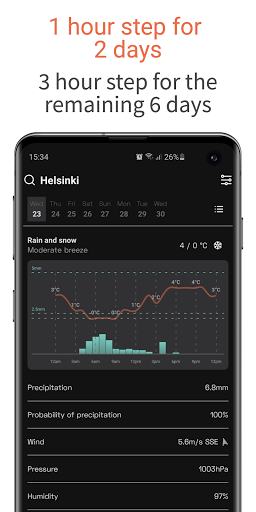
Un approccio scientifico ma semplice alle previsioni del tempo
OpenWeather App è un'applicazione gratuita e senza pubblicità che ti aiuterà a pianificare il tuo tempo in base alle condizioni meteorologiche in modo conciso e minimalista. Sii consapevole di eventuali precipitazioni entro un'ora con una precisione minuto o pianifica le tue attività per la prossima domenica mattina. L'app OpenWeather può dirti quale parte della giornata avrà un cielo sereno e una leggera brezza perfetta per una corsa o un giro in bicicletta per i 7 giorni a venire.
Chi usa OpenWeather?
I dati di OpenWeather vengono utilizzati da milioni di sviluppatori e aziende in tutto il mondo. Molto probabilmente, vedi già i nostri dati tramite la tua applicazione meteo. Ora puoi ottenere il tuo bollettino meteorologico sin dal suo inizio, tramite l'app OpenWeather.
8 motivi per amare l'app OpenWeather
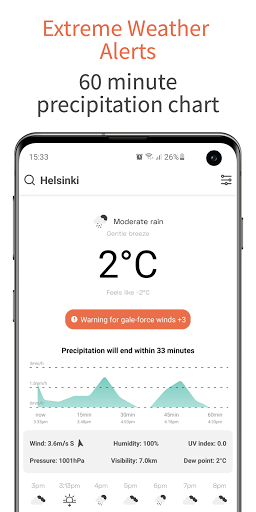
1. Design minimalista che fornisce tutte le informazioni meteorologiche di cui hai bisogno tra cui: si sente come, velocità del vento; la direzione del vento; pressione atmosferica; umidità; Indice UV e visibilità;
2. Non farti sorprendere dalla pioggia o dallo spettacolo con il grafico a 60 minuti che indica eventuali precipitazioni e l'intensità nella tua zona;
3. Icone intuitivamente chiare che indicano le condizioni meteorologiche per 48 ore consecutive;
4. Carta meteorologica oraria per i primi 2 giorni e per ogni 3 ore nei 6 giorni successivi;
5. Espandere qualsiasi giorno della settimana e ottenere un grafico visivo sulla temperatura e informazioni meteorologiche dettagliate per il giorno, oltre all'ora del tramonto / alba. I primi 2 giorni vengono forniti con un grafico di fluttuazione della temperatura oraria;
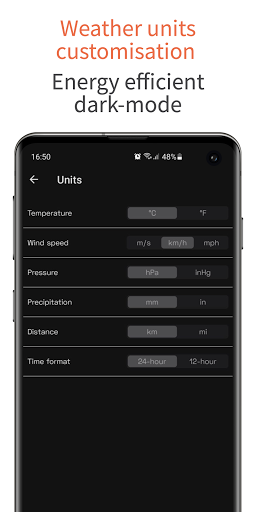
6. Funzione di personalizzazione per le unità di misurazione del tempo. Costruisci il tuo set di misurazioni preferite per temperatura (° C / ° F), distanza (km / mi), precipitazioni (mm / pollici) e altro;
7. Senza pubblicità e gratuito;
8. Modalità oscura.
Altre caratteristiche:
- Aggiungi fino a 6 città ai preferiti e ottieni previsioni meteo accurate per qualsiasi località;
- Il tempo è diverso? - Puoi sempre dirci qual è il tempo reale nella tua località.
La magia dietro l'app OpenWeather
Tutti i dati per l'app OpenWeather sono forniti da One Call API ™. OpenWeather aggrega ed elabora i dati meteorologici da decine di migliaia di stazioni meteorologiche, radar terrestri e satelliti per fornire ai propri utenti dati meteorologici precisi e utilizzabili per qualsiasi luogo in tutto il mondo.
Mostra altro

1. Scarica il programma di installazione di MEmu e completa l'installazione

2. Avvia il Memu e apri il Google Play sulla homepage

3. Cerca OpenWeather in Google Play
Install
4. Scarica e installa OpenWeather
5. Al termine dell'installazione, fai clic sull'icona per avviar

6. Divertiti giocando a OpenWeather su PC con MEmu
MEmu App Player è il miglior emulatore Android gratuito, utilizzato da 50 milioni di persone per ottenere un'esperienza di gioco Android superba. La tecnilogia di virtualizzazione MEmu ti permette di giocare a migliaia di giochi Android con semplicità sul tuo computer, anche i giochi con la grafica più esigente.
Schermo più grande con una grafica migliore; Lunga durata, senza limitazione di batteria o dati mobili.
Supporto completo per mappa di tastiera per un controllo preciso di tastiera e mouse o gamepad.
Multipli account di gioco o attività su un singolo PC contemporaneamente con il gestore di multi istanza.
Use OpenWeather on PC by following steps: