Ludo Neo-Classic: King of Dice
更新日
現在のバージョン
1.53
提供元

スマホ不要!プロ選手のようにキーボードとマウスで操作しよう。MEmuエミュはあなたにすべての期待を与える。電池が切れてしまうとか画面が小さいとかの問題を心配する必要がなくて、存分Ludo Neo-Classic: King of Diceを楽しんでください。新しいMEmuエミュ7はPCでLudo Neo-Classic: King of Diceをプレイするのに最適!完璧なキーマッピングシステムにより、まるでパソコンゲームみたい。マルチインスタンスで複数のゲームやアプリを同時に実行!唯一無二な仮想化エンジンがパソコンの可能性を最大限になる。遊べるだけでなく、より楽しめる!
もっと見る
Ludo Neo-Classic: King of DiceをPCでダウンロード!大画面でより楽しむ。電源が落ちてしまうとか通信料が足りないとかの問題を心配する必要がなく、PCの大画面でより快適にゲームを楽しましょう! The most versatile/customizable Ludo game available for mobile.
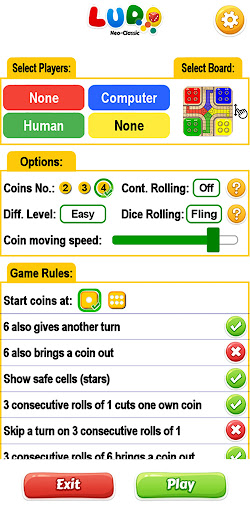
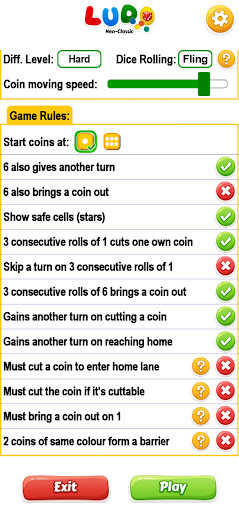
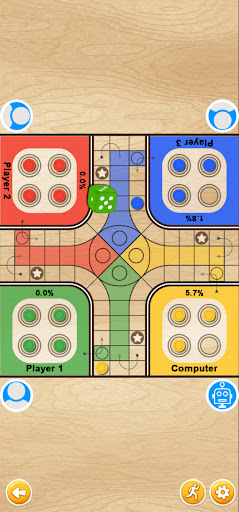
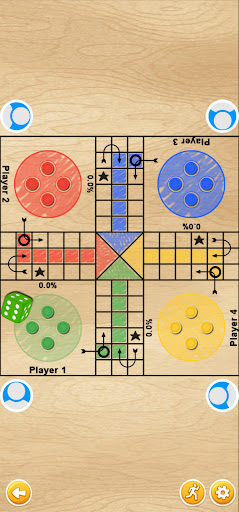
The most versatile/customizable Ludo game available for mobile. It has both classic and new modern design & Nepali/Indian local rules along with international rules. Lots of options/rules for customization according to your need is possible. Hope you enjoy playing it ;).
Features:
1. Added rules/options which are played and popular in Nepal/India and most of the south asian regions:
i) Option to show safe block(square) which is represented by star icon
ii) Option to get another turn on both dice number 1 (Pot) and 6 (Chhakka)
iii) 3 consecutive rolls of 1 kills one own playing coin
iv) 3 consecutive rolls of 6 brings a coin out if all coins are in the yard
v) All the rules are optional so you can play both international version or local version or your own customized version according to your desire
2. Classic sketch marks design with wooden or white board
3. New modern design with wooden or white board
4. Option to choose the dice number (1-6) which will start the token(coin)
5. Option to choose the number of coins to be played (from 1 to 4)
6. Dice changing color according to color of actual player on turn
7. Variety of rules to meet your own taste of gaming experience
8. Multiplayer in the same device (up to 4 player)
9. Play against computer.
10. Game play progress is saved automatically, you can resume the game later even after app is closed
About user data and permissions uses:
-Ludo Neo-Classic accesses information pertaining to your device name, operating system version, carrier, geo-location, IP address for analytics purpose so that we can provide a better game experience.
もっと見る

1. MEmuインストーラーをダウンロードしてセットアップを完了する

2. MEmuを起動し、デスクトップでのPlayストアを開く

3. PlayストアでLudo Neo-Classic: King of Diceを検索する
Install
4. Ludo Neo-Classic: King of Diceをダウンロードしてインストールする
5. インストールが完了したら、アイコンをクリックしてスタート

6. MEmuを使用してPCでLudo Neo-Classic: King of Diceを楽しむ
MEmu App Playerは最高の無料で提供されるAndroidエミュレータで、5,000万人がすでに優れたAndroidゲーム体験を楽しんでいます。 MEmuの仮想化技術は、あなたのPCで何千ものAndroidゲームを快適にプレイすることを可能にします。
大画面でより精細;無限の待機、電池とドラフィックの極限を超え
キーボード・マウス・コントローラーを全力でサポート、より快適
マルチインスタンスで複数のゲームを同時に実行
Play Ludo Neo-Classic: King of Dice on PC by following steps: