
Smurfs' Village
更新日
現在のバージョン
2.98.1
提供元

スマホ不要!プロ選手のようにキーボードとマウスで操作しよう。MEmuエミュはあなたにすべての期待を与える。電池が切れてしまうとか画面が小さいとかの問題を心配する必要がなくて、存分Smurfs' Villageを楽しんでください。新しいMEmuエミュ7はPCでSmurfs' Villageをプレイするのに最適!完璧なキーマッピングシステムにより、まるでパソコンゲームみたい。マルチインスタンスで複数のゲームやアプリを同時に実行!唯一無二な仮想化エンジンがパソコンの可能性を最大限になる。遊べるだけでなく、より楽しめる!
もっと見る
Smurfs' VillageをPCでダウンロード!大画面でより楽しむ。電源が落ちてしまうとか通信料が足りないとかの問題を心配する必要がなく、PCの大画面でより快適にゲームを楽しましょう! スマーフたちが新たな冒険に旅立ちます!



スマーフたちが新たな冒険に旅立ちます!
邪悪な魔法使いガーガメルと彼の猫アズラエルがついにスマーフの村を見つけ、愛すべき青い仲間たちを魔法の森のあちこちに散らばらせてしまいました。パパスマーフ、スマーフェット、ブレイニー、ジョーキー、グリーディ、そしてスマーフファミリーの仲間たちが、家族みんなで楽しめる冒険へとあなたを導き、悪党ガーガメルを倒しましょう!
土曜の朝に大人気のアニメをベースにしたこの冒険は、キノコの家1つとスマーフたちが飛び交う広大な土地から始まります。あなたの役割は、スマーフたちが住める新しい森の村を作ることです!
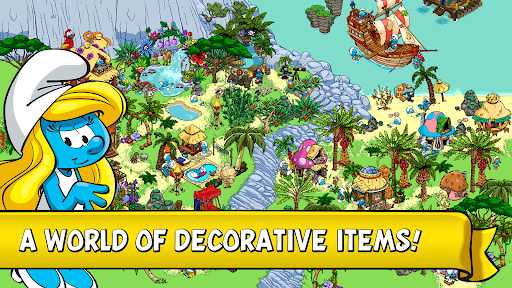
スマーフベリーを収穫し、カラフルな小屋、特別なキノコの家、そして美しい橋を建てましょう。作物が育つ間、様々なミニゲームをプレイしましょう!カラフルな庭園、ライト、フラワーチェア、ハンモックなど、5,000種類以上の手作りアイテムで村を飾り付けましょう!
スマーフIDを作成すると、安全に友達を追加したり、村を探索したり評価したりできるだけでなく、注目の村になるチャンスもあります!
今すぐダウンロードして、史上最高のスマーフ村を作りましょう!
スマーフ村の特徴:
ファミリーアドベンチャー:自分だけのスマーフ村を作り、スマーフたちの新しい家を作ろう。
お気に入りのスマーフたちと遊ぼう:スマーフファミリーが勢ぞろい!パパスマーフ、スマーフェット、のんびりスマーフ、ベビースマーフ、ハンディスマーフ、ジョーキースマーフ。
スマーフベリーを収穫:アプリ内購入で作物と青い村の成長をスピードアップ。
スマーフのミニゲーム:村の成長に合わせて、様々なミニゲームをプレイしましょう。「貪欲スマーフのお菓子作りゲーム」「パパスマーフのポーション調合ゲーム」「ペインタースマーフのお絵かきゲーム」「怠け者スマーフの釣りゲーム」「ハンディスマーフのミニゲーム」など。追加ボーナスをアンロックしましょう。
友達とつながろう:FacebookやGame Centerでスマーフ体験をシェアしたり、友達の村にギフトを送ったりできます。
オフラインプレイ:インターネットに接続しなくても、いつでも村を管理できます。
---
スマーフの村は楽しんでいますか?ゲームについてもっと詳しく!
Facebook: www.facebook.com/smurfsvillage
YouTube: www.youtube.com/@GCGGardenCityGames
ヘルプが必要ですか?お問い合わせ: https://smurfs.zendesk.com
プライバシーポリシー: www.gardencitygames.uk/privacy-policy-2
利用規約: www.gardencitygames.uk/termsofservice
もっと見る

1. MEmuインストーラーをダウンロードしてセットアップを完了する

2. MEmuを起動し、デスクトップでのPlayストアを開く

3. PlayストアでSmurfs' Villageを検索する
Install
4. Smurfs' Villageをダウンロードしてインストールする
5. インストールが完了したら、アイコンをクリックしてスタート

6. MEmuを使用してPCでSmurfs' Villageを楽しむ
MEmu App Playerは最高の無料で提供されるAndroidエミュレータで、5,000万人がすでに優れたAndroidゲーム体験を楽しんでいます。 MEmuの仮想化技術は、あなたのPCで何千ものAndroidゲームを快適にプレイすることを可能にします。
大画面でより精細;無限の待機、電池とドラフィックの極限を超え
キーボード・マウス・コントローラーを全力でサポート、より快適
マルチインスタンスで複数のゲームを同時に実行
Play Smurfs' Village on PC by following steps: