Wattpad - Read & Write Stories
更新日
現在のバージョン
11.30.1
提供元

スマートフォンは不要!パソコンと同じようにキーボードとマウスで操作できます。MEmu Playは、あなたが待ち望んでいたすべての楽しみをお届けします。バッテリー残量や小さな画面を気にすることなく、Wattpad - Read & Write Storiesをご利用ください。最新のMEmu 9は、Wattpad - Read & Write StoriesをPCで体験するのに最適です!完璧なキーマッピングシステムにより、PCのようなスムーズな操作性を実現します。マルチインスタンス機能により、複数のアプリケーションを同時に実行できます。独自の仮想化エンジンがPCのパフォーマンスを最大限に引き出します。アプリを使用するだけでなく、高品質な体験を得ることができます。
もっと見る
Wattpad - Read & Write StoriesをPCでダウンロード!大画面でより楽しむ。電源が落ちてしまうとか通信料が足りないとかの問題を心配する必要がなく、PCの大画面でより快適にゲームを楽しましょう! Wattpad.


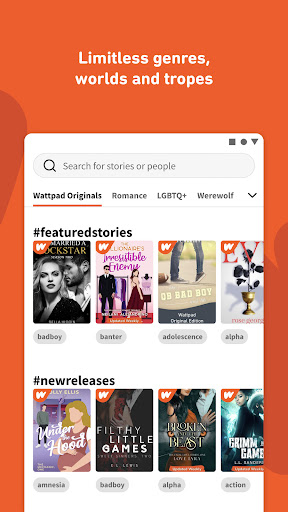

Wattpad. Stories to obsess over.
Read and write original stories in your own language!
Discover the social storytelling platform that connects a global community of millions of readers and writers through the power of story.
Download Wattpad today to start reading or writing.
Join Wattpad to become a member of an international community of story lovers. Connect with other passionate readers & writers, comment directly on stories as you read them, and support writers as they create and share their original creations. You can even read together and share your library or create reading lists so your friends always know what you’re reading.
Get your story discovered.
Have your own story to tell? Get it discovered through the power of community and technology on Wattpad. Share your original story and book ideas with our community who are there to cheer you on throughout your writing journey.
Think your story could be the next blockbuster?
Our production studio discovers untapped, unsigned and talented writers on Wattpad and connects them to global multi-media entertainment companies. The Kissing Booth, Perfect Addiction, and After are just a few of the stories first discovered on Wattpad—and adapted into TV shows, movies and books that captivated fans around the world.
Why Wattpad?
Book lovers: The Wattpad app offers millions of stories, novels, books, fanfiction and poetry in over 25 languages from writers around the world. You can read and write your own story using our app and publish it online to join Wattpad's community of avid readers and writers.
Features of Wattpad, the top story reading and writing app!
- Read millions of free stories
- Readers can browse popular book genres including romance, fanfiction, scifi, historical fiction, LGBTQ+, fantasy, mystery, comedy, young adult fiction and much more, or discover other thrilling genres such as werewolf, mafia, dark romance and billionaire
- Search popular trending book titles
- Build your own free library and save your favorite stories to keep them with you wherever you go
- Download to read offline
- Share your comments and vote for your favorites
- Get alerts when new book chapters are added
- Start your writing journey today!
- Connect with a community of book readers and fanfiction lovers
- Hooked on a story? Simply sync your account to easily pick up where you left off, whether you’re reading or writing on your computer, mobile phone, or tablet.
Explore popular stories on our ebook reading app, including Float, Lost Luna, Ex-Husband Turned Boss, and Chasing Red, or newly added stories like So I Married a Rockstar, Wild Fangs, Submitting to the Mafia King, and many more for a seamless ebook reading experience.
Already a fan? Follow us on social media to stay up-to-date on your favorite writers, stories, contests and more!
Instagram: https://www.instagram.com/wattpad/
Facebook: https://www.facebook.com/wattpad/
TikTok: https://www.tiktok.com/@wattpad
Twitter: https://twitter.com/wattpad
もっと見る

1. MEmuインストーラーをダウンロードしてセットアップを完了する

2. MEmuを起動し、デスクトップでのPlayストアを開く

3. PlayストアでWattpad - Read & Write Storiesを検索する
Install
4. Wattpad - Read & Write Storiesをダウンロードしてインストールする
5. インストールが完了したら、アイコンをクリックしてスタート

6. MEmuを使ってパソコンでWattpad - Read & Write Storiesを体験する
MEmu Playは現在、最高の無料Androidエミュレーターであり、5,000万人のユーザーが優れたAndroidアプリ体験を楽しんでいます。MEmuの仮想化テクノロジーにより、数千ものAndroidアプリをコンピューターでスムーズに実行できます。
大画面でより精細;無限の待機、電池とドラフィックの極限を超え
キーボード・マウス・コントローラーを全力でサポート、より快適
マルチインスタンスで複数のゲームを同時に実行
Use Wattpad - Read & Write Stories on PC by following steps: