Aurora Forecast 3D
更新日
現在のバージョン
8.7
提供元

スマートフォンは不要!パソコンと同じようにキーボードとマウスで操作できます。MEmu Playは、あなたが待ち望んでいたすべての楽しみをお届けします。バッテリー残量や小さな画面を気にすることなく、Aurora Forecast 3Dをご利用ください。最新のMEmu 9は、Aurora Forecast 3DをPCで体験するのに最適です!完璧なキーマッピングシステムにより、PCのようなスムーズな操作性を実現します。マルチインスタンス機能により、複数のアプリケーションを同時に実行できます。独自の仮想化エンジンがPCのパフォーマンスを最大限に引き出します。アプリを使用するだけでなく、高品質な体験を得ることができます。
もっと見る
Aurora Forecast 3DをPCでダウンロード!大画面でより楽しむ。電源が落ちてしまうとか通信料が足りないとかの問題を心配する必要がなく、PCの大画面でより快適にゲームを楽しましょう! The Aurora Forecast 3D is a tool to track down where the aurora is located in the sky from any location on planet.
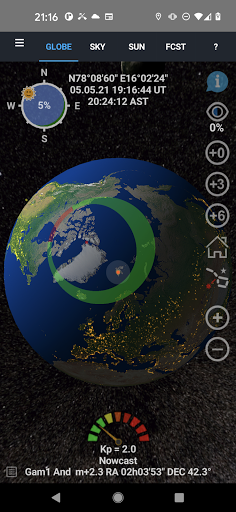
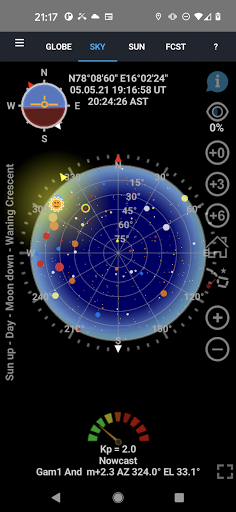
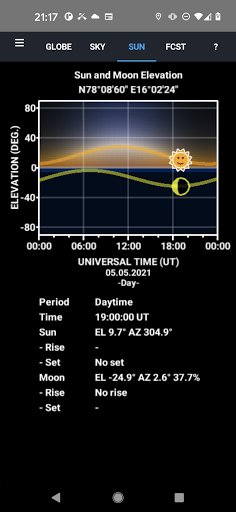
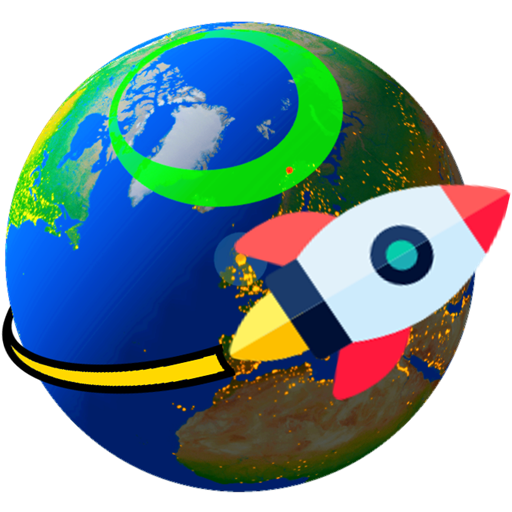
The Aurora Forecast 3D is a tool to track down where the aurora is located in the sky from any location on planet. It renders Earth in 3D with rotation and scaling at your fingertips. You can select locations and make your own ground - station list. The Sun illuminates the globe as it updates in near real-time. The short term forecasts are up to +6 hours, while the long term forecasts are up to 3 days ahead in time. They are updated when the app is active and connected to internet.
An Aurora Compass is included that shows where the auroral oval [1,2], the Moon and the Sun are located as you look up at the sky from your location. The phase and age of the Moon is also visualized in the compass. By zooming out in the 3D view port, satellites, stars and planets appear in their orbits [3] around the Sun.
FEATURES
- 3D view port of Earth.
- Solar illumination of the Earth and the Moon.
- Aurora oval size and location in real time.
- Day side location of the red Cusp.
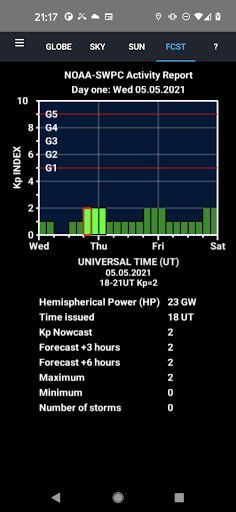
- Forecasts based on predicted Kp index estimated by the Space Weather Prediction Centre (NOAA-SWPC).
- Includes a 2.4 million star map [4].
- City light texture [5].
- Earth, Sun and Moon textures [6,7].
- Sky view module to track planets and stars [8].
- 3-day space weather condition forecast as news ticker.
- Two-Line Element (TLE) satellite orbit calculations [9].
- Skyview navigation.
- 3D Laser Star pointer to identify star signs.
- Sounding rocket trajectories.
- Sun and Moon daily elevation plots with rise and set time.
- Epoch selection for magnetic pole position [10]
- Ovals based on polar orbiting satellites data [11]
- Target web links added to satellites, stars, planets and position.
- All-sky camera links to the Boreal Aurora Camera Constellation (BACC).
- Sky color animation [12,13].
- Zhang and Paxton ovals added [14]
- Geomagnetic storm push notifications.
- Youtube demonstration.
References
[1] Sigernes F., M. Dyrland, P. Brekke, S. Chernouss, D.A. Lorentzen, K. Oksavik, and C.S. Deehr, Two methods to forecast auroral displays, Journal of Space Weather and Space Climate (SWSC), Vol. 1, No. 1, A03, DOI:10.1051/swsc/2011003, 2011.
[2] Starkov G. V., Mathematical model of the auroral boundaries, Geomagnetism and Aeronomy, 34 (3), 331-336, 1994.
[3] P. Schlyter, How to compute planetary positions, http://stjarnhimlen.se/, Stockholm, Sweden.
[4] Bridgman, T. and Wright, E., The Tycho Catalog Sky map- Version 2.0, NASA/Goddard Space Flight Center Scientific Visualization Studio, http://svs.gsfc.nasa.gov/3572, January 26, 2009.
[5] The Visible Earth catalog, http://visibleearth.nasa.gov/, NASA/Goddard Space Flight Center, April-October, 2012.
[6] T. Patterson, Natural Earth III - Texture Maps, http://www.shadedrelief.com, October 1, 2016.
[7] Nexus - Planet Textures, http://www.solarsystemscope.com/nexus/, January 4, 2013.
[8] Hoffleit, D. and Warren, Jr., W.H., The Bright Star Catalog, 5th Revised Edition (Preliminary Version), Astronomical Data Center, NSSDC/ADC, 1991.
[9] Vallado, David A., Paul Crawford, Richard Hujsak, and T.S. Kelso, Revisiting Spacetrack Report #3, AIAA/AAS-2006-6753, https://celestrak.com, 2006.
[10] Tsyganenko, N.A., Secular drift of the auroral ovals: How fast do they actually move?, Geophysical Research Letters, 46, 3017-3023, 2019.
[11] M. J. Breedveld, Predicting the Auroral Oval Boundaries by Means of Polar Operational Environmental Satellite Particle Precipitation Data, Master thesis, Department of Physics and Technology, Faculty of Science and Technology, The Arctic University of Norway, June 2020.
[12] Perez, R., J,M. Seals and B. Smith, An all-weather model for sky illuminance distribution, Solar Energy, 1993.
[13] Preetham, A.J, P. Shirley and B. Smith, A practical model for daylight Computer Graphics, (SIGGRAPH 99 Proceedings), 91-100, 1999.
[14] Zhang Y., and L. J. Paxton, An empirical Kp-dependent global auroral model based on TIMED/GUVI data, J. Atm. Solar-Terr. Phys., 70, 1231-1242, 2008.
もっと見る

1. MEmuインストーラーをダウンロードしてセットアップを完了する

2. MEmuを起動し、デスクトップでのPlayストアを開く

3. PlayストアでAurora Forecast 3Dを検索する
Install
4. Aurora Forecast 3Dをダウンロードしてインストールする
5. インストールが完了したら、アイコンをクリックしてスタート

6. MEmuを使ってパソコンでAurora Forecast 3Dを体験する
MEmu Playは現在、最高の無料Androidエミュレーターであり、5,000万人のユーザーが優れたAndroidアプリ体験を楽しんでいます。MEmuの仮想化テクノロジーにより、数千ものAndroidアプリをコンピューターでスムーズに実行できます。
大画面でより精細;無限の待機、電池とドラフィックの極限を超え
キーボード・マウス・コントローラーを全力でサポート、より快適
マルチインスタンスで複数のゲームを同時に実行
Use Aurora Forecast 3D on PC by following steps: