CamView Smart
更新日
現在のバージョン
3.9.6.8
提供元

スマートフォンは不要!パソコンと同じようにキーボードとマウスで操作できます。MEmu Playは、あなたが待ち望んでいたすべての楽しみをお届けします。バッテリー残量や小さな画面を気にすることなく、CamView Smartをご利用ください。最新のMEmu 9は、CamView SmartをPCで体験するのに最適です!完璧なキーマッピングシステムにより、PCのようなスムーズな操作性を実現します。マルチインスタンス機能により、複数のアプリケーションを同時に実行できます。独自の仮想化エンジンがPCのパフォーマンスを最大限に引き出します。アプリを使用するだけでなく、高品質な体験を得ることができます。
もっと見る
CamView SmartをPCでダウンロード!大画面でより楽しむ。電源が落ちてしまうとか通信料が足りないとかの問題を心配する必要がなく、PCの大画面でより快適にゲームを楽しましょう! Our Remote Camera App is an advanced solution for remote monitoring and capturing of images and videos, designed to make your life easier and more secure.
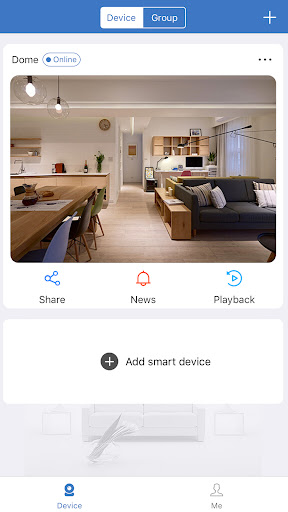
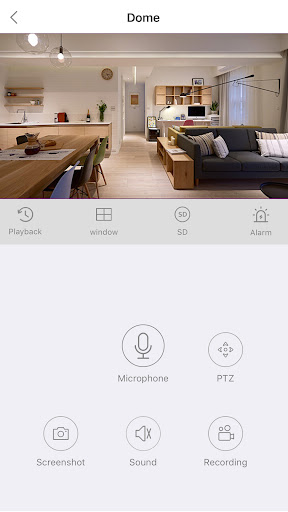
Our Remote Camera App is an advanced solution for remote monitoring and capturing of images and videos, designed to make your life easier and more secure. This app is the perfect tool for people who want to keep an eye on their homes, pets, loved ones, or even their business when they're away.
The app allows you to control and access your camera's footage from anywhere in the world, using your smartphone or tablet. You can remotely control your camera's settings, such as zoom, focus, exposure, and other parameters, to get the perfect shot, and switch between photo and video modes with ease.
Our app features a user-friendly interface that is intuitive and easy to navigate, making it accessible to anyone. You can view live footage, take snapshots, record videos, and even set up alerts to notify you when there's motion detected in the camera's field of view. Our app also supports multiple camera configurations, so you can monitor multiple locations simultaneously.
The app's advanced features allow you to take advantage of the latest camera technology, such as pan-tilt-zoom (PTZ) controls, night vision, and motion detection. With our PTZ controls, you can move your camera remotely, changing the camera's field of view to capture the perfect shot. The app's night vision mode ensures that you can monitor your property even in low light conditions, and the motion detection feature sends you an alert if the camera detects movement.
Our app's cloud storage options make it easy to store your footage securely and access it from anywhere. You can choose from different storage plans to suit your needs, and our cloud storage is encrypted to keep your data safe and private. You can access your footage from any device with internet access, allowing you to keep an eye on your property from anywhere, at any time.
In addition, our app is compatible with most cameras on the market, so you can use it with your existing camera. Our app supports both wired and wireless connections, making it easy to set up and use.
In conclusion, our Remote Camera App is a powerful, all-in-one solution for remote monitoring and capturing. It's user-friendly, accessible, and compatible with most cameras on the market. Whether you're monitoring your home, pets, loved ones, or business, our app makes it easy to stay connected and in control. So why wait? Download our app today and start capturing and monitoring images and videos from afar!
もっと見る

1. MEmuインストーラーをダウンロードしてセットアップを完了する

2. MEmuを起動し、デスクトップでのPlayストアを開く

3. PlayストアでCamView Smartを検索する
Install
4. CamView Smartをダウンロードしてインストールする
5. インストールが完了したら、アイコンをクリックしてスタート

6. MEmuを使ってパソコンでCamView Smartを体験する
MEmu Playは現在、最高の無料Androidエミュレーターであり、5,000万人のユーザーが優れたAndroidアプリ体験を楽しんでいます。MEmuの仮想化テクノロジーにより、数千ものAndroidアプリをコンピューターでスムーズに実行できます。
大画面でより精細;無限の待機、電池とドラフィックの極限を超え
キーボード・マウス・コントローラーを全力でサポート、より快適
マルチインスタンスで複数のゲームを同時に実行
Use CamView Smart on PC by following steps: