Mic Monitor – Real Time Voice
更新日
現在のバージョン
1.54
提供元

スマートフォンは不要!パソコンと同じようにキーボードとマウスで操作できます。MEmu Playは、あなたが待ち望んでいたすべての楽しみをお届けします。バッテリー残量や小さな画面を気にすることなく、Mic Monitor – Real Time Voiceをご利用ください。最新のMEmu 9は、Mic Monitor – Real Time VoiceをPCで体験するのに最適です!完璧なキーマッピングシステムにより、PCのようなスムーズな操作性を実現します。マルチインスタンス機能により、複数のアプリケーションを同時に実行できます。独自の仮想化エンジンがPCのパフォーマンスを最大限に引き出します。アプリを使用するだけでなく、高品質な体験を得ることができます。
もっと見る
MEmu Playを使えば、PCでMic Monitor – Real Time Voiceを快適に楽しめます。何千ものAndroidアプリをデスクトップ版で利用できる、パワフルな無料Androidエミュレーターです。友達とつながり、より効率的に作品を磨き上げましょう! HearYourself — Live Vocal Monitor, Mic Monitor & Vocal Effects.
HearYourself — Live Vocal Monitor, Mic Monitor & Vocal Effects
Wired headphones required for real-time monitoring. Bluetooth devices are supported for playback of recordings only.
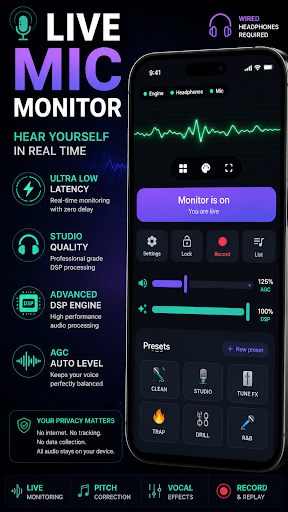
Hear your own voice live in real time with ultra-low latency vocal monitoring.
HearYourself is a professional Mic Monitor and Live Vocal Monitor app that lets singers hear themselves instantly while singing, practicing, warming up or performing.
Sing into your microphone and hear your voice back through wired headphones with studio-quality vocal effects, pitch correction, EQ, reverb and noise reduction.
━━━━━━━━━━━━━━
FEATURES
Live Mic Monitor & Vocal Monitor
Hear your voice in real time as you sing with instant, low-latency monitoring.
Studio Vocal Presets
Clean, Studio, Trap, Drill, R&B, Hyperpop, Techno, Diva, Ballad, Radio, Pop and more.
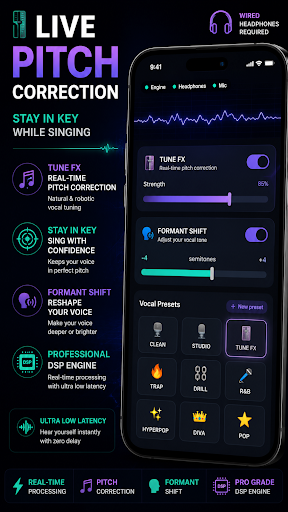
Tune FX (Pitch Correction)
Real-time pitch correction that helps keep your singing in key.
Formant Shift
Reshape your vocal tone and character. Make your voice deeper, brighter or more expressive.
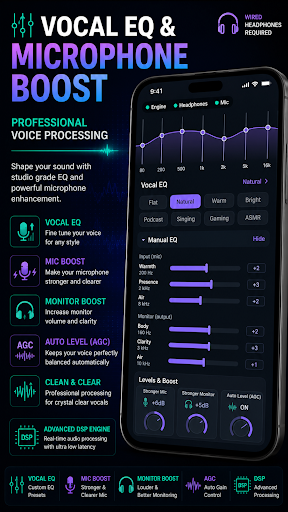
Full Vocal Controls
EQ, reverb, delay, chorus, de-esser and compression.
Clean Signal Processing
Noise reduction, noise gate and AGC (Auto Gain Control) for a cleaner vocal sound.
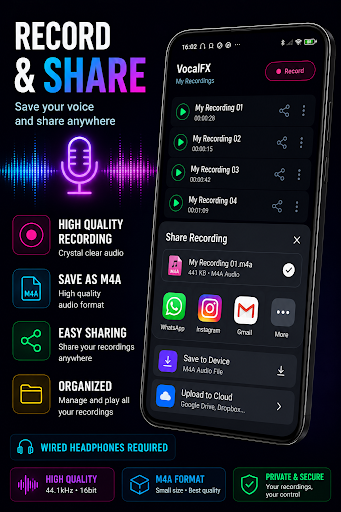
⏺ Record & Replay
Record your voice, save takes and play them back anytime.
Privacy First
• No internet connection required
• No data collection
• No accounts
• All audio is processed directly on your device
━━━━━━━━━━━━━━
PERFECT FOR
• Singers practicing or warming up
• Vocalists who want live vocal effects
• Karaoke lovers
• Content creators
• Musicians
• Voice training and rehearsal
• Anyone who wants to hear themselves clearly
━━━━━━━━━━━━━━
REQUIREMENTS
• Wired headphones (required for real-time monitoring)
• Microphone
• Android 8.0 or higher
━━━━━━━━━━━━━━
Hear yourself sing with professional live vocal monitoring, pitch correction, vocal effects, EQ, noise reduction and studio-quality audio processing — directly on your phone.
もっと見る

1. MEmuインストーラーをダウンロードしてセットアップを完了する

2. MEmuを起動し、デスクトップでのPlayストアを開く

3. PlayストアでMic Monitor – Real Time Voiceを検索する
Install
4. Mic Monitor – Real Time Voiceをダウンロードしてインストールする
5. インストールが完了したら、アイコンをクリックしてスタート

6. MEmuを使ってパソコンでMic Monitor – Real Time Voiceを体験する
MEmu Playは現在、最高の無料Androidエミュレーターであり、5,000万人のユーザーが優れたAndroidアプリ体験を楽しんでいます。MEmuの仮想化テクノロジーにより、数千ものAndroidアプリをコンピューターでスムーズに実行できます。
大画面でより精細;無限の待機、電池とドラフィックの極限を超え
キーボード・マウス・コントローラーを全力でサポート、より快適
マルチインスタンスで複数のゲームを同時に実行
Use Mic Monitor – Real Time Voice on PC by following steps: