How to Crochet Step by Step
更新日
現在のバージョン
37.7.0
提供元

スマートフォンは不要!パソコンと同じようにキーボードとマウスで操作できます。MEmu Playは、あなたが待ち望んでいたすべての楽しみをお届けします。バッテリー残量や小さな画面を気にすることなく、How to Crochet Step by Stepをご利用ください。最新のMEmu 9は、How to Crochet Step by StepをPCで体験するのに最適です!完璧なキーマッピングシステムにより、PCのようなスムーズな操作性を実現します。マルチインスタンス機能により、複数のアプリケーションを同時に実行できます。独自の仮想化エンジンがPCのパフォーマンスを最大限に引き出します。アプリを使用するだけでなく、高品質な体験を得ることができます。
もっと見る
How to Crochet Step by StepをPCでダウンロード!大画面でより楽しむ。電源が落ちてしまうとか通信料が足りないとかの問題を心配する必要がなく、PCの大画面でより快適にゲームを楽しましょう! TUTORIALS LIST:.
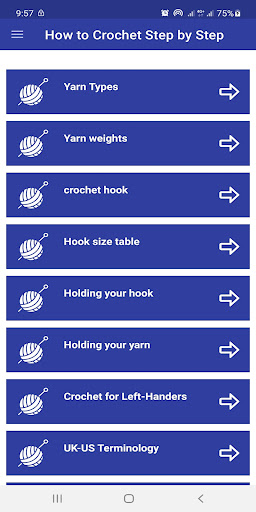
TUTORIALS LIST:
01. Yarn Types
02. Yarn weights
03. crochet hook
04. Hook size table
05. Holding your hook
06. Holding your yarn
07. Crochet for Left-Handers
08. UK-US Terminology
09. Making Slipknot
10. Making Yarn Over
11. Drawing up Loop
12. Making Foundation Chain
13. Working the Chain
14. Working into subsequent rows
15. Double Crochet
16. treble crochet
17. half treble crochet
18. Double Treble Crochet
19. Turning Chain
20. Slip Stitch
21. Identifying and Counting stitches
22. Fixing Mistakes
23. Fastening Off
24. Basic Edging
25. Weaving in Ends
26. Changing Colors
27. Reading Charted Stitch Diagram
28. Increasing
29. Decreasing
30. Starting in the round
31. Working in the Round
32. Standard Increase
33. Invisible finish
34. Spray Blocking
35. Steam blocking
36. Wet blocking
37. Blocking lace
38. Slip Stitch
39. Flat slip-stitched seam
40. Shells Fans and V Stitches
41. Spike Stitches
42. Crossed stitches
43. Post Stitches
44. Chainless foundation stitches
45. Linked stitches
46. Cluster stitch
47. Puff stitch
48. popcorn stitch
49. Solid Square
50. Circle in Square
51. Granny square
52. Granny triangle
53. Flower Motif
54. Fringe technique
55. Reverse double crochet
56. Picot edging
57. Stitch Pattern Gallery
APPLICATION FEATURES
- Small Size Application
- Fast Loading
- Easy to use
- User friendly interface
DISCLAIMER
The content in this app is not affiliated with, endorsed, sponsored, or specifically approved by any company. All copyright and trademarks are owned by their respective owners. The images in this application are collected from around the web, if we are in breach of copyright, please let us know and it will be removed as soon as possible.
This app is not affiliated nor related with any of the content displayed within the app. The content used are publicly available from various website which retains all copyrights, and thus the app is not to be held responsible for any of the content displayed within.
もっと見る

1. MEmuインストーラーをダウンロードしてセットアップを完了する

2. MEmuを起動し、デスクトップでのPlayストアを開く

3. PlayストアでHow to Crochet Step by Stepを検索する
Install
4. How to Crochet Step by Stepをダウンロードしてインストールする
5. インストールが完了したら、アイコンをクリックしてスタート

6. MEmuを使ってパソコンでHow to Crochet Step by Stepを体験する
MEmu Playは現在、最高の無料Androidエミュレーターであり、5,000万人のユーザーが優れたAndroidアプリ体験を楽しんでいます。MEmuの仮想化テクノロジーにより、数千ものAndroidアプリをコンピューターでスムーズに実行できます。
大画面でより精細;無限の待機、電池とドラフィックの極限を超え
キーボード・マウス・コントローラーを全力でサポート、より快適
マルチインスタンスで複数のゲームを同時に実行
Use How to Crochet Step by Step on PC by following steps: