IpSensorMan
更新日
現在のバージョン
1672857216
提供元

スマートフォンは不要!パソコンと同じようにキーボードとマウスで操作できます。MEmu Playは、あなたが待ち望んでいたすべての楽しみをお届けします。バッテリー残量や小さな画面を気にすることなく、IpSensorManをご利用ください。最新のMEmu 9は、IpSensorManをPCで体験するのに最適です!完璧なキーマッピングシステムにより、PCのようなスムーズな操作性を実現します。マルチインスタンス機能により、複数のアプリケーションを同時に実行できます。独自の仮想化エンジンがPCのパフォーマンスを最大限に引き出します。アプリを使用するだけでなく、高品質な体験を得ることができます。
もっと見る
IpSensorManをPCでダウンロード!大画面でより楽しむ。電源が落ちてしまうとか通信料が足りないとかの問題を心配する必要がなく、PCの大画面でより快適にゲームを楽しましょう! IpSensorMan Manages talking to various sporting sensors using ANT+™ or Bluetooth or Bluetooth Low Energy interfaces.
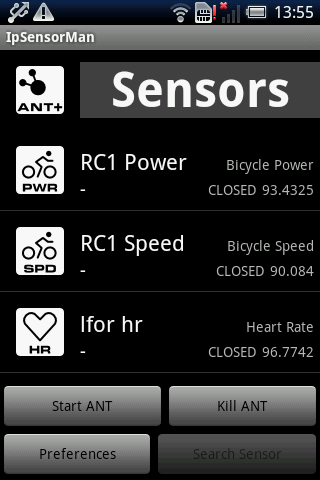
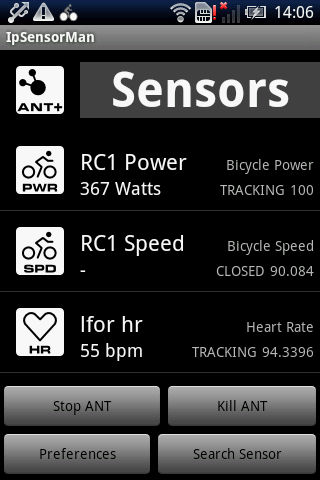
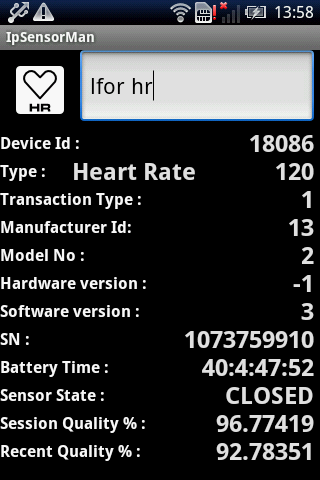

IpSensorMan Manages talking to various sporting sensors using ANT+™ or Bluetooth or Bluetooth Low Energy interfaces. Using a separate app allows multiple client apps to access to the sensors simultaneously. Most of the hard work for talking to the various standard sensors is provided by the app simplifying the client apps. Simplified information is broadcast to any registered application that wants access to the sensor data.
This product is ANT+ certified and complies with the following specified ANT+ device profiles:
Bicycle speed data
Bicycle cadence data
Bicycle combined speed and cadence data
Bicycle power data
Heart rate data
The following are supported but have not gone though certification yet.
Stride Based Speed and Distance (footpod)
Environment (Garmin Tempe)
Running dynamics
Bike Radar
Fitness equipment control (FEC). Trainer control.
Shifting
Suspension
Dropper post
Remote control
Muscle Oxygen
Bike Light
Polar Wearlink®+ transmitter with Bluetooth® and Zephyr HxM BlueTooth Heart rate monitor support added with 1.2.6
Bluetooth Low Energy / Bluetooth Smart support for the following.
Heart rate
Bike speed and cadence
Bike power (Only a single sensor not dual pedals transmitting independently)
Running speed and cadence (footpod)
Stryd running power.
IpSensorMan should recognize other ANT+ sensor types although full decoding support is not currently implemented.
Currently the applications using IpSensorMan are:
IpBike an ANT+ sensor based bike computer. https://market.android.com/details?id=com.iforpowell.android.ipbike
IpPeloton an app to show details from other ANT+ heart rate monitors and power sensors. So you can easily compare your effort with your riding companions effort. https://market.android.com/details?id=com.iforpowell.android.ippeloton
IpWatts an application to log the data from multiple power sensors simultaniously with a single timebase. Also logs a single Speed, Cadence and Heart rate source. The app you need if you want to compare Power meters.
https://market.android.com/details?id=com.iforpowell.android.ipwatts
Other applications may well be added.
If you are a developer and want to use this interface then please feel free to email me.
Permission reasons.
Network communications - full Internet access. The crash reporting system want this. Also I collect usage stats via flurry.com. I am really interested what phones it is installed on and what ANT+ sensors it is used with. You can switch this off from the options.
Hardware controls - ANT radio access. I won't be able to do much without this one.
System tools - modify global system settings, prevent phone from sleeping. There is an option to keep ANT active when the phone is in airplane mode which us useful for saving power, this needs to modify the system settings. You still need to do the airplane mode entry yourself. This feature needs at least version 2.6 of ANT Radio Services. If we are actively monitoring the ant radio the phone will not sleep, the screen may still go off though.
Bluetooth - in order to support the Bluetooth Heart rate monitors.
Location - is needed to be able to access Bluetooth low energy sensors. This is because theoretically you can then see beacons which can be used to get your location. I do not have any Beacon support.
For details on USB Host mode and using an ANT usb stick please see
http://www.iforpowell.com/cms/index.php?page=usb-ant-stick
もっと見る

1. MEmuインストーラーをダウンロードしてセットアップを完了する

2. MEmuを起動し、デスクトップでのPlayストアを開く

3. PlayストアでIpSensorManを検索する
Install
4. IpSensorManをダウンロードしてインストールする
5. インストールが完了したら、アイコンをクリックしてスタート

6. MEmuを使ってパソコンでIpSensorManを体験する
MEmu Playは現在、最高の無料Androidエミュレーターであり、5,000万人のユーザーが優れたAndroidアプリ体験を楽しんでいます。MEmuの仮想化テクノロジーにより、数千ものAndroidアプリをコンピューターでスムーズに実行できます。
大画面でより精細;無限の待機、電池とドラフィックの極限を超え
キーボード・マウス・コントローラーを全力でサポート、より快適
マルチインスタンスで複数のゲームを同時に実行
Use IpSensorMan on PC by following steps: