Node Video - Pro Video Editor
更新日
現在のバージョン
6.65.0
提供元

スマートフォンは不要!パソコンと同じようにキーボードとマウスで操作できます。MEmu Playは、あなたが待ち望んでいたすべての楽しみをお届けします。バッテリー残量や小さな画面を気にすることなく、Node Video - Pro Video Editorをご利用ください。最新のMEmu 9は、Node Video - Pro Video EditorをPCで体験するのに最適です!完璧なキーマッピングシステムにより、PCのようなスムーズな操作性を実現します。マルチインスタンス機能により、複数のアプリケーションを同時に実行できます。独自の仮想化エンジンがPCのパフォーマンスを最大限に引き出します。アプリを使用するだけでなく、高品質な体験を得ることができます。
もっと見る
Node Video - Pro Video EditorをPCでダウンロード!大画面でより楽しむ。電源が落ちてしまうとか通信料が足りないとかの問題を心配する必要がなく、PCの大画面でより快適にゲームを楽しましょう! Must-Have video editing app for Pro Editors.
Must-Have video editing app for Pro Editors.
Please stay tuned for updates and more powerful features!
----------------------------------------------------------------------------------------------------
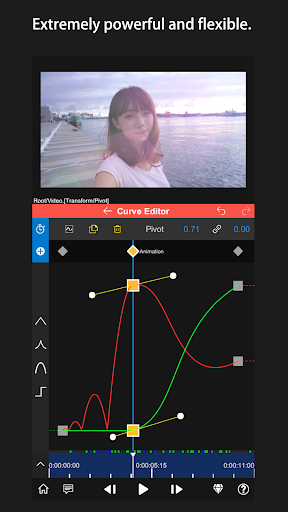
•Extremely powerful and flexible.
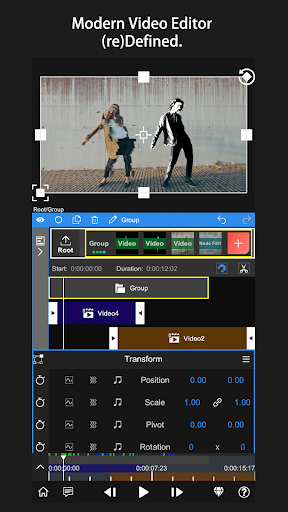
Limitless Layers & Groups.
Precise Video Editing & Rich Possibilities.
Super Fast Rendering.
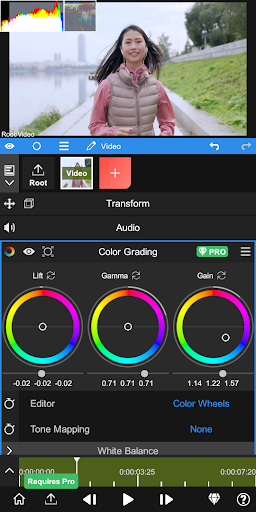
Various Editing Tools are available: Motion Tracker, Pen Tool, Timeline, Keyframe animation, Curve Editor, Masking, Color Correction, Optical flow, Saber, Puppet Pin, etc.
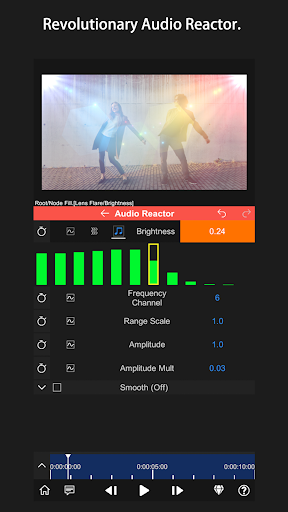
•Revolutionary Audio Reactor.
Visualize your audio to anything. Every parameter of every effect&property is controllable by the audio spectrum.
•AI Powered Features.
Automatically separating Human&Background in real time!
More Features Coming Soon!
•3D Renderers.
Mapping your videos & images to 3D models.
•Professional Effects and Presets.
Get new effects and presets regularly, only for Pro subscribers.
•Currently included Effects/Properties
-Blend Mode
-Motion Blur
-Luma Fade
-Lens Flare
-Fractal Noise
-Time Remap
-Basic Color Correction(Exposure, Contrast, White Balance, etc.)
-Emboss
-4 Color Gradient
-Shift Channels
-Invert
-Camera Lens Blur
-Gaussian Blur
-Cross Blur
-Directional Blur
-Radial Blur
-Glow
-Motion Tile
-Mosaic
-Find Edges
-Vignette
-Displacement Map
-Mirror
-Lens Distortion
-Polar Coordinates
-Clipping Mask
-Human Matting
-Shape Mask
-RGB Curve
-HSL Curve
-Color Wheel
-Sketch
-Old Movie
-Manga
-Cartoon
* Don't hesitate to contact us on - contact@nodevideo.com
もっと見る

1. MEmuインストーラーをダウンロードしてセットアップを完了する

2. MEmuを起動し、デスクトップでのPlayストアを開く

3. PlayストアでNode Video - Pro Video Editorを検索する
Install
4. Node Video - Pro Video Editorをダウンロードしてインストールする
5. インストールが完了したら、アイコンをクリックしてスタート

6. MEmuを使ってパソコンでNode Video - Pro Video Editorを体験する
MEmu Playは現在、最高の無料Androidエミュレーターであり、5,000万人のユーザーが優れたAndroidアプリ体験を楽しんでいます。MEmuの仮想化テクノロジーにより、数千ものAndroidアプリをコンピューターでスムーズに実行できます。
大画面でより精細;無限の待機、電池とドラフィックの極限を超え
キーボード・マウス・コントローラーを全力でサポート、より快適
マルチインスタンスで複数のゲームを同時に実行
Use Node Video - Pro Video Editor on PC by following steps: