
Pleco Chinese Dictionary
更新日
現在のバージョン
1728858097
提供元

スマートフォンは不要!パソコンと同じようにキーボードとマウスで操作できます。MEmu Playは、あなたが待ち望んでいたすべての楽しみをお届けします。バッテリー残量や小さな画面を気にすることなく、Pleco Chinese Dictionaryをご利用ください。最新のMEmu 9は、Pleco Chinese DictionaryをPCで体験するのに最適です!完璧なキーマッピングシステムにより、PCのようなスムーズな操作性を実現します。マルチインスタンス機能により、複数のアプリケーションを同時に実行できます。独自の仮想化エンジンがPCのパフォーマンスを最大限に引き出します。アプリを使用するだけでなく、高品質な体験を得ることができます。
もっと見る
Pleco Chinese DictionaryをPCでダウンロード!大画面でより楽しむ。電源が落ちてしまうとか通信料が足りないとかの問題を心配する必要がなく、PCの大画面でより快適にゲームを楽しましょう! Pleco is the ultimate Chinese learning companion - an integrated Chinese English dictionary / document reader / flashcard system with fullscreen handwriting input and live camera-based character lookups, from a company with 17 years' experience making mobile Chinese learning software.
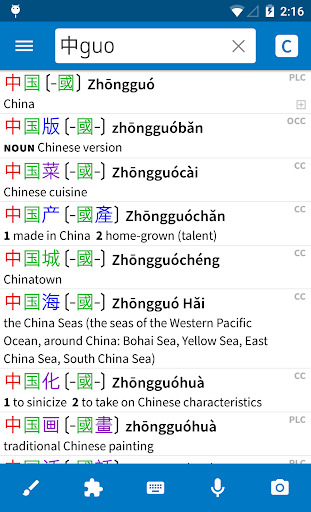
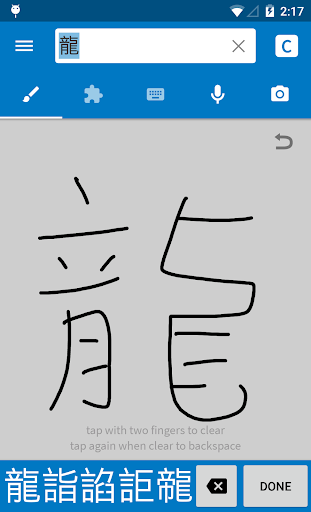
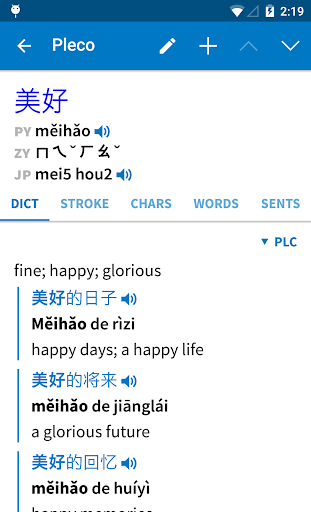
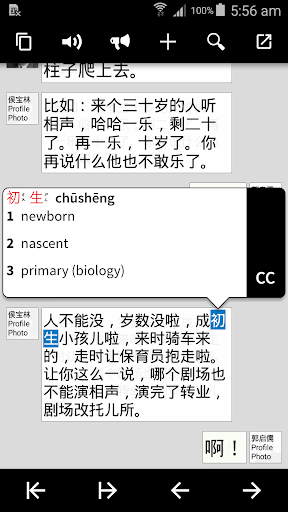
Pleco is the ultimate Chinese learning companion - an integrated Chinese English dictionary / document reader / flashcard system with fullscreen handwriting input and live camera-based character lookups, from a company with 17 years' experience making mobile Chinese learning software.
Major features: ($ = paid add-on)
• Great dictionaries: the free app comes with two dictionaries - CC-CEDICT and our in-house PLC dictionary - which together cover 130,000 Chinese words and include 20,000 example sentences with Pinyin. We offer 8 more free dictionaries as optional downloads, including a 22,000-entry Cantonese-English dictionary, and 19 other great dictionaries are available as paid upgrades. ($)
• Handwriting input: lookup unknown characters by drawing them, with a best-in-class recognition engine. (basic version free, enhanced version $)
• Live Optical Character Recognizer (OCR): look up Chinese words in the dictionary simply by pointing your device's camera at them, or by scrolling around a still image. ($)
• Screen Reader/OCR: instantly tap-lookup Chinese words in other apps through a floating interface; works on Android 4.1 and later. (reader free, OCR $)
• Flashcard System: create a card from any dictionary entry with a single button tap, import premade word lists, use advanced techniques like SRS (spaced repetition), and study in a variety of modes including fill-in-the-blanks and tone drills. (simple version free, full-featured $)
• Audio Pronunciation: instantly hear male + female native-speaker audio for Chinese dictionary headwords; recordings available for over 34,000 words. (stitched-syllable free, multi-syllable $) Or listen to example sentences with text-to-speech (system TTS free, enhanced $).
• Powerful search: look up words by Chinese characters, Pinyin (spaces/tones optional), or a combination, with support for wildcards and full-text search.
• Cross-referencing: tap on any Chinese character / word in any dictionary entry to bring up its definition.
• Stroke Order Diagrams: animations showing you how to draw each Chinese character; 500 in free app, 28,000 in paid add-on.
• Voice Recognition: look up words by speaking them into your device's microphone.
• Document Reader: open a Chinese-language text or PDF file and look up unknown words in the dictionary simply by tapping on them. ($) You can also look up characters on web pages through "Share" and in other documents through the clipboard. (free)
• PRC- and Taiwan-friendly: supports traditional and simplified characters (in dictionary definitions, stroke order, search, OCR, and handwriting), and supports Zhuyin (with ruby support) as well as Pinyin for pronunciation display.
• Cantonese: display headwords + perform searches in Jyutping/Yale romanization. We also offer Cantonese dictionary and Cantonese audio add-ons. (some $)
• No ads: we won't even nag you about buying add-ons.
We also offer excellent customer support - send us an email and see for yourself - and an active user community at plecoforums.com.
We've been making Chinese dictionary apps since 2000, and our sales and customer base have been steadily growing for 17 years across four different platforms. We take good care of our longtime users: people who bought a dictionary on a Palm Pilot in 2001 can still use that dictionary on a new Android phone in 2020 without even paying an upgrade fee.
Paid add-ons can be moved to a new device like any other paid app; just open our free app on your new device and they should reactivate.
If you already own Pleco on another OS, see pleco.com/android for migration options.
This app uses Accessibility services. (for our Screen Reader feature, which helps users to get by in Chinese-speaking regions without knowing Chinese)
Twitter/Facebook: plecosoft
もっと見る

1. MEmuインストーラーをダウンロードしてセットアップを完了する

2. MEmuを起動し、デスクトップでのPlayストアを開く

3. PlayストアでPleco Chinese Dictionaryを検索する
Install
4. Pleco Chinese Dictionaryをダウンロードしてインストールする
5. インストールが完了したら、アイコンをクリックしてスタート

6. MEmuを使ってパソコンでPleco Chinese Dictionaryを体験する
MEmu Playは現在、最高の無料Androidエミュレーターであり、5,000万人のユーザーが優れたAndroidアプリ体験を楽しんでいます。MEmuの仮想化テクノロジーにより、数千ものAndroidアプリをコンピューターでスムーズに実行できます。
大画面でより精細;無限の待機、電池とドラフィックの極限を超え
キーボード・マウス・コントローラーを全力でサポート、より快適
マルチインスタンスで複数のゲームを同時に実行
Use Pleco Chinese Dictionary on PC by following steps: