Smart PDF Reader & PDF Viewer PC版

Smart PDF Reader & PDF ViewerをPCでダウンロード

Smart PDF Reader & PDF Viewer PC版

Smart PDF Reader & PDF Viewer

  • 更新日

  • 現在のバージョン

    1.1.1

  • 提供元

    Smart PDF Reader & PDF Viewer PC版

Smart PDF Reader & PDF Viewer PC版紹介

スマートフォンは不要!パソコンと同じようにキーボードとマウスで操作できます。MEmu Playは、あなたが待ち望んでいたすべての楽しみをお届けします。バッテリー残量や小さな画面を気にすることなく、Smart PDF Reader & PDF Viewerをご利用ください。最新のMEmu 9は、Smart PDF Reader & PDF ViewerをPCで体験するのに最適です!完璧なキーマッピングシステムにより、PCのようなスムーズな操作性を実現します。マルチインスタンス機能により、複数のアプリケーションを同時に実行できます。独自の仮想化エンジンがPCのパフォーマンスを最大限に引き出します。アプリを使用するだけでなく、高品質な体験を得ることができます。

もっと見る

Smart PDF Reader & PDF Viewer PC版の画像と動画

MEmu Playを使えば、PCでSmart PDF Reader & PDF Viewerを快適に楽しめます。何千ものAndroidアプリをデスクトップ版で利用できる、パワフルな無料Androidエミュレーターです。友達とつながり、より効率的に作品を磨き上げましょう! Smart PDF Reader & PDF Viewer is a lightweight and practical PDF reading tool.

アプリ情報

Smart PDF Reader & PDF Viewer is a lightweight and practical PDF reading tool. With a simple interface and easy operation, it enables you to quickly open and manage local PDF files anytime and anywhere, improving reading efficiency.
Core functions:

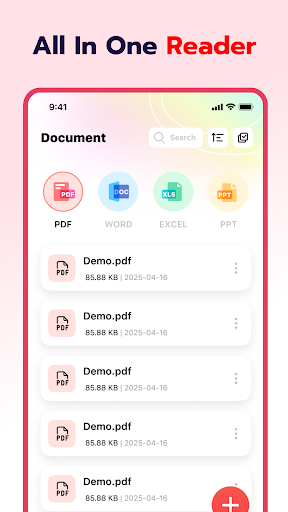
Automatic document recognition
The application will automatically search for and list all PDF files in the device, facilitating unified management and quick access. It is suitable for various scenarios such as learning, office work, and reading e-books.

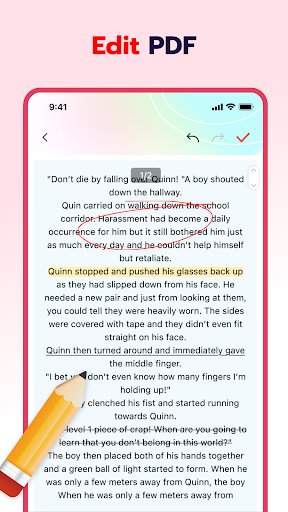
Document editing
The page turning is smooth and natural, and it's easy to mark with a brush. The text is clear, the pictures are fully displayed, the details are obvious at a glance, and it is suitable for different reading preferences.

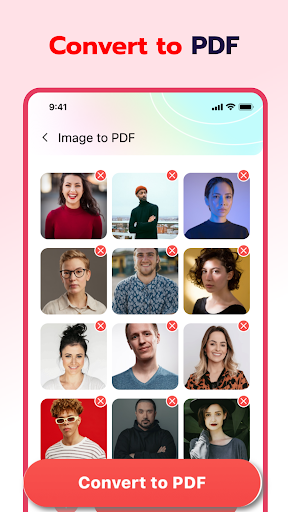
Image to PDF
Supports one-click generation of PDF files from local images, with automatic layout, compression optimization, and convenient archiving, printing and sharing.
Intelligent File Manager
- Display the recently opened PDF documents and quickly review the usage records
- It supports operations such as deletion and marking "collection", facilitating classified management
- One-click file sharing, supporting collaborative viewing with others
- Support the quick invocation of the print function to directly output the document content

AI-Powered Translation
Instantly translate your PDF files into multiple languages. Supported languages include English, French, Spanish, German, Japanese, Traditional Chinese, Korean, Marathi, Portuguese, Italian, Vietnamese, and Indonesian.
AI PDF Summary
Automatically extract key points from your PDF documents and generate concise summaries. Save time by quickly understanding the main content without reading the entire file.
Scan to PDF
Scan physical documents using your device camera and convert them into high-quality PDF files.

Permission Statement
To provide better services, our application needs to apply for the following permissions to achieve core functions:
MANAGE_EXTERNAL_STORAGE
File search and display: Quickly scan documents within the device to generate a clear file list for easy search and reading.
Intelligent classification management: Automatically categorize files based on their attributes (such as name and creation time), making document management more efficient.
FOREGROUND_SERVICE_SPECIAL_USE
Stable processing of large PDF files: When opening complex documents, preprocessing (such as generating thumbnails) is required. By leveraging the continuous operation of front-end services, interruptions can be avoided to enhance the smoothness of reading.
We strictly adhere to the privacy policy, only invoking necessary permissions after user authorization, and never collecting irrelevant data to ensure information security.

Learn more
- privacy policy: https://easyfastclick.com/1/privacy
- the terms of service: https://easyfastclick.com/1/terms
If you have any suggestions or feedback during use, please contact: swiftline@proton.me
We will constantly optimize the functions and enhance the experience, and be committed to providing you with pure and efficient document reading services.

もっと見る

Smart PDF Reader & PDF ViewerをPCでダウンロードする方法

  • Smart PDF Reader & PDF Viewer PC版

    1. MEmuインストーラーをダウンロードしてセットアップを完了する

  • Smart PDF Reader & PDF Viewer PC版

    2. MEmuを起動し、デスクトップでのPlayストアを開く

  • Smart PDF Reader & PDF Viewer PC版

    3. PlayストアでSmart PDF Reader & PDF Viewerを検索する

  • Smart PDF Reader & PDF Viewer PC版 Install

    4. Smart PDF Reader & PDF Viewerをダウンロードしてインストールする

  • Smart PDF Reader & PDF Viewer PC版

    5. インストールが完了したら、アイコンをクリックしてスタート

  • Smart PDF Reader & PDF Viewer PC版
    Smart PDF Reader & PDF Viewer PC版 Smart PDF Reader & PDF Viewer PC版

    6. MEmuを使ってパソコンでSmart PDF Reader & PDF Viewerを体験する

MEmu Play を使用して Smart PDF Reader & PDF Viewer を体験する理由は何ですか?

MEmu Playは現在、最高の無料Androidエミュレーターであり、5,000万人のユーザーが優れたAndroidアプリ体験を楽しんでいます。MEmuの仮想化テクノロジーにより、数千ものAndroidアプリをコンピューターでスムーズに実行できます。

  • 大画面でより精細;無限の待機、電池とドラフィックの極限を超え

  • キーボード・マウス・コントローラーを全力でサポート、より快適

  • マルチインスタンスで複数のゲームを同時に実行

体験を始める準備はできましたか?

ホットな話題

Smart PDF Reader & PDF Viewer - FAQs

  • Smart PDF Reader & PDF ViewerをPCで使用するには?

    Use Smart PDF Reader & PDF Viewer on PC by following steps:

    • Download MEmu, then install and launch it
    • Login to Google Play Store, install the app
    • Enjoy using the app on PC with MEmu
  • PCでSmart PDF Reader & PDF Viewerを実行するための最小システム要件とは?
    • Intel or AMD Processor
    • Microsoft Windows 7 and above
    • 2GB of memory
    • 5GB of free disk space
    • Hardware Virtualization Technology