Snobar
更新日
現在のバージョン
1.2.21
提供元

スマートフォンは不要!パソコンと同じようにキーボードとマウスで操作できます。MEmu Playは、あなたが待ち望んでいたすべての楽しみをお届けします。バッテリー残量や小さな画面を気にすることなく、Snobarをご利用ください。最新のMEmu 9は、SnobarをPCで体験するのに最適です!完璧なキーマッピングシステムにより、PCのようなスムーズな操作性を実現します。マルチインスタンス機能により、複数のアプリケーションを同時に実行できます。独自の仮想化エンジンがPCのパフォーマンスを最大限に引き出します。アプリを使用するだけでなく、高品質な体験を得ることができます。
もっと見る
SnobarをPCでダウンロード!大画面でより楽しむ。電源が落ちてしまうとか通信料が足りないとかの問題を心配する必要がなく、PCの大画面でより快適にゲームを楽しましょう! The first car community.
The first car community
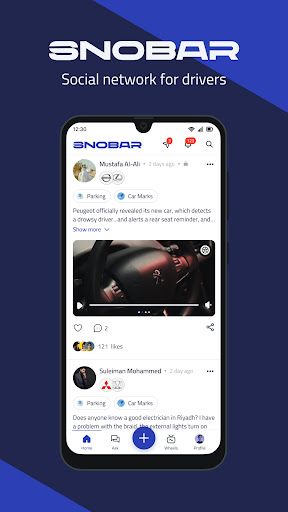
SNOBAR is a super app dedicated to people who are passionate about cars. Connect with your friends, get access to community knowledge, create, contribute, and inspire your followers. Build your own community, and follow people that inspire you. Get the latest updates and news from the cars world. Find a solution for your issue or answer using a convenient Q&A knowledge base, and help others with advice or share your knowledge or lifehacks. Try SNOBAR Wheels and you will love it! Don't get bored. Manage your garage, tell your followers the story or share the related content using linked Posts. Sold your car? Transfer it to another Snobar user, so the story of the car will never end!
Share automotive content:
Explore automotive content such as opinions, ideas, shows, videos, and questions as well. In SNOBAR, you can share everything related to cars. The application brings together those interested in cars from everywhere, and organizes this world which grows in every minute of your life! Start chatting with others, interact with them, and build social relationships with people who share similar interests.
Car garage:
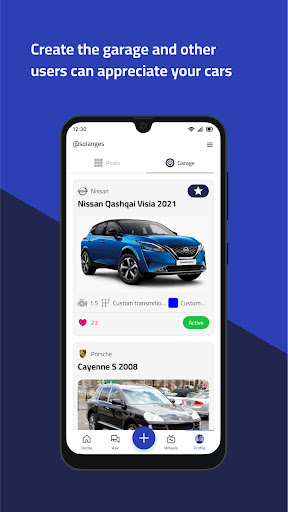
Design a garage for your car, upload its photos, and enter its color, engine type, gear type, additions, and features of it, so SNOBAR provides a space for you to post your diaries, share your photos, and interests, and a (Garage) dedicated to your car, so you can mention it in your posts and questions, and enable others to know more about the car you own.
Ask and answer:
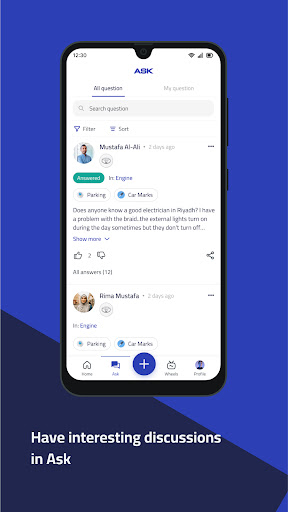
Ask others in the (Ask) section about troubles and faults, or answer in your turn the questions that users ask according to your experiences and the daily hacks.
Because you are an essential part of the global automotive community, SNOBAR trusts you and your expertise, so as you register, you have the right to vote on questions and answers with acceptance or rejection. Your experience matters to everyone, so do not hesitate to help!
Enjoy Wheels!
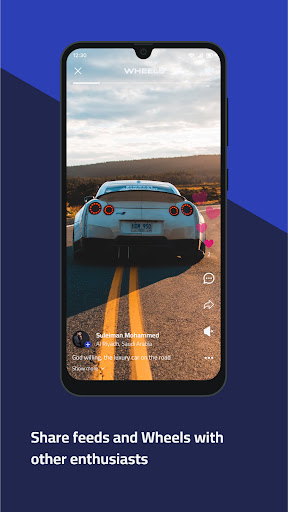
Now you can watch short videos (WHEELS) and enjoy your time without even having to touch the screen! So enjoy watching Wheels with the automatic swipe-up feature that SNOBAR provides! And you, in turn, go out and record your own Wheels, share it with your friends, and get involved together in the car community that SNOBAR brings together.
もっと見る

1. MEmuインストーラーをダウンロードしてセットアップを完了する

2. MEmuを起動し、デスクトップでのPlayストアを開く

3. PlayストアでSnobarを検索する
Install
4. Snobarをダウンロードしてインストールする
5. インストールが完了したら、アイコンをクリックしてスタート

6. MEmuを使ってパソコンでSnobarを体験する
MEmu Playは現在、最高の無料Androidエミュレーターであり、5,000万人のユーザーが優れたAndroidアプリ体験を楽しんでいます。MEmuの仮想化テクノロジーにより、数千ものAndroidアプリをコンピューターでスムーズに実行できます。
大画面でより精細;無限の待機、電池とドラフィックの極限を超え
キーボード・マウス・コントローラーを全力でサポート、より快適
マルチインスタンスで複数のゲームを同時に実行
Use Snobar on PC by following steps: