
WeCom
更新日
現在のバージョン
4.1.30
提供元

スマートフォンは不要!パソコンと同じようにキーボードとマウスで操作できます。MEmu Playは、あなたが待ち望んでいたすべての楽しみをお届けします。バッテリー残量や小さな画面を気にすることなく、WeComをご利用ください。最新のMEmu 9は、WeComをPCで体験するのに最適です!完璧なキーマッピングシステムにより、PCのようなスムーズな操作性を実現します。マルチインスタンス機能により、複数のアプリケーションを同時に実行できます。独自の仮想化エンジンがPCのパフォーマンスを最大限に引き出します。アプリを使用するだけでなく、高品質な体験を得ることができます。
もっと見る
WeComをPCでダウンロード!大画面でより楽しむ。電源が落ちてしまうとか通信料が足りないとかの問題を心配する必要がなく、PCの大画面でより快適にゲームを楽しましょう! WeCom is a business communication and office collaboration tool developed by Tencent WeChat Team.
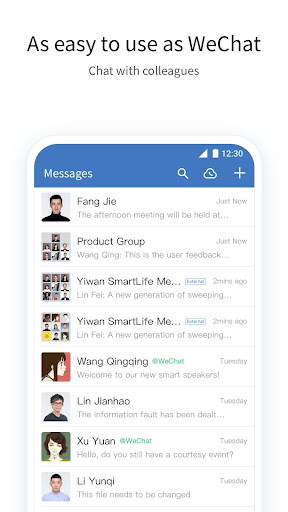
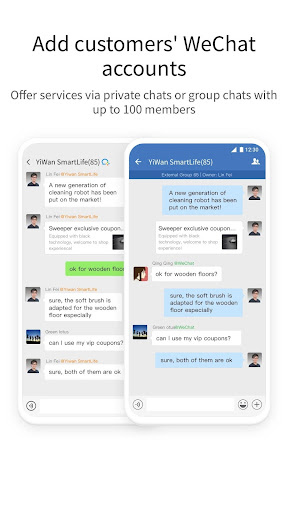
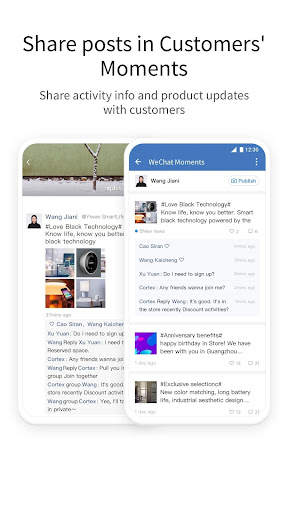
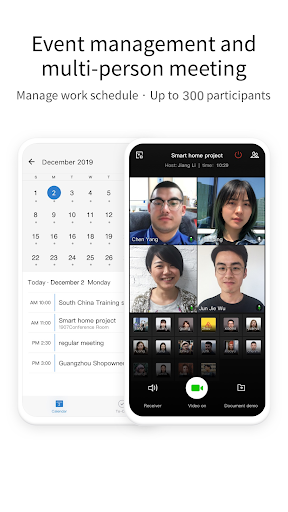
WeCom is a business communication and office collaboration tool developed by Tencent WeChat Team. WeCom provides the familiar communication experience as WeChat and connects with WeChat in an all-round manner. It also offers productivity tools such as Event, Meeting, WeDoc and WeDrive, and flexible OA apps for effective business communication and management.
WeCom has been widely adopted by millions of leading organizations, including Rainbow, P&G, Cartier, WalMart, Chow Tai Fook, L'Oreal, IKEA, Bank of China, PICC, Deppon Express, and Changan Automobile.
1. A familiar communication experience
[Ease of Use] Provides a IM experience consistent with WeChat’s.
[Reliable Storage] Enables real-time message syncing to PCs, mobiles phones, the cloud, and other devices.
[Efficient Communication] Allows users to check message read status to ensure effective communication.
[Corporate Directory] Allows administrators to batch import and manage corporate directory. Finding co-workers has never been easier.
2. Connecting with WeChat
[Exchange Messages] Add WeChat users as contacts and offer services via private or group chats.
[Contact Customers] Companies can view and manage customers added by members, and assign customers of former members.
[Customer Moments] Share posts about activity information and product updates to Moments to interact with customers.
[Customer Group] Group chat with WeChat can reach up to 100 people. Members can use efficient tools in group chats, and companies can assign group chats of former members.
[Company Pay] Companies can use WeChat Pay to make funds with WeChat users, and can also receive payments from members or send red packets.
3. Integrated with kinds of efficiency tool
[Event Management] Simultaneously, through "Make an Appointment", you can easily check the idle/busy status of the group members and select the appropriate time to start the event. Members will receive the event invitation in their Event app.
[Multi-person Meeting] Initiate and join online meetings anytime & anywhere, allowing sharing documents and screens among up to 25 participants, and providing some management features for hosts.
[WeDoc] Online real-time collaborative docs and sheets. Edits can be updated in real-time, freeing collaborators from transferring the files with each other.
[WeDrive] Free 100 GB of shared space for file sharing between colleagues. Space permission can be specified as needed for real-time sync of files and higher security of data.
[Business Mailbox] Send and receive business emails and forward to Group Chats if needed.
4. Diversified Office Apps
[Basic Office Apps] Preset ready-to-use office apps such as Attendance, Approvals, Reports, Announcement, and Forum.
[Third-party Apps] Provide companies with high-quality third-party apps and hardware, covering mobile office, and other fields, as well as smart attendance, unlimited screen casting, and meeting television.
[APIs] Provide various APIs, making it easier for you to integrate company apps.
5. Strong security and management capabilities
[all-round safeguard] Based on the integration of offense and defense capabilities of Tencent over the past 20 years, WeChat Work is the first domestic office product to pass SOC2Type2 auditing, and has obtained ISO27018, ISO20000, ISO27001, and national three-level certifications to provide reliable data security guarantee for companies.
[Corporate Directory Management] Batch import contacts into a directory where they are managed in one place for convenient and accurate lookup.
[App Management] Manage all company apps and configure the authorized scopes. Sending messages by apps, custom app menu, asset library and other features are also provided.
[Plentiful Configuration]Configure Employee Identity Information and view permission to Corporate Directory, hide departments or members if needed.
WeCom, Offering Every Enterprise their own WeChat
もっと見る

1. MEmuインストーラーをダウンロードしてセットアップを完了する

2. MEmuを起動し、デスクトップでのPlayストアを開く

3. PlayストアでWeComを検索する
Install
4. WeComをダウンロードしてインストールする
5. インストールが完了したら、アイコンをクリックしてスタート

6. MEmuを使ってパソコンでWeComを体験する
MEmu Playは現在、最高の無料Androidエミュレーターであり、5,000万人のユーザーが優れたAndroidアプリ体験を楽しんでいます。MEmuの仮想化テクノロジーにより、数千ものAndroidアプリをコンピューターでスムーズに実行できます。
大画面でより精細;無限の待機、電池とドラフィックの極限を超え
キーボード・マウス・コントローラーを全力でサポート、より快適
マルチインスタンスで複数のゲームを同時に実行
Use WeCom on PC by following steps: