AI KataGo Go
Dikemas kini
Versi Semasa
1.1.20
Ditawarkan Oleh

Dengan semangat anda untuk bermain AI KataGo Go, tangan anda tidak seharusnya terhad pada skrin kecil telefon anda. Main seperti profesional dan kendalikan sepenuhnya permainan anda dengan papan kekunci dan tetikus. MEmu menawarkan semua perkara yang anda harapkan. Muat turun dan mainkan AI KataGo Go di PC. Main selagi anda mahu, tidak ada batasan bateri, data mudah alih dan panggilan yang mengganggu. MEmu 9 yang baru adalah pilihan terbaik untuk bermain AI KataGo Go di PC. Disiapkan dengan kepakaran kami, sistem pemetaan kunci pratetap yang indah menjadikan AI KataGo Go permainan PC sebenar. Dikodkan dengan penyerapan kami, pengurus multi-instance menjadikan bermain 2 atau lebih akaun pada peranti yang sama mungkin. Dan yang paling penting, enjin emulasi eksklusif kami dapat melepaskan potensi penuh PC anda, menjadikan semuanya lancar.Kami tidak hanya peduli bagaimana anda bermain, tetapi juga keseluruhan proses menikmati kebahagiaan permainan.
Tunjukkan Lagi
Download AI KataGo Go on PC with MEmu Android Emulator. Enjoy playing on big screen. 1.
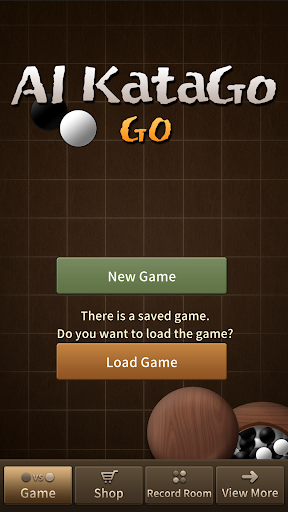
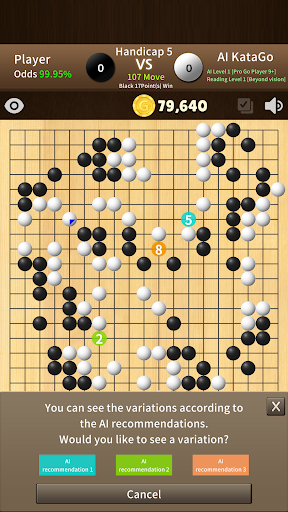
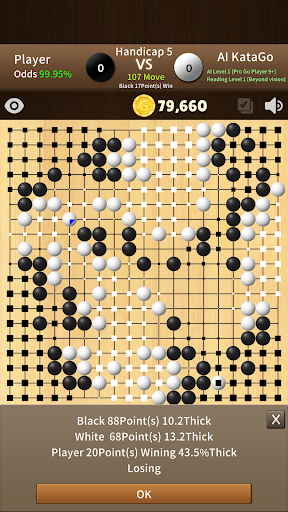
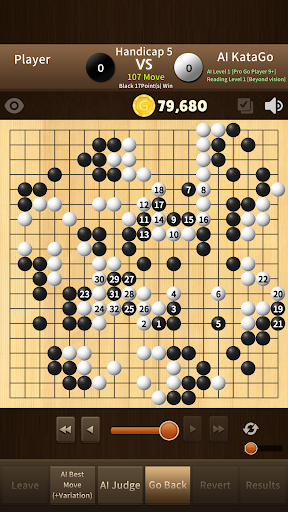
1. Enjoy Go easily with the strongest artificial intelligence Katago on your mobile.
- It is the most upgraded artificial intelligence Go that surpasses the professional Go player.
- Anytime, anywhere, you can easily improve your energy by mobile.
- KataGo levels are divided into 3 levels, so you can choose your desired game power. (Pro 9+, Pro 5+, Amateur Dan)
- There is no game time limit and the game is automatically saved.
- You can continue playing at any time.
2. 3 number of AI recommendations and variation of change
- Ask KataGo to find the next best move, 3 referrals.
- You can see the variation of change that KataGo thinks for each move of recommendations.
- Improve your energy through the AI recommendations and variation of change.
3. AI situation judgment
- Artificial intelligence does not count points differently from people, but determines how strong it is based on the size of ownership.
- The size of ownership is represented by the size of a square, so this size tells you how the AI can figure out what's going on.
4. First try of the Go game with the 'Opening Game'.
- It is a reality that even professional Go players are difficult to play a game with a KataGo equally. But, what if it's only for 'opening game’?
- You can set the first 5 moves within 50 to play with the desired stone.
- Take a look at how artificial intelligence responds with various opening games. Sooner or later, you will feel that you are a leader in opening games.
5. ‘AI recommendations’ and ‘AI situation judgment’ are possible even in the case of reviewing current game and reviewing previous games.
- In addition to simply reviewing the current game , it is possible to grasp the situation according to various changes in development by using 'AI Recommendations' and 'AI situation judgment' in black or white turn.
- It is important to have a good teacher in Go, but it is also very important to review the previous games. You can study well because you can use ‘AI recommendations’ and ‘AI situation judgment’ for reviewing the previous games.
6. Reasonable system
- The strongest artificial intelligence Go that surpasses professional Go players
- Easy on mobile
- Without worrying about heat or battery (AI engine does not work on mobile, it works on powerful server)
- Without time limit and people stress
- You can study while enjoying Go.
- Avoid indiscriminate advertising.
(There are no interstitial AD insertions that stress the users.)
- We are constantly upgrading and will continue to progress. (A lot of comments would be appreciated.)
The ‘AI KataGo Go(Baduk)’ app was developed with the motivation to become a means to help users in their hobbies of Go, rather than a simple Go game.
Considering the server maintenance cost, the service is provided at a reasonable price, and I think it has a significant service price advantage compared to other services.
Please use it a lot.
Thank you.
Tunjukkan Lagi

1. Muat turun pemasang MEmu dan selesaikan persediaan

2. Mulakan MEnu kemudian buka Google Play di desktop

3. Cari AI KataGo Go di Google Play
Install
4. Muat turun dan Pasang AI KataGo Go
5. Apabila selesai pemasangan, menekan ikon itu untuk memulakan

6. Nikmati bermain AI KataGo Go di komputer dengan MEmu
MEmu Play adalah emulator Android terbaik dan 100 juta orang sudah menikmati pengalaman permainan Androidnya yang luar biasa. Teknologi virtualisasi MEmu memberi kuasa kepada anda untuk bermain beribu-ribu permainan Android dengan lancar di komputar anda, malah yang paling intensif grafik.
Skrin lebih besar dengan grafik yang lebih baik; Tempoh yang panjang, tanpa had bateri atau data mudah alih.
Sokongan Keymapping penuh untuk kawalan tepat papan kekunci dan tetikus atau gamepad.
Pelbagai akaun permainan atau tugas pada satu PC sekaligus dengan pengurus pelbagai contoh.
Play AI KataGo Go on PC by following steps: