Assistive Touch Android
Dikemas kini
Versi Semasa
1.7
Ditawarkan Oleh

Berhentilah bimbang dengan bayaran berlebihan semasa menggunakan Assistive Touch Android di telefon bimbit anda, bebaskan diri anda dari layar kecil dan nikmati penggunaan aplikasi pada paparan yang jauh lebih besar. Mulai sekarang, dapatkan pengalaman skrin penuh aplikasi anda dengan papan kekunci dan tetikus. MEmu Play semua ciri mengejutkan yang anda harapkan: pemasangan cepat dan penyediaan mudah, kawalan intuitif, tidak ada batasan bateri, data mudah alih, dan panggilan yang mengganggu. MEmu 9 yang baru adalah pilihan terbaik untuk menggunakan Assistive Touch Android di komputer anda. Dikodkan dengan penyerapan kami, pengurus multi-instance menjadikan pembukaan 2 atau lebih akaun pada masa yang sama mungkin. Dan yang paling penting, mesin emulasi eksklusif kami dapat melepaskan potensi penuh PC anda, menjadikan semuanya lancar dan menyeronokkan.
Tunjukkan Lagi
Nikmati pengalaman hebat menggunakan Assistive Touch Android di PC dengan MEmu Play. Ia merupakan emulator Android percuma yang hebat yang menyediakan beribu-ribu aplikasi Android untuk versi desktop mereka. Nikmati berhubung dengan rakan-rakan dan menggilap kerja anda dengan kecekapan yang lebih tinggi! Assistive Touch Android:.
Assistive Touch Android:
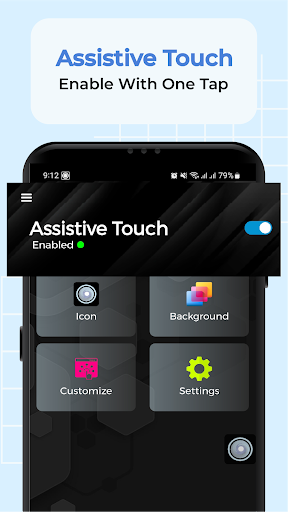
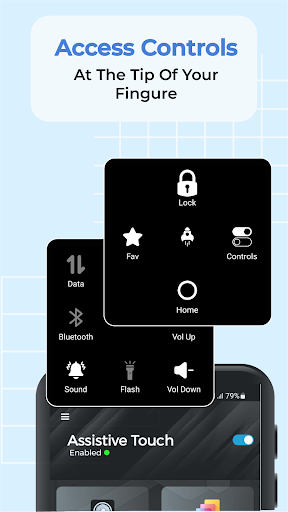
Assistive Touch Android is an easy tool to access controls quickly. It's fast, smooth, beautiful and easy touch android application. It shows up an 3d touch floating ball icon on screen, which remains with you everywhere in device for assitive tasks.
With a floating panel on the screen, you can use assistive tool, gestures and control center. It provides you quick access to your favorite apps. You can access all the features at the tip of your finger. These features include:
- Navigate to Home
- Lock Device
- Access Favorite Apps
- Boost Up Device
- Access Control Center
- Control Location
- Control Wi-Fi
- Control Mobile Data
- Control Airplane
- Toggle Bluetooth On/Off
- Toggle Portrait/Landscape
- Toggle Flashlight On/Off
- Toggle Sound Status
- Volume Up and Down
- Brightness High and Low
- Toggle DND On/Off
- Open All Apps
More conveniently, you can customize floating panel with all these features.
3D Touch Floating Ball:
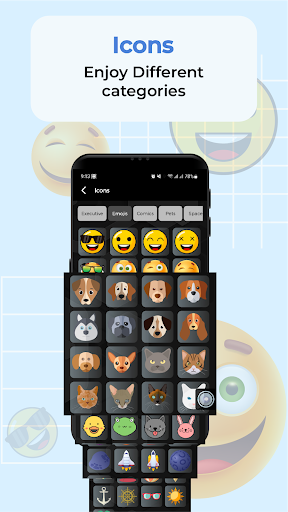
The floating icon assist you all over the device. You can drag it to any side of mobile and access floating panel dashboard from it. You can change the icon of easy touch floating ball with the variety of available icons in different categories for free. These categories include executive, emoji, classic, comics, and many more.
Backgrounds of Floating Pannel:
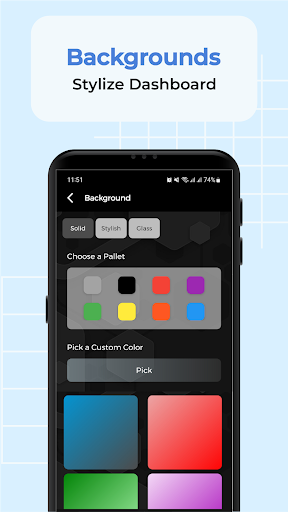
By default, floating panel comes up with black background. You can change background to a different solid color. You can also use a stylish background which uses gradients to make look and feel more smooth and beautiful. Not just this, you can also try glassy backgrounds which is transparent and present an executive view of device and easy assistive touch for android.
Customization:
Control Center of Floating panel is providing a quick service to access controls with easy touch. But it is limited to eight controls. Customization provides you a place where you can change the features of floating easy assistive touch with your favorite features.
Favorite Apps:
Floating Panel of Assistive Touch For Android is providing a quick access to your favorite apps. You can add your favorite apps and then use it by just opening easy assistive touch panel from anywhere in the device. You can customize it by removing old app with long press on it and adding a new favorite app by clicking on add.
Settings:
Within settings, you can control the size of floating assistive touch icon and its transparency. You can also control the animations speed which you can see in floating panel when switching to control center or favorite apps or when back to home.
ℹHow To Use:
- Open the assistive touch android app
- Give permission for draw/display over other app
- Customize your necessary shortcut, quick ball appearance, panel background and actions
- Enjoy fast access to all settings and control your device quickly.
Permissions:
- We don't collect your personal data. We need some permission to do some actions. We don't collect your data with this permission.
- We need QUERY_ALL_PACKAGES permission to let you select your favorite apps to add in Assistive Touch Android App.
- We need WRITE_SETTINGS permission to let you toggle orientation of device between portrait and landscape.
- We need OVERLAY permission to allow this app to show over other apps, change position, drag and drop.
Feedback
If you like Assistive Touch Android App please review and give us 5 stars. If you have any problem with this app please contact us and give us feedback for your problem, we will fix it quickly. You can email us if you want new features in this app.
FAQ:
How to uninstall this app?
If you want to uninstall this Assistive Touch Android App, please open app info and go to setting, and click on uninstall button.
Download Assistive Touch Android now for FREE!
Tunjukkan Lagi

1. Muat turun pemasang MEmu dan selesaikan persediaan

2. Mulakan MEnu kemudian buka Google Play di desktop

3. Cari Assistive Touch Android di Google Play
Install
4. Muat turun dan Pasang Assistive Touch Android
5. Apabila selesai pemasangan, menekan ikon itu untuk memulakan

6. Gunakan MENu untuk mengalami Assistive Touch Android pada komputer anda
MEmu Play ialah emulator Android terbaik, dengan lebih 100 juta pengguna mengalami pengalaman aplikasi Android yang unggul. Teknologi virtualisasi MEmu membolehkan anda menjalankan beribu-ribu aplikasi Android dengan lancar pada komputer anda, walaupun yang paling mencabar.
Skrin lebih besar dengan grafik yang lebih baik; Tempoh yang panjang, tanpa had bateri atau data mudah alih.
Sokongan Keymapping penuh untuk kawalan tepat papan kekunci dan tetikus atau gamepad.
Pelbagai akaun permainan atau tugas pada satu PC sekaligus dengan pengurus pelbagai contoh.
Use Assistive Touch Android on PC by following steps: