djay - DJ App & Mixer
Dikemas kini
Versi Semasa
1782312893
Ditawarkan Oleh

Berhentilah bimbang dengan bayaran berlebihan semasa menggunakan djay - DJ App & Mixer di telefon bimbit anda, bebaskan diri anda dari layar kecil dan nikmati penggunaan aplikasi pada paparan yang jauh lebih besar. Mulai sekarang, dapatkan pengalaman skrin penuh aplikasi anda dengan papan kekunci dan tetikus. MEmu Play semua ciri mengejutkan yang anda harapkan: pemasangan cepat dan penyediaan mudah, kawalan intuitif, tidak ada batasan bateri, data mudah alih, dan panggilan yang mengganggu. MEmu 9 yang baru adalah pilihan terbaik untuk menggunakan djay - DJ App & Mixer di komputer anda. Dikodkan dengan penyerapan kami, pengurus multi-instance menjadikan pembukaan 2 atau lebih akaun pada masa yang sama mungkin. Dan yang paling penting, mesin emulasi eksklusif kami dapat melepaskan potensi penuh PC anda, menjadikan semuanya lancar dan menyeronokkan.
Tunjukkan Lagi
Download djay - DJ App & Mixer on PC with MEmu Android Emulator. Enjoy playing on big screen. *** ယခု Spotify ပေါင်းစပ်မှုဖြင့် ***.
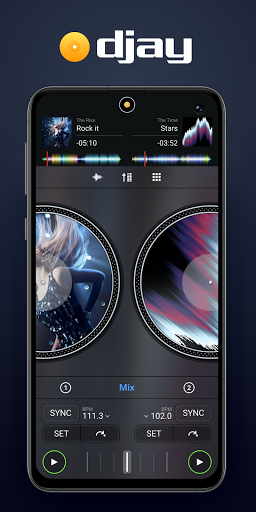
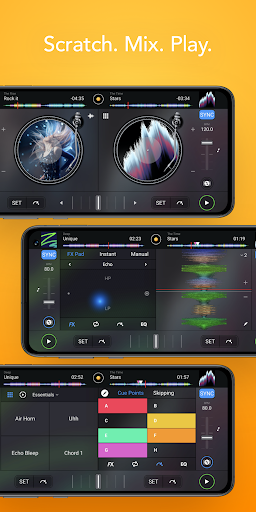
*** ယခု Spotify ပေါင်းစပ်မှုဖြင့် ***
djay သည် သင့် Android စက်ပစ္စည်းအား အင်္ဂါရပ်အပြည့်ဖြင့် DJ စနစ်အဖြစ် ပြောင်းလဲပေးပါသည်။ Spotify နှင့် Apple Music တို့နှင့် ချောမွေ့စွာ ပေါင်းစပ်ထားသောကြောင့် djay သည် သင့်အား သန်းပေါင်းများစွာသော သီချင်းများကို တိုက်ရိုက်ကြည့်ရှုခွင့် ပေးပါသည်။ တိုက်ရိုက်ထုတ်လွှင့်ခြင်း၊ တေးသွားများကို ရောသမမွှေခြင်း သို့မဟုတ် AI စွမ်းအင်သုံး Automix သည် သင့်အတွက် ချောမွေ့မှုမရှိသော ရောနှောမှုကို အလိုအလျောက် ဖန်တီးနိုင်စေပါသည်။ သင်သည် ပရော်ဖက်ရှင်နယ် ဒီဂျေ သို့မဟုတ် ဂီတနှင့်ကစားခြင်းကို နှစ်သက်သော အစပြုသူဖြစ်ပါစေ၊ djay သည် သင့်အား Android တွင် အလိုလိုသိသာဆုံးနှင့် အစွမ်းထက်ဆုံး DJ အတွေ့အကြုံကို ပေးပါသည်။
ဂီတစာကြည့်တိုက်
• Spotify- သီချင်းသန်းပေါင်းများစွာ + သင့်ကိုယ်ပိုင်အစီအစဉ်များ (Spotify Premium စာရင်းသွင်းမှု)
• Apple Music- သီချင်းပေါင်း သန်း 100+၊ cloud ရှိ သင်၏ကိုယ်ပိုင်စာကြည့်တိုက်
• djay Music- ထိပ်တန်းအနုပညာရှင်များနှင့် ခေတ်စားနေသော အမျိုးအစားများမှ DJ-အဆင်သင့် သီချင်းထောင်ပေါင်းများစွာ — အခမဲ့ပါဝင်ပါသည်။
• TIDAL- သီချင်းပေါင်း သန်းပေါင်းများစွာ၊ အရည်အသွေးမြင့် အသံ (TIDAL DJ တိုးချဲ့မှု)
• SoundCloud- မြေအောက်နှင့် ပရီမီယံသီချင်းပေါင်း သန်းပေါင်းများစွာ (SoundCloud Go+)
• Beatport- အီလက်ထရွန်းနစ်တေးဂီတသံစဉ် သန်းပေါင်းများစွာ
• Beatsource- အဖွင့်ဖော်မတ်တေးသီချင်း သန်းပေါင်းများစွာ
• Local Music- သင့်စက်ပေါ်တွင် သိမ်းဆည်းထားသော သီချင်းအားလုံး
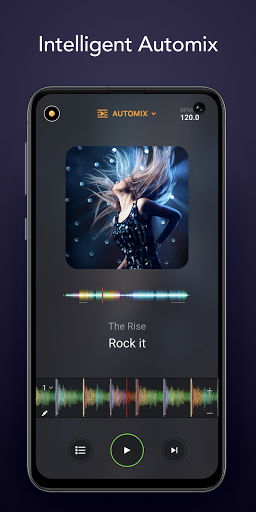
အော်တိုမစ်
ကျောခိုင်းပြီး ရင်သပ်ရှုမောဖွယ်၊ အကြိတ်အနယ် အသွင်ကူးပြောင်းမှုများနှင့်အတူ အလိုအလျောက် DJ ရောနှောမှုကို နားထောင်ပါ။ AI-powered Automix သည် တေးဂီတစီးဆင်းနေစေရန် အကောင်းဆုံး intro နှင့် outro အပိုင်းများအပါအဝင် စည်းချက်ပုံစံများကို ဉာဏ်ထက်မြက်စွာ ခွဲခြားသတ်မှတ်ပေးပါသည်။
NEURAL MIX™ ဖွဲများ
• မည်သည့်သီချင်း၏ အသံ၊ ဒရမ်နှင့် တူရိယာများကို အချိန်နှင့်တပြေးညီ သီးခြားခွဲထုတ်ပါ။
BEAT Maker & REMIX ကိရိယာများ
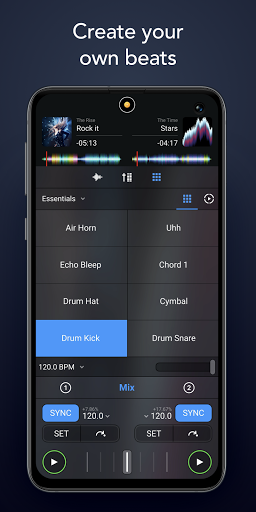
• Sequencer- သင့်တေးဂီတတိုက်ရိုက်ထုတ်လွှင့်မှု၏ထိပ်တွင် စည်းချက်ဖန်တီးပါ။
• Looper- တစ်ပုဒ်လျှင် 48 loops အထိ သင့်တေးဂီတကို ရောစပ်ပါ။
• ဒရမ်များနှင့်နမူနာများ၏ အစီအမံများကို လိုက်ဖက်သော အစီအမံများ
• ရာနှင့်ချီသော ကွင်းဆက်များနှင့် နမူနာများပါရှိသော ကျယ်ပြန့်သော အကြောင်းအရာစာကြည့်တိုက်။
နားကြပ်များဖြင့် ကြိုတင်လုပ်ဆောင်ခြင်း။
နားကြပ်များဖြင့် နောက်သီချင်းကို အစမ်းကြည့်ရှုပြီး ပြင်ဆင်ပါ။ djay ၏ Split Output မုဒ်ကိုဖွင့်ခြင်းဖြင့် သို့မဟုတ် ပြင်ပအသံကြားခံစနစ်ကို အသုံးပြုခြင်းဖြင့် သင်သည် တိုက်ရိုက် DJing အတွက် ပင်မစပီကာများမှတစ်ဆင့် တိုက်ရိုက် DJing ပြုလုပ်ရန်အတွက် ရောနှောထားသော နားကြပ်များမှ သီချင်းများကို ကြိုတင်နားဆင်နိုင်ပါသည်။
DJ HARDWARE ပေါင်းစည်းမှု
• Bluetooth MIDI- AlphaTheta DDJ-FLX-2၊ Hecules DJ Control Mix Ultra၊ Hercules DJ Control Mix၊ Pioneer DJ DDJ-200
• USB Midi- ရှေ့ဆောင် DJ DDJ-WeGO4၊ Pioneer DDJ-WeGO3၊ Reloop Mixtour၊ Reloop Beatpad၊ Reloop Beatpad 2၊ Reloop Mixon4
အဆင့်မြင့်အသံအင်္ဂါရပ်များ
• သော့ခတ်ခြင်း၊ အချိန်ဆွဲခြင်း၊ အသံပြောင်းခြင်း။
• အချိန်နှင့်တပြေးညီ ပင်စည်ပိုင်းခြားခြင်း။
• Mixer၊ Filter နှင့် EQ ထိန်းချုပ်မှုများ
• 50+ Audio FX- Echo၊ Flanger၊ Crush၊ Gate နှင့် အခြားအရာများ
• Crossfader FX
• Looping & Cue Points
• အလိုအလျောက် BPM နှင့် သော့ထောက်လှမ်းခြင်း။
• အလိုအလျောက်ရရှိခြင်း။
• ရောင်စုံလှိုင်းပုံစံများ
မှတ်ချက်- Android အတွက် djay ကို Android လည်ပတ်မှုစနစ်တွင် အသုံးပြုရန် ဒီဇိုင်းထုတ်ထားသည်။ သို့သော်၊ စျေးကွက်ရှိ Android စက်ပစ္စည်းများ၏ ကျယ်ပြန့်မှုကြောင့် djay ၏အင်္ဂါရပ်အားလုံးကို စက်ပစ္စည်းတိုင်းတွင် ပံ့ပိုးနိုင်မည်မဟုတ်ပေ။ ဥပမာအားဖြင့်၊ Neural Mix သည် ARM64-based device လိုအပ်ပြီး စက်ပစ္စည်းအဟောင်းများတွင် ပံ့ပိုးမထားပါ။ ထို့အပြင် အချို့သော DJ controllers များတွင် ပေါင်းစပ်ထားသော ပြင်ပအသံကြားခံကိရိယာများအပါအဝင် အချို့သော Android စက်ပစ္စည်းများသည် ပြင်ပအသံအင်တာဖေ့စ်ကို မပံ့ပိုးနိုင်ပါ။
ရွေးချယ်နိုင်သော PRO စာရင်းသွင်းမှုသည် သင့်အား တစ်ကြိမ်စာရင်းသွင်းနိုင်ပြီး PRO အင်္ဂါရပ်အားလုံး၊ အပြင် 1000+ ကွင်းဆက်များ၊ နမူနာများနှင့် ရုပ်ပုံများအပါအဝင် သင့်စက်ပစ္စည်းများအားလုံးတွင် djay Pro ကို အသုံးပြုနိုင်သည်။
djay ရှိ streaming ဝန်ဆောင်မှုမှ သီချင်းများကို ဝင်ရောက်ကြည့်ရှုရန် ပံ့ပိုးထားသော streaming subscription နှင့် internet connection တစ်ခု လိုအပ်ပါသည်။ တိုက်ရိုက်လွှင့်သီချင်းများအတွက် အသံဖမ်းယူ၍မရနိုင်ပါ။ Apple Music သို့မဟုတ် Spotify မှ တိုက်ရိုက်ထုတ်လွှင့်သည့်အခါ Neural Mix ကို အသုံးမပြုနိုင်ပါ။ သတ်မှတ်ထားသော သီချင်းများကို သင့်အကောင့်တွင် သို့မဟုတ် သင့်နိုင်ငံတွင် ရရှိနိုင်မည်မဟုတ်ပါ။ ထုတ်လွှင့်ခြင်းဝန်ဆောင်မှုရရှိနိုင်မှုနှင့် ဈေးနှုန်းများသည် နိုင်ငံ၊ ငွေကြေးနှင့် ဝန်ဆောင်မှုပေါ်မူတည်၍ ကွဲပြားနိုင်သည်။
Tunjukkan Lagi

1. Muat turun pemasang MEmu dan selesaikan persediaan

2. Mulakan MEnu kemudian buka Google Play di desktop

3. Cari djay - DJ App & Mixer di Google Play
Install
4. Muat turun dan Pasang djay - DJ App & Mixer
5. Apabila selesai pemasangan, menekan ikon itu untuk memulakan

6. Gunakan MENu untuk mengalami djay - DJ App & Mixer pada komputer anda
MEmu Play ialah emulator Android terbaik, dengan lebih 100 juta pengguna mengalami pengalaman aplikasi Android yang unggul. Teknologi virtualisasi MEmu membolehkan anda menjalankan beribu-ribu aplikasi Android dengan lancar pada komputer anda, walaupun yang paling mencabar.
Skrin lebih besar dengan grafik yang lebih baik; Tempoh yang panjang, tanpa had bateri atau data mudah alih.
Sokongan Keymapping penuh untuk kawalan tepat papan kekunci dan tetikus atau gamepad.
Pelbagai akaun permainan atau tugas pada satu PC sekaligus dengan pengurus pelbagai contoh.
Use djay - DJ App & Mixer on PC by following steps: