djay - DJ App & Mixer
Updated
Current Version
5.2.6
Offered By

Stop worrying about high battery drain when using djay - DJ App & Mixer on your phone. Free yourself from the tiny screen and enjoy the app on a much larger display. From now on, get a full-screen experience of your app with the convenience of a keyboard and mouse. MEmu offers you all the surprising features you’d expect: quick installation and easy setup, intuitive controls, and no more worries about battery life, mobile data, or unexpected calls. The all-new MEmu 9 is the choice for using djay - DJ App & Mixer on your computer. With the MEmu multi-instance manager, you can run two or more accounts at the same time. Most importantly, our exclusive emulation engine unlocks your PC’s full potential, delivering smooth and enjoyable performance.
Show more
Enjoy superb experience of using djay - DJ App & Mixer on PC with MEMU App Player. It's a powerful free Android emulator which provides you with thousands of android apps for their desktop version. Enjoy connecting with friends and polishing your work with higher efficiency! djay transforms your Android device into a full-featured DJ system.
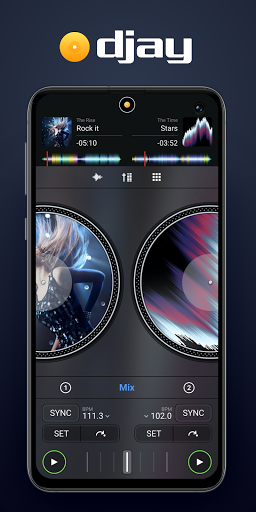
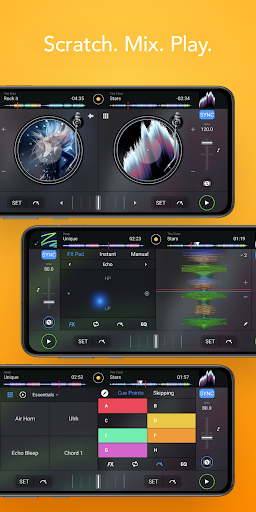
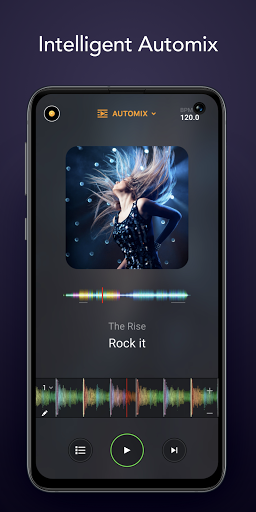
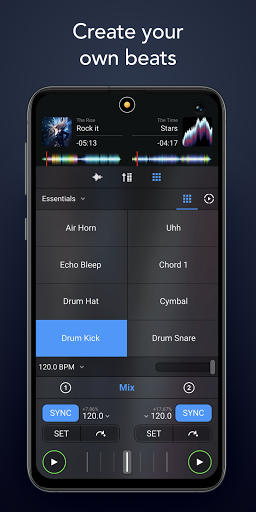
djay transforms your Android device into a full-featured DJ system. Seamlessly integrated with your music library, djay gives you direct access to all the music on your device, plus millions of songs. You can perform live, remix tracks, or enable Automix mode to let djay create a seamless mix for you automatically. Whether you are a professional DJ or a beginner who just loves to play with music, djay offers you the most intuitive yet powerful DJ experience on an Android device.
MUSIC LIBRARY
Mix all your music + millions of songs: My Music, TIDAL Premium, SoundCloud Go+.
*NOTE: As of July 1, 2020, Spotify is no longer playable through 3rd party DJ apps. Please visit algoriddim.com/streaming-migration to learn how to migrate to a new supported service.
AUTOMIX AI
Lean back and listen to an automatic DJ mix with stunning transitions. Automix AI intelligently identifies rhythmic patterns including the best intro and outro sections of songs to keep the music flowing.
REMIX TOOLS
• Sequencer: create beats on top of your music live
• Looper: remix your music with up to 8 loops per track
• Beat-matched sequencing of drums and samples
PRE-CUEING WITH HEADPHONES
Preview and prepare the next song through headphones. By enabling djay’s Split Output mode or by using an external audio interface you can pre-listen to songs through headphones independently from the mix that goes through the main speakers for live DJing.
DJ HARDWARE INTEGRATION
• Native integration of Pioneer DJ DDJ-200 via Bluetooth MIDI
• Native integration of Pioneer DJ DDJ-WeGO4, Pioneer DDJ-WeGO3, Reloop Mixtour, Reloop Beatpad, Reloop Beatpad 2, Reloop Mixon4
ADVANCED AUDIO FEATURES
• Key lock / time-stretching
• Mixer, Tempo, Pitch-Bend, Filter and EQ controls
• Audio FX: Echo, Flanger, Crush, Gate, and more
• Looping & Cue Points
• Automatic beat & tempo detection
• Auto gain
• High-res waveforms
Note: djay for Android is developed to work on the Android operating system. However, due to the vast number of Android devices available in the market, some devices may not support every feature of the app. Specifically, external audio interfaces (like the ones integrated in some DJ controllers) are not supported by some Android devices.
Show more

1. Download MEmu installer and finish the setup

2. Start MEmu then open Google Play on the desktop

3. Search djay - DJ App & Mixer in Google Play
Install
4. Download and Install djay - DJ App & Mixer
5. On install completion click the icon to start

6. Enjoy using djay - DJ App & Mixer on PC with MEmu
MEmu Play is the best Android emulator, and 100 million users already enjoy its superb Android app experience. Powered by advanced virtualization technology, it lets you enjoy thousands of Android apps smoothly on your PC—including the most graphics-intensive ones.
Bigger screen with better graphics; Long duration, without limitation of battery or mobile data.
Full Keymapping support for precise control of keyboard and mouse or gamepad.
Multiple game accounts or tasks on single PC at one time with Multi-Instance manager.
Use djay - DJ App & Mixer on PC by following steps: