Fake GPS Location-GPS JoyStick
Dikemas kini
Versi Semasa
4.3.5
Ditawarkan Oleh

Berhentilah bimbang dengan bayaran berlebihan semasa menggunakan Fake GPS Location-GPS JoyStick di telefon bimbit anda, bebaskan diri anda dari layar kecil dan nikmati penggunaan aplikasi pada paparan yang jauh lebih besar. Mulai sekarang, dapatkan pengalaman skrin penuh aplikasi anda dengan papan kekunci dan tetikus. MEmu Play semua ciri mengejutkan yang anda harapkan: pemasangan cepat dan penyediaan mudah, kawalan intuitif, tidak ada batasan bateri, data mudah alih, dan panggilan yang mengganggu. MEmu 9 yang baru adalah pilihan terbaik untuk menggunakan Fake GPS Location-GPS JoyStick di komputer anda. Dikodkan dengan penyerapan kami, pengurus multi-instance menjadikan pembukaan 2 atau lebih akaun pada masa yang sama mungkin. Dan yang paling penting, mesin emulasi eksklusif kami dapat melepaskan potensi penuh PC anda, menjadikan semuanya lancar dan menyeronokkan.
Tunjukkan Lagi
Download Fake GPS Location-GPS JoyStick on PC with MEmu Android Emulator. Enjoy playing on big screen. Allows you to test location based apps by mocking your location via an overlay joystick control!
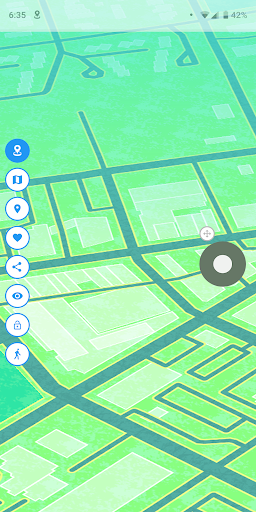
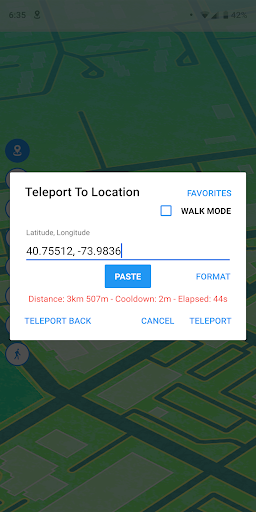
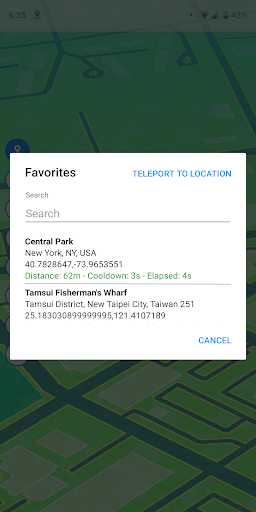
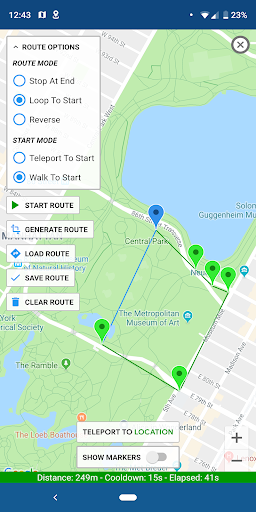
Allows you to test location based apps by mocking your location via an overlay joystick control!
Will overwrite your current location and any apps that you want to test will think you're in New York, London or any other place in the world!
This app has a "JoyStick" option which makes it simple and fun to change your location instantly.
Installation:
We've assembled a FAQ with steps on how to make this app work for you! Please read it carefully before emailing or leaving a review:
http://gpsjoystick.theappninjas.com/faq/
Features:
- Changes GPS location instantly and easily
- Select your current location or any location in the world using the map or joystick
- Enter latitude/longitude directly from the joystick and teleport anywhere
- Change your location in any direction you point the joystick
- Create and save a route using any number of points on a map and walk automatically
- Pause and continue the route directly from the joystick
- Use loop or reverse route mode to walk on your route over and over
- Keep track of your favorite list of locations and routes
- Keep track of custom markers for groups of points of interest
- Import and export GPX files to your favorites, routes or custom markers
- Displays distance and cooldown time information
- Hide option in the notification to show/hide the joystick on your screen
- Have 3 customizable speeds for your joystick
- Size, type and opacity settings for the joystick
- Lots of settings options for complete user customization
Plus this app automatically includes the best algorithm for providing realistic GPS values. All of these variance options are available in Settings to allow complete customization for the best and most realistic location testing.
Follow us on FB for the latest news:
https://www.facebook.com/gpsjoystick
Tunjukkan Lagi

1. Muat turun pemasang MEmu dan selesaikan persediaan

2. Mulakan MEnu kemudian buka Google Play di desktop

3. Cari Fake GPS Location-GPS JoyStick di Google Play
Install
4. Muat turun dan Pasang Fake GPS Location-GPS JoyStick
5. Apabila selesai pemasangan, menekan ikon itu untuk memulakan

6. Gunakan MENu untuk mengalami Fake GPS Location-GPS JoyStick pada komputer anda
MEmu Play ialah emulator Android terbaik, dengan lebih 100 juta pengguna mengalami pengalaman aplikasi Android yang unggul. Teknologi virtualisasi MEmu membolehkan anda menjalankan beribu-ribu aplikasi Android dengan lancar pada komputer anda, walaupun yang paling mencabar.
Skrin lebih besar dengan grafik yang lebih baik; Tempoh yang panjang, tanpa had bateri atau data mudah alih.
Sokongan Keymapping penuh untuk kawalan tepat papan kekunci dan tetikus atau gamepad.
Pelbagai akaun permainan atau tugas pada satu PC sekaligus dengan pengurus pelbagai contoh.
Use Fake GPS Location-GPS JoyStick on PC by following steps: