Fake GPS Location-GPS JoyStick
更新日
現在のバージョン
4.3.5
提供元

スマートフォンは不要!パソコンと同じようにキーボードとマウスで操作できます。MEmu Playは、あなたが待ち望んでいたすべての楽しみをお届けします。バッテリー残量や小さな画面を気にすることなく、Fake GPS Location-GPS JoyStickをご利用ください。最新のMEmu 9は、Fake GPS Location-GPS JoyStickをPCで体験するのに最適です!完璧なキーマッピングシステムにより、PCのようなスムーズな操作性を実現します。マルチインスタンス機能により、複数のアプリケーションを同時に実行できます。独自の仮想化エンジンがPCのパフォーマンスを最大限に引き出します。アプリを使用するだけでなく、高品質な体験を得ることができます。
もっと見る
Fake GPS Location-GPS JoyStickをPCでダウンロード!大画面でより楽しむ。電源が落ちてしまうとか通信料が足りないとかの問題を心配する必要がなく、PCの大画面でより快適にゲームを楽しましょう! Allows you to test location based apps by mocking your location via an overlay joystick control!
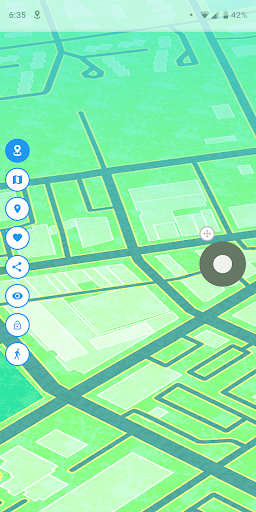
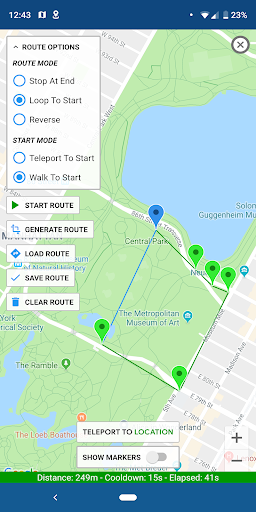
Allows you to test location based apps by mocking your location via an overlay joystick control!
Will overwrite your current location and any apps that you want to test will think you're in New York, London or any other place in the world!
This app has a "JoyStick" option which makes it simple and fun to change your location instantly.
Installation:
We've assembled a FAQ with steps on how to make this app work for you! Please read it carefully before emailing or leaving a review:
http://gpsjoystick.theappninjas.com/faq/
Features:
- Changes GPS location instantly and easily
- Select your current location or any location in the world using the map or joystick
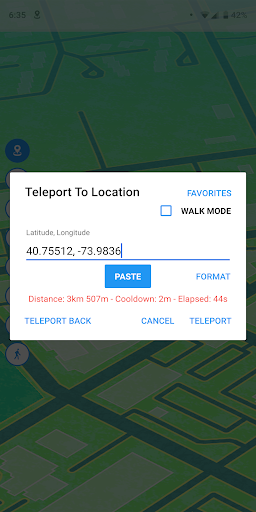
- Enter latitude/longitude directly from the joystick and teleport anywhere
- Change your location in any direction you point the joystick
- Create and save a route using any number of points on a map and walk automatically
- Pause and continue the route directly from the joystick
- Use loop or reverse route mode to walk on your route over and over
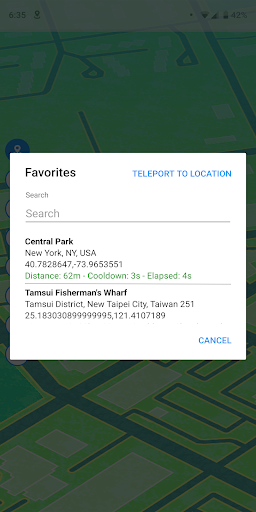
- Keep track of your favorite list of locations and routes
- Keep track of custom markers for groups of points of interest
- Import and export GPX files to your favorites, routes or custom markers
- Displays distance and cooldown time information
- Hide option in the notification to show/hide the joystick on your screen
- Have 3 customizable speeds for your joystick
- Size, type and opacity settings for the joystick
- Lots of settings options for complete user customization
Plus this app automatically includes the best algorithm for providing realistic GPS values. All of these variance options are available in Settings to allow complete customization for the best and most realistic location testing.
Follow us on FB for the latest news:
https://www.facebook.com/gpsjoystick
もっと見る

1. MEmuインストーラーをダウンロードしてセットアップを完了する

2. MEmuを起動し、デスクトップでのPlayストアを開く

3. PlayストアでFake GPS Location-GPS JoyStickを検索する
Install
4. Fake GPS Location-GPS JoyStickをダウンロードしてインストールする
5. インストールが完了したら、アイコンをクリックしてスタート

6. MEmuを使ってパソコンでFake GPS Location-GPS JoyStickを体験する
MEmu Playは現在、最高の無料Androidエミュレーターであり、5,000万人のユーザーが優れたAndroidアプリ体験を楽しんでいます。MEmuの仮想化テクノロジーにより、数千ものAndroidアプリをコンピューターでスムーズに実行できます。
大画面でより精細;無限の待機、電池とドラフィックの極限を超え
キーボード・マウス・コントローラーを全力でサポート、より快適
マルチインスタンスで複数のゲームを同時に実行
Use Fake GPS Location-GPS JoyStick on PC by following steps: