NAVER Map, Navigation
Dikemas kini
Versi Semasa
5.32.0.27
Ditawarkan Oleh

Berhentilah bimbang dengan bayaran berlebihan semasa menggunakan NAVER Map, Navigation di telefon bimbit anda, bebaskan diri anda dari layar kecil dan nikmati penggunaan aplikasi pada paparan yang jauh lebih besar. Mulai sekarang, dapatkan pengalaman skrin penuh aplikasi anda dengan papan kekunci dan tetikus. MEmu Play semua ciri mengejutkan yang anda harapkan: pemasangan cepat dan penyediaan mudah, kawalan intuitif, tidak ada batasan bateri, data mudah alih, dan panggilan yang mengganggu. MEmu 9 yang baru adalah pilihan terbaik untuk menggunakan NAVER Map, Navigation di komputer anda. Dikodkan dengan penyerapan kami, pengurus multi-instance menjadikan pembukaan 2 atau lebih akaun pada masa yang sama mungkin. Dan yang paling penting, mesin emulasi eksklusif kami dapat melepaskan potensi penuh PC anda, menjadikan semuanya lancar dan menyeronokkan.
Tunjukkan Lagi
Download NAVER Map, Navigation on PC with MEmu Android Emulator. Enjoy playing on big screen. South Korea's GPS navigation Get started right away.
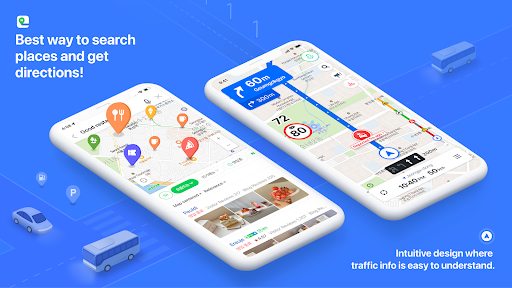
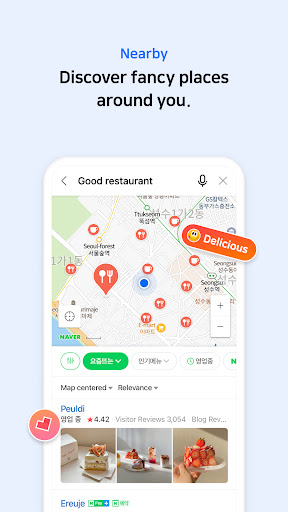
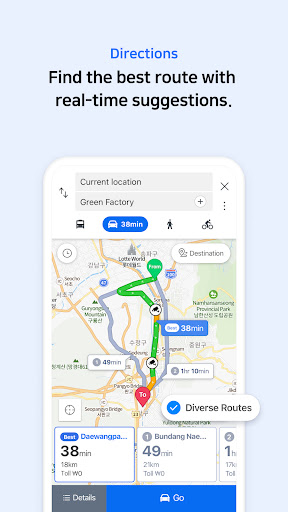
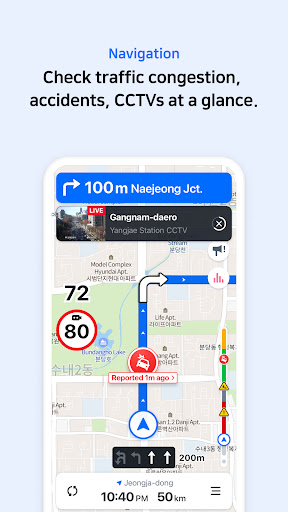
South Korea's GPS navigation Get started right away
* Experience the completely new NAVER Map.
[Key features]
- Menu tab for Map home
Quickly access and use Nearby, Bookmark, Transit, Navigation and the MY tab from the home screen.
- Simplified search
Search locations, buses, subway, and more in a comprehensive search bar.
- Nearby (SmartAround)
Check restaurants and places to visit in your surroundings provided by NAVER's user data.
- Navigation
Fast and accurate navigation with real-time traffic info and optimized usability for any driving condition.
- Vector map
360 degrees rotation-enabled vector map with 3D view of key landmarks via tilting.
- Transit
You can easily reach your destination by using transit directions for various modes of transportation, real-time departure and arrival times, and notifications for when to get on/off.
- Street view
Seamless street and aerial views provided for location search and route planning.
- Bookmark
Easily save your best restaurants and must-visit tourist spots on NAVER Map and share them with others.
- Instant search
View useful info about your query, such as opening/closing times for supermarkets while you search.
- Language
Korean/English/Japanese/Chinese maps and English navigation provided.
*Requires Android OS 7.0 or later
*Find out more tips on how to use NAVER Map
- NAVER Map customer service: http://naver.me/GYywEiT4
- NAVER Map blog: https://blog.naver.com/naver_map
----
*User confirmation for NAVER Map
Enabling the below privacy settings is recommended:
(Some features to make calls and send messages while navigating is supported only in Korea)
- Microphone: Used to provide voice search or voice comman.(KR only)
- Location: Used to find users' location when users find direction or use navigation.
- Phone: Used to make calls while navigating.(KR only)
- Call history: Used to access receipts of phone calls/messages while navigating.(KR only)
- SMS: Used to send messages while navigating.(KR only)
- File and Media (Photos and Videos): Used to provide service including navigation smoothly and store required content on a device and view it. (Note that photos and videos are not accessible in Naver Map 5.28.0 or later on devices running OS 13.0 or later.)
- Contacts: Used to make calls and send messages while navigating.(KR only)
- Camera: Used in Feedback and NAVER’s MY - Receipt Confirmation to take photos of receipts.
- Notifications: Used to receive important notices, events, and promotional notifications (supported on devices running Android 13.0 or later).
----
*Contact: 1588-3820
*Address: 95, Jeongjail-ro, Bundang-gu, Seongnam-si, Gyeonggi-do, Republic of Korea
Tunjukkan Lagi

1. Muat turun pemasang MEmu dan selesaikan persediaan

2. Mulakan MEnu kemudian buka Google Play di desktop

3. Cari NAVER Map, Navigation di Google Play
Install
4. Muat turun dan Pasang NAVER Map, Navigation
5. Apabila selesai pemasangan, menekan ikon itu untuk memulakan

6. Gunakan MENu untuk mengalami NAVER Map, Navigation pada komputer anda
MEmu Play ialah emulator Android terbaik, dengan lebih 100 juta pengguna mengalami pengalaman aplikasi Android yang unggul. Teknologi virtualisasi MEmu membolehkan anda menjalankan beribu-ribu aplikasi Android dengan lancar pada komputer anda, walaupun yang paling mencabar.
Skrin lebih besar dengan grafik yang lebih baik; Tempoh yang panjang, tanpa had bateri atau data mudah alih.
Sokongan Keymapping penuh untuk kawalan tepat papan kekunci dan tetikus atau gamepad.
Pelbagai akaun permainan atau tugas pada satu PC sekaligus dengan pengurus pelbagai contoh.
Use NAVER Map, Navigation on PC by following steps: