NAVER Map, Navigation
更新日
現在のバージョン
6.4.0.7
提供元

スマートフォンは不要!パソコンと同じようにキーボードとマウスで操作できます。MEmu Playは、あなたが待ち望んでいたすべての楽しみをお届けします。バッテリー残量や小さな画面を気にすることなく、NAVER Map, Navigationをご利用ください。最新のMEmu 9は、NAVER Map, NavigationをPCで体験するのに最適です!完璧なキーマッピングシステムにより、PCのようなスムーズな操作性を実現します。マルチインスタンス機能により、複数のアプリケーションを同時に実行できます。独自の仮想化エンジンがPCのパフォーマンスを最大限に引き出します。アプリを使用するだけでなく、高品質な体験を得ることができます。
もっと見る
NAVER Map, NavigationをPCでダウンロード!大画面でより楽しむ。電源が落ちてしまうとか通信料が足りないとかの問題を心配する必要がなく、PCの大画面でより快適にゲームを楽しましょう! 韓国のGPSナビゲーション 今すぐ始めましょう.
韓国のGPSナビゲーション 今すぐ始めましょう
* 新しくなったNAVERマップを体験してください。
※ 韓国旅行中ですか?
NAVERマップの賢い使い方のヒントをお見逃しなく:https://naver.me/GfCSj5Ut
[主な機能]
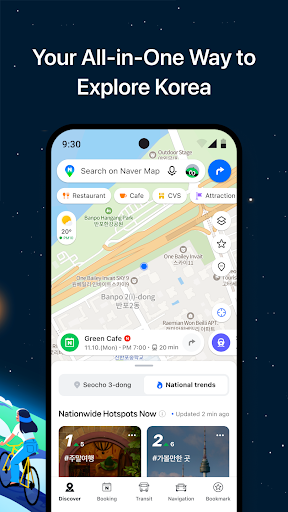
- マップホームメニュータブ
ホーム画面から、「発見」「予約」「交通機関」「ナビゲーション」「ブックマーク」タブを簡単にご利用いただけます。
- 簡易検索
包括的な検索バーで、場所、バス、地下鉄などを検索できます。
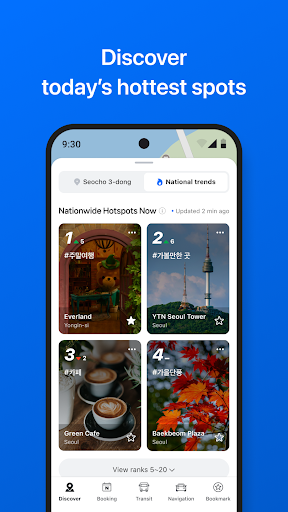
- 発見
全国各地や近隣の新しい場所を見つけるのに役立ちます。リアルタイムランキング、おすすめフィード、人気スポット、ブックマークリスト、クーポンオファーをお楽しみください。
- 予約
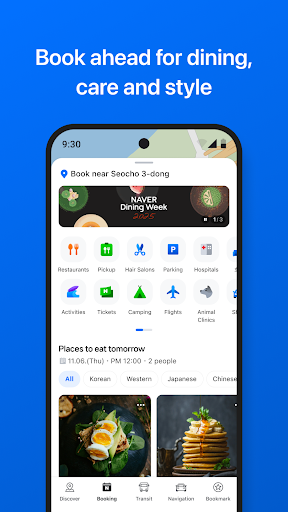
NAVERで予約可能な店舗や商品をまとめて検索できる、新しい「予約」タブをお試しください。近くのレストラン、ヘアサロン、遊園地、1日レッスン、電車の切符など、すべてが「予約」タブにまとめて見つかります。
- ナビゲーション
リアルタイムの交通情報と、あらゆる運転状況に最適な操作性を備えた、高速で正確なナビゲーション。
- ベクターマップ
360度回転可能なベクターマップ。傾斜機能により主要なランドマークを3D表示。
- 交通機関
様々な交通手段の交通機関ルート案内、リアルタイムの出発・到着時刻、乗降時間の通知機能により、目的地まで簡単にアクセスできます。
- ストリートビュー
位置情報の検索やルートプランニングに、シームレスなストリートビューと航空写真を提供します。
- ブックマーク
お気に入りのレストランや必見の観光スポットをNAVERマップに簡単に保存し、他のユーザーと共有できます。
- マイ
すべての地図、レビュー、予約を一か所で確認し、簡単にレビューを作成できます。
- インスタント検索
検索中に、スーパーマーケットの営業時間など、検索クエリに関する便利な情報を確認できます。
- 言語
韓国語/英語/日本語/中国語の地図と英語のナビゲーションを提供します。
*Android OS 8.0以降が必要です
*NAVERマップの使い方に関するヒントはこちら
- NAVERマップカスタマーサービス: http://naver.me/GYywEiT4
- NAVERマップブログ: https://blog.naver.com/naver_map
----
*NAVERマップのユーザー確認
以下のプライバシー設定を有効にすることを推奨します。
(ナビゲーション中に通話やメッセージを送信する機能の一部は、韓国でのみサポートされています)
- マイク: 音声検索や音声コマンドに使用されます。(韓国のみ)
- 位置情報: ユーザーが道順を検索したり、ナビゲーションを使用したりする際に、ユーザーの位置を特定するために使用されます。
- 電話:ナビゲーション中に電話をかけるために使用されます。(韓国のみ)
- ファイルとメディア(写真、動画、音楽、オーディオ):ナビゲーションなどのサービスをスムーズに提供し、必要なコンテンツをデバイスに保存して閲覧するために使用されます。(OS 13.0以降のデバイスでは、NAVERマップアプリ5.35.2以降では写真と動画にアクセスできません。)
- 連絡先:ナビゲーション中に電話をかけたり、メッセージを送信したりするために使用されます。(韓国のみ)
- カメラ:フィードバック機能やNAVERのMYレシート確認機能でレシートの写真を撮るために使用されます。
- 通知:重要なお知らせ、イベント、プロモーションの通知を受け取るために使用されます(Android 13.0以降のデバイスでサポートされています)
- 近くのデバイス:Bluetooth接続が確立されたときにアプリを自動的に起動するために使用されます。 (Android 12.0 以降を搭載したデバイスでサポートされます)
----
*連絡先: 1588-3820
*住所: 韓国 京畿道 城南市 盆唐区 貞一路 95
もっと見る

1. MEmuインストーラーをダウンロードしてセットアップを完了する

2. MEmuを起動し、デスクトップでのPlayストアを開く

3. PlayストアでNAVER Map, Navigationを検索する
Install
4. NAVER Map, Navigationをダウンロードしてインストールする
5. インストールが完了したら、アイコンをクリックしてスタート

6. MEmuを使ってパソコンでNAVER Map, Navigationを体験する
MEmu Playは現在、最高の無料Androidエミュレーターであり、5,000万人のユーザーが優れたAndroidアプリ体験を楽しんでいます。MEmuの仮想化テクノロジーにより、数千ものAndroidアプリをコンピューターでスムーズに実行できます。
大画面でより精細;無限の待機、電池とドラフィックの極限を超え
キーボード・マウス・コントローラーを全力でサポート、より快適
マルチインスタンスで複数のゲームを同時に実行
Use NAVER Map, Navigation on PC by following steps: