Notes: Color Notepad, Notebook
Dikemas kini
Versi Semasa
1.5.4
Ditawarkan Oleh

Berhentilah bimbang dengan bayaran berlebihan semasa menggunakan Notes: Color Notepad, Notebook di telefon bimbit anda, bebaskan diri anda dari layar kecil dan nikmati penggunaan aplikasi pada paparan yang jauh lebih besar. Mulai sekarang, dapatkan pengalaman skrin penuh aplikasi anda dengan papan kekunci dan tetikus. MEmu Play semua ciri mengejutkan yang anda harapkan: pemasangan cepat dan penyediaan mudah, kawalan intuitif, tidak ada batasan bateri, data mudah alih, dan panggilan yang mengganggu. MEmu 9 yang baru adalah pilihan terbaik untuk menggunakan Notes: Color Notepad, Notebook di komputer anda. Dikodkan dengan penyerapan kami, pengurus multi-instance menjadikan pembukaan 2 atau lebih akaun pada masa yang sama mungkin. Dan yang paling penting, mesin emulasi eksklusif kami dapat melepaskan potensi penuh PC anda, menjadikan semuanya lancar dan menyeronokkan.
Tunjukkan Lagi
Download Notes: Color Notepad, Notebook on PC with MEmu Android Emulator. Enjoy playing on big screen. Tired of carrying heavy sticky notes or notepad with you!
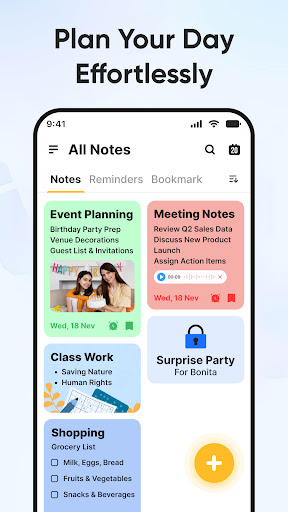
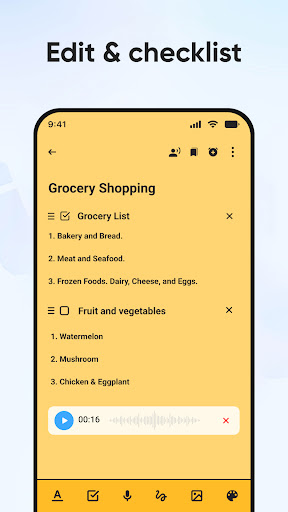
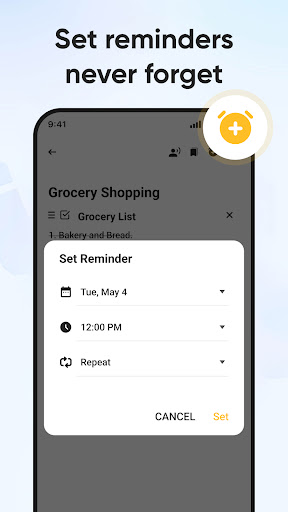
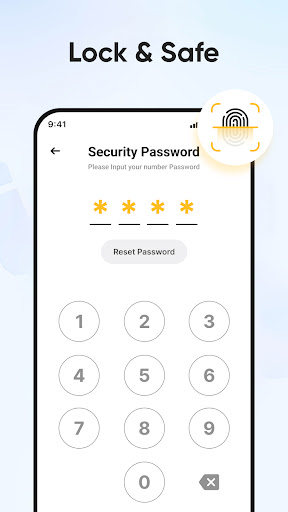
Tired of carrying heavy sticky notes or notepad with you! Looking for all in one easy to use note-taking app? Well, we brought notepad for you to note ideas and simplify planning important moments in your life with your digital notepad. Easy to use free notebook app that serves all your needs like organize notes with separate category and thoughts by theme at office, study, home or personal notes all in simple Notepad form. Notes- Color Notepad, Notebook is the best note taking app comes with amazing editing features. Notebook-Sticky notes is one app with many perks that you can’t afford to miss! In addition, you can use synced notes on different devices. Notes- Color Notepad, Notebook supports to save all notes automatically in all cases.
Notes- Color Notepad, Notebook helps you plan different events, create something new, and track your list of too important tasks. Take notes, add images to your notes and write memos on your phone.
Keep search your notes fast and effortlessly. Take notes, organize, share ideas and quickly capture what’s on your mind with notepad app.
Salient features
Add notes and list with simple interface
With notepad app set reminders so you don't miss important tasks.
Keep bookmarks your important notes list
Organize your tasks by note in calendar
Organize notes with categories
Notes- Color Notepad, Notebook syncs your notes across all devices
Speak and record a voice memo Notepad app will transcribe automatically
Create drawing and make your phone digital sketchbook
Take pictures and add images to your notes.
Create your notes with personalised themes according to your own preferences.
With color note Change font color, font size, text format conveniently
Create many checklists for to do list notes to get things done
Easily find your organize notes in search
Sticky notes and widget allowing to Put your notes on your home screen
Share your ideas with friends and family
Notebook-Best Note taking App
Note pad helps keeping notes of assignments, office work, or other task scenarios like an actual notebook. Note widget is not an ordinary note taking app. With sticky note you could enhance/edit all the notes from your list. You can try different font and sizes to your saved to do list and memo along with multiple color notes drawing tools, drawing re-edit option, adding checklist, task creating date. Notepad auto saved all noted tasks and lists. You can also delete noted task, memo and to do list whenever you want.
Organised Notes and Memo
Notes- Color Notepad, Notebook helps you to organize and categorize your notes. With Note writer you could add a particular category. Note widget provides various list maker options like add, delete and hide category option to make it more convenience keep notes.
Record Audio with Notes- Color Notepad, Notebook
For Easy notes stickies now, you don’t have to be a note writer anymore just open notepad app and start recording to keep all important notes, such as taking notes during lectures and meetings and keep them to your recorded notepad list where you could listen them with notebook app with ease. Notes- Color Notepad, Notebook recordings comes up with play, pause and delete option. You can pick Background paper style for your sticky notes.
NoteBook with Color Notepad
Get creative with color notes by highlighting all the good notes with vibrant drawing pencils. Color notes have multiple options for making your writing pad interesting and colourful. Color note notes all the tasks in an eye-catching manner.
Bookmark All Your sticky notes
Detailed to do list, sticky notes, task list and memo sometimes exceed to multiple pages which create fuss. Notebook app is here to solve your problem. 1 and get access to your notes in a blink!
SAVE AND SHARE
With Notebook app give title to your notes then save, share or print the required notepad doc with friends and family.
Tunjukkan Lagi

1. Muat turun pemasang MEmu dan selesaikan persediaan

2. Mulakan MEnu kemudian buka Google Play di desktop

3. Cari Notes: Color Notepad, Notebook di Google Play
Install
4. Muat turun dan Pasang Notes: Color Notepad, Notebook
5. Apabila selesai pemasangan, menekan ikon itu untuk memulakan

6. Gunakan MENu untuk mengalami Notes: Color Notepad, Notebook pada komputer anda
MEmu Play ialah emulator Android terbaik, dengan lebih 100 juta pengguna mengalami pengalaman aplikasi Android yang unggul. Teknologi virtualisasi MEmu membolehkan anda menjalankan beribu-ribu aplikasi Android dengan lancar pada komputer anda, walaupun yang paling mencabar.
Skrin lebih besar dengan grafik yang lebih baik; Tempoh yang panjang, tanpa had bateri atau data mudah alih.
Sokongan Keymapping penuh untuk kawalan tepat papan kekunci dan tetikus atau gamepad.
Pelbagai akaun permainan atau tugas pada satu PC sekaligus dengan pengurus pelbagai contoh.
Use Notes: Color Notepad, Notebook on PC by following steps: