Resume Builder App, CV maker
Dikemas kini
Versi Semasa
8.4
Ditawarkan Oleh

Berhentilah bimbang dengan bayaran berlebihan semasa menggunakan Resume Builder App, CV maker di telefon bimbit anda, bebaskan diri anda dari layar kecil dan nikmati penggunaan aplikasi pada paparan yang jauh lebih besar. Mulai sekarang, dapatkan pengalaman skrin penuh aplikasi anda dengan papan kekunci dan tetikus. MEmu Play semua ciri mengejutkan yang anda harapkan: pemasangan cepat dan penyediaan mudah, kawalan intuitif, tidak ada batasan bateri, data mudah alih, dan panggilan yang mengganggu. MEmu 9 yang baru adalah pilihan terbaik untuk menggunakan Resume Builder App, CV maker di komputer anda. Dikodkan dengan penyerapan kami, pengurus multi-instance menjadikan pembukaan 2 atau lebih akaun pada masa yang sama mungkin. Dan yang paling penting, mesin emulasi eksklusif kami dapat melepaskan potensi penuh PC anda, menjadikan semuanya lancar dan menyeronokkan.
Tunjukkan Lagi
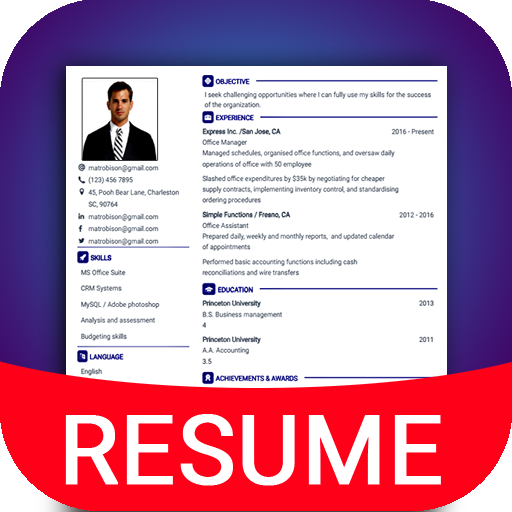
Download Resume Builder App, CV maker on PC with MEmu Android Emulator. Enjoy playing on big screen. Intelligent cv's Resume builder app will help you to create professional resume & Curriculum vitae for job application in few minutes.
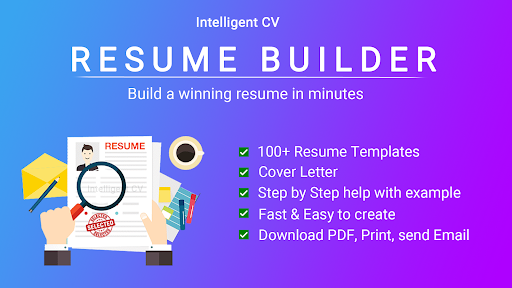
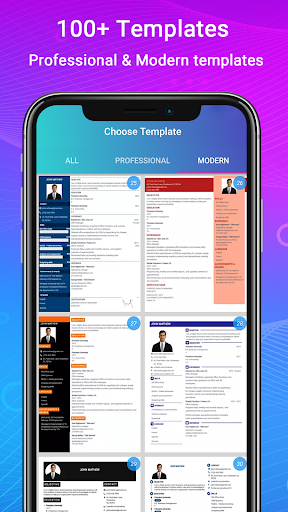
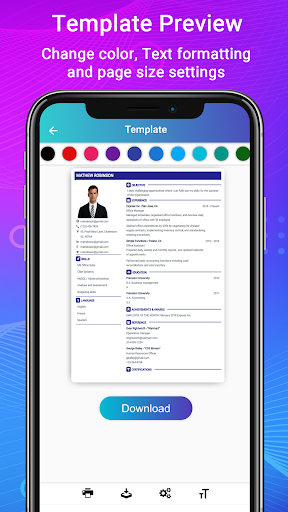
Intelligent cv's Resume builder app will help you to create professional resume & Curriculum vitae for job application in few minutes. More than 50 resume templates available and each Resume template & CV template available in 15 colors. So you have 500+ resume designs in offline and online.
Create a modern & professional resume and cover letter with this CV maker app. Our resume expert's tips will help you how to write a good resume for 2023 trend. Resume writing tips will help you get more job offers in 2023. Prepare yourself ready for full time and part time work from home jobs.
Intelligent CV - Resume builder app Features:
1. 500+ professional resume templates & 42 perfect resume formats.
2. Step by step guidance with resume examples.
3. Resume with cover letter template.
4. Advanced Resume editor - Special CV writing tools to customize paragraph & lists.
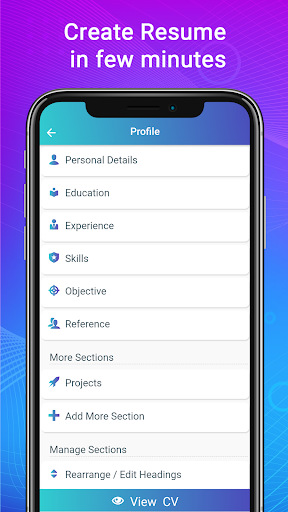
5. Smart resume Manager - Change CV section order, Edit CV section title names, create new sections, modify at any time.
6. Resume formatting options - Font size, colors and margin settings.
7. Live resume format preview.
8. Download resume in PDF format.
9. Print or share the resume from the resume builder app.
10. Full resume writing service and support in English.
Resume builder app can easily adapt the CV or resume designs to any resume format you choose such as functional, reverse-chronological, or combination Curriculum vitae, one page / single page or two page resume formats, United states resume format, biodata format, CV portfolio and job application CV format. ATS Resume templates optimized for applicant tracking systems and automated processing.
Write a cover letter for resume using the same templates as your resume template and revamp cv.
Intelligent CV had designed the resume builder with all type of professional resume templates based on research and latest trends in various industries in United states, Europe, Canada and other part of Americas. This will help ensure your resume focuses on what international hiring managers expecting.
Resume builder app with step by step resume guide.
1. Easy to use:
Anyone who know to use android mobile phone can create curriculum vitae in PDF format. Fill the biodata information, education, experience, skills and photo for creating curriculum vitae.
2. Curriculum vitae helper: Resume examples and Samples for each resume Sections are very useful for Students, fresh graduate, first time job seekers or entry level jobs, High school / college student internship and also experienced.
3. Resume cover letter templates: Add cover letter to resume or download resume cover letter separately in PDF. Resume creator app has many cover letter templates & formats for various fields such as engineering student internship, IT Software developer, business management job, nurse, teachers, assistant sales associative, medical doctor, graphic designer, Customer service, executives, accountant, bank job, etc.
4. Resume with photo:
Resume builder with image which is optional. All resume templates has option to add profile photo.
5. Biodata Maker & portfolio maker:
Apart from resume & CV, Resume builder app helps to create biodata and portfolio for job with available few biodata formats.
6. Download CV in PDF format in offline, Print Resume, Email the resume and Share the resume.
7. Successful career builder:
Stress free resume making process and Resume writing service with smart and quick CV maker app. For job application form generate high quality CV in PDF which gives better support than docx format so you can generate resume in PDF format.
8. View my resume: See all created resume in "Saved resume / Downloads".
If you have any queries with this resume builder app, contact us.
Tunjukkan Lagi

1. Muat turun pemasang MEmu dan selesaikan persediaan

2. Mulakan MEnu kemudian buka Google Play di desktop

3. Cari Resume Builder App, CV maker di Google Play
Install
4. Muat turun dan Pasang Resume Builder App, CV maker
5. Apabila selesai pemasangan, menekan ikon itu untuk memulakan

6. Gunakan MENu untuk mengalami Resume Builder App, CV maker pada komputer anda
MEmu Play ialah emulator Android terbaik, dengan lebih 100 juta pengguna mengalami pengalaman aplikasi Android yang unggul. Teknologi virtualisasi MEmu membolehkan anda menjalankan beribu-ribu aplikasi Android dengan lancar pada komputer anda, walaupun yang paling mencabar.
Skrin lebih besar dengan grafik yang lebih baik; Tempoh yang panjang, tanpa had bateri atau data mudah alih.
Sokongan Keymapping penuh untuk kawalan tepat papan kekunci dan tetikus atau gamepad.
Pelbagai akaun permainan atau tugas pada satu PC sekaligus dengan pengurus pelbagai contoh.
Use Resume Builder App, CV maker on PC by following steps: