Save Web Page: Read it offline
Dikemas kini
Versi Semasa
1.3.1
Ditawarkan Oleh

Berhentilah bimbang dengan bayaran berlebihan semasa menggunakan Save Web Page: Read it offline di telefon bimbit anda, bebaskan diri anda dari layar kecil dan nikmati penggunaan aplikasi pada paparan yang jauh lebih besar. Mulai sekarang, dapatkan pengalaman skrin penuh aplikasi anda dengan papan kekunci dan tetikus. MEmu Play semua ciri mengejutkan yang anda harapkan: pemasangan cepat dan penyediaan mudah, kawalan intuitif, tidak ada batasan bateri, data mudah alih, dan panggilan yang mengganggu. MEmu 9 yang baru adalah pilihan terbaik untuk menggunakan Save Web Page: Read it offline di komputer anda. Dikodkan dengan penyerapan kami, pengurus multi-instance menjadikan pembukaan 2 atau lebih akaun pada masa yang sama mungkin. Dan yang paling penting, mesin emulasi eksklusif kami dapat melepaskan potensi penuh PC anda, menjadikan semuanya lancar dan menyeronokkan.
Tunjukkan Lagi
Download Save Web Page: Read it offline on PC with MEmu Android Emulator. Enjoy playing on big screen. A free screen capture application that saves web pages as they are and lets you view them offline anytime.
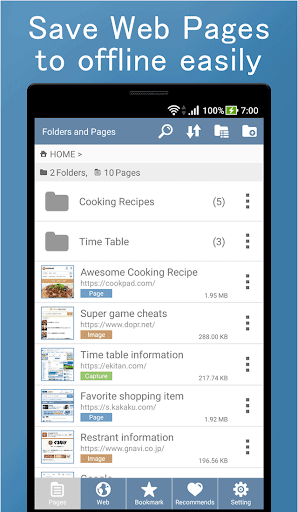
A free screen capture application that saves web pages as they are and lets you view them offline anytime.
You can easily save pages such as SNS posts, recipes, and timetables with one touch.
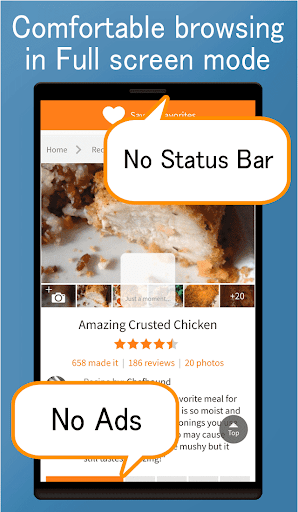
Browse comfortably with full screen mode.
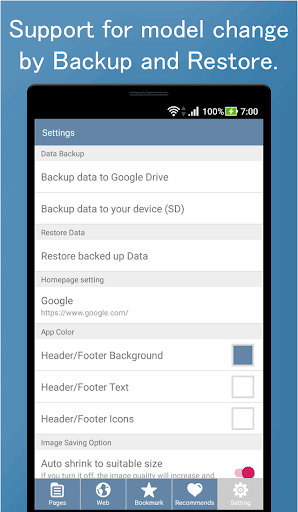
You can back up and restore data, so even if you change the device model, you can take over data for peace of mind.
All features are free.
*** Main features ***
- Save web page (you can choose 3 ways)
- Save as it is (MHTML format)
- Save as image (save the entire page as a screenshot)
- Save only the displayed part as an image
- View saved pages offline anytime
- Complete full screen mode
- Data backup & restore
- Web browser
- Management of stored pages (folder, sort, search, Batch delete / move)
- Batch delete, batch folder move (long press)
- Bookmark function
- Call from other browser app and display page
- MHTML viewer
- Change the color in the app freely
*** Convenient usage ***
- Once saved pages, you can view it offline many times without using communication charges even without radio waves.
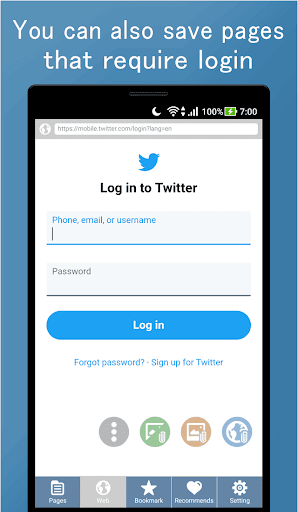
- Pages that require login can also be saved using the in-app browser function.
- Feel free to save the page and use it as a Read It Later application.
- Saved pages can be viewed even if pages on the web are lost.
- It is very convenient if you save pages such as frequently viewed recipes and timetables.
SNS articles such as Instagram and Twitter, cooking recipes, gourmet information, train and bus timetables, favorite online shops, blog articles, beauty cosmetics information, housing information, lyrics, game cheats pages, etc.
If you save your favorite pages you often view, you can view them immediately without spending on communication charges.
- It is very comfortable to be able to display a web page on the whole screen by using the full screen mode completely!
- You can open MHTML file.
- You can choose from three storage formats, so you can save space on your device or capture only the part you need.
- Since there is a data backup and restore function, saved page data can be used as it is even if your device model is changed.
- You can freely change the color in the app. Please use the app in your favorite color.
*** How to call from browser app ***
1. Select [Share] or [Share Page] from the browser application menu
2. Select [Save Web Page]
3. [Save Web Page] will launched. So save the page.
Clip web page, make web archive easily.
Save Web Page - Save Pages for Offline reading and Read it later.
Tunjukkan Lagi

1. Muat turun pemasang MEmu dan selesaikan persediaan

2. Mulakan MEnu kemudian buka Google Play di desktop

3. Cari Save Web Page: Read it offline di Google Play
Install
4. Muat turun dan Pasang Save Web Page: Read it offline
5. Apabila selesai pemasangan, menekan ikon itu untuk memulakan

6. Gunakan MENu untuk mengalami Save Web Page: Read it offline pada komputer anda
MEmu Play ialah emulator Android terbaik, dengan lebih 100 juta pengguna mengalami pengalaman aplikasi Android yang unggul. Teknologi virtualisasi MEmu membolehkan anda menjalankan beribu-ribu aplikasi Android dengan lancar pada komputer anda, walaupun yang paling mencabar.
Skrin lebih besar dengan grafik yang lebih baik; Tempoh yang panjang, tanpa had bateri atau data mudah alih.
Sokongan Keymapping penuh untuk kawalan tepat papan kekunci dan tetikus atau gamepad.
Pelbagai akaun permainan atau tugas pada satu PC sekaligus dengan pengurus pelbagai contoh.
Use Save Web Page: Read it offline on PC by following steps: