Transcribe: Speech to Text App
Dikemas kini
Versi Semasa
4.1.2
Ditawarkan Oleh

Berhentilah bimbang dengan bayaran berlebihan semasa menggunakan Transcribe: Speech to Text App di telefon bimbit anda, bebaskan diri anda dari layar kecil dan nikmati penggunaan aplikasi pada paparan yang jauh lebih besar. Mulai sekarang, dapatkan pengalaman skrin penuh aplikasi anda dengan papan kekunci dan tetikus. MEmu Play semua ciri mengejutkan yang anda harapkan: pemasangan cepat dan penyediaan mudah, kawalan intuitif, tidak ada batasan bateri, data mudah alih, dan panggilan yang mengganggu. MEmu 9 yang baru adalah pilihan terbaik untuk menggunakan Transcribe: Speech to Text App di komputer anda. Dikodkan dengan penyerapan kami, pengurus multi-instance menjadikan pembukaan 2 atau lebih akaun pada masa yang sama mungkin. Dan yang paling penting, mesin emulasi eksklusif kami dapat melepaskan potensi penuh PC anda, menjadikan semuanya lancar dan menyeronokkan.
Tunjukkan Lagi
Nikmati pengalaman hebat menggunakan Transcribe: Speech to Text App di PC dengan MEmu Play. Ia merupakan emulator Android percuma yang hebat yang menyediakan beribu-ribu aplikasi Android untuk versi desktop mereka. Nikmati berhubung dengan rakan-rakan dan menggilap kerja anda dengan kecekapan yang lebih tinggi! Transcribe is an all-in-one app that turns voice recordings, conversations, meetings and videos into text with AI.
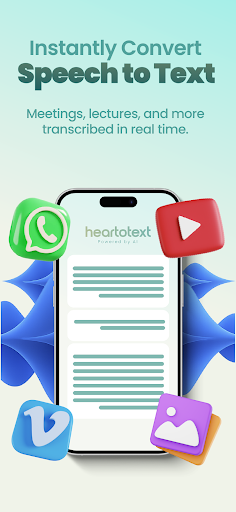
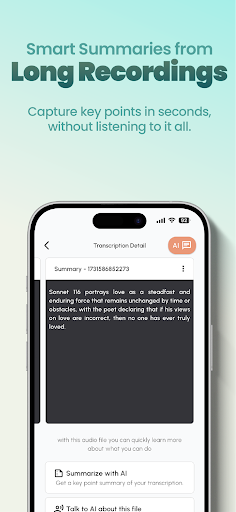
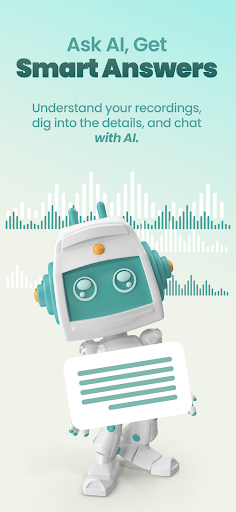
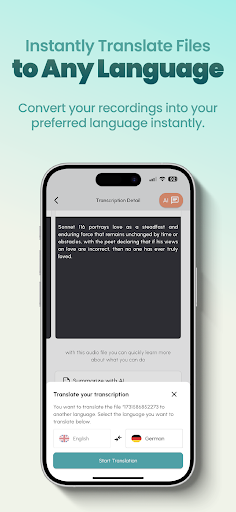
Transcribe is an all-in-one app that turns voice recordings, conversations, meetings and videos into text with AI. Record, transcribe, summarize, translate and ask AI questions - all in one place. The accurate audio to text and speech to text solution for students, creators, professionals and journalists. Try it free - no credit card required.
WHY TRANSCRIBE?
- Get clean, accurate text even in noisy rooms, with multiple speakers and accents
- Stop re-listening - turn hours of audio into readable notes in minutes
- Speech recognition in many languages with automatic language detection
- Automatic punctuation, paragraph breaks and timestamps you can edit
KEY FEATURES
- Speech to Text: Convert speech to text quickly and with high accuracy
- Built-in Voice Recorder: Capture audio and dictate on the go with the in-app recorder
- File Upload: Transcribe MP3, MP4, WAV, M4A and more audio/video formats
- Speaker Identification: Automatically label different speakers
- AI Summary: Summarize long meetings and lectures in seconds
- AI Chat & Q&A: Chat with your transcript like a document - ask follow-up questions, pull out action items and get instant answers
- Translation: Translate your transcripts into many languages
- Subtitle Generator: Create automatic captions for your videos (SRT, VTT)
- Live Dictation: Speak and watch your words appear as text
WHO IS IT FOR?
- Students: Lectures, seminars and online classes, lecture notes and exam prep
- Content creators: YouTube and podcast to text, TikTok voiceover scripts, Reels and social captions
- Professionals & small business: Meeting minutes, client and sales calls, freelancer notes
- Healthcare: Medical dictation, patient visit notes, telehealth summaries
- Legal: Court transcription, hearing transcripts, depositions and testimony
- Journalists: Interview transcription, press conferences
- Real estate & HR: Property tour narrations, CRM call notes, interview records
- Accessibility: Readable text of audio for the deaf and hard of hearing
- Researchers: Survey, focus group and qualitative interview analysis
USE CASES
Upload voice memos and voice messages from WhatsApp and other apps and convert them to text. One app for vlogs, webinars, voice notes, phone call recordings and any audio-to-text need.
EXPORT FORMATS
Export your notes as PDF, Word, TXT, SRT and VTT.
SOURCES & PLATFORMS
Get started by uploading an audio/video link (URL) or file. Upload recordings from sources like Google Drive, Dropbox, YouTube, Vimeo, Zoom, Google Meet or Microsoft Teams as files. Third-party names are trademarks of their respective owners.
HOW IT WORKS
1. Upload a file or record with the in-app recorder
2. AI converts your speech into text in minutes
3. Review and edit with the synced player, then save, export or share
SECURE & PRIVATE
Your data is protected with strong encryption, and files are deleted automatically after processing. Your privacy is our priority.
SUPPORTED FORMATS
Audio: MP3, WAV, M4A, AAC, FLAC, OGG and more. Video: MP4, MOV, AVI, MKV, WMV and more.
FREQUENTLY ASKED QUESTIONS
Is Transcribe free? You can try the app with a free trial, no credit card required.
Which languages are supported? Speech recognition works in many languages, including English.
Can I transcribe video? Yes, video transcription and subtitle generation are supported.
Does it work offline? Files are processed in the cloud, so an internet connection is needed.
MORE WAYS TO USE TRANSCRIBE
A handy voice recorder, note-taking and meeting recorder app, with online and live transcription, speech recognition, an audio to text converter and mp3 to text. Whether you transcribe an interview or turn a lecture into notes, Transcribe captures every word accurately.
Start turning your meetings, lectures and interviews into text today. Try it free - no credit card required.
Support: support@heartotext.com
Web: heartotext.com
EULA: https://heartotext.com/pages/eula
Terms of Use: https://heartotext.com/pages/terms-of-use
Tunjukkan Lagi

1. Muat turun pemasang MEmu dan selesaikan persediaan

2. Mulakan MEnu kemudian buka Google Play di desktop

3. Cari Transcribe: Speech to Text App di Google Play
Install
4. Muat turun dan Pasang Transcribe: Speech to Text App
5. Apabila selesai pemasangan, menekan ikon itu untuk memulakan

6. Gunakan MENu untuk mengalami Transcribe: Speech to Text App pada komputer anda
MEmu Play ialah emulator Android terbaik, dengan lebih 100 juta pengguna mengalami pengalaman aplikasi Android yang unggul. Teknologi virtualisasi MEmu membolehkan anda menjalankan beribu-ribu aplikasi Android dengan lancar pada komputer anda, walaupun yang paling mencabar.
Skrin lebih besar dengan grafik yang lebih baik; Tempoh yang panjang, tanpa had bateri atau data mudah alih.
Sokongan Keymapping penuh untuk kawalan tepat papan kekunci dan tetikus atau gamepad.
Pelbagai akaun permainan atau tugas pada satu PC sekaligus dengan pengurus pelbagai contoh.
Use Transcribe: Speech to Text App on PC by following steps: