Trello: Manage Team Projects
Dikemas kini
Versi Semasa
1734456614
Ditawarkan Oleh

Berhentilah bimbang dengan bayaran berlebihan semasa menggunakan Trello: Manage Team Projects di telefon bimbit anda, bebaskan diri anda dari layar kecil dan nikmati penggunaan aplikasi pada paparan yang jauh lebih besar. Mulai sekarang, dapatkan pengalaman skrin penuh aplikasi anda dengan papan kekunci dan tetikus. MEmu Play semua ciri mengejutkan yang anda harapkan: pemasangan cepat dan penyediaan mudah, kawalan intuitif, tidak ada batasan bateri, data mudah alih, dan panggilan yang mengganggu. MEmu 9 yang baru adalah pilihan terbaik untuk menggunakan Trello: Manage Team Projects di komputer anda. Dikodkan dengan penyerapan kami, pengurus multi-instance menjadikan pembukaan 2 atau lebih akaun pada masa yang sama mungkin. Dan yang paling penting, mesin emulasi eksklusif kami dapat melepaskan potensi penuh PC anda, menjadikan semuanya lancar dan menyeronokkan.
Tunjukkan Lagi
Download Trello: Manage Team Projects on PC with MEmu Android Emulator. Enjoy playing on big screen. Manage projects, organize tasks, and build team collaboration—all in one place.
Manage projects, organize tasks, and build team collaboration—all in one place. Join over 1,000,000 teams worldwide that are using Trello to get more done!
Trello helps teams move work forward.
Trello is the flexible work management tool that empowers all teams to plan, track, and accomplish their work, their way.
Whether you’re planning a website design project, managing weekly meetings, or onboarding a new employee, Trello is infinitely customizable and flexible for every type of work.
With Trello you can:
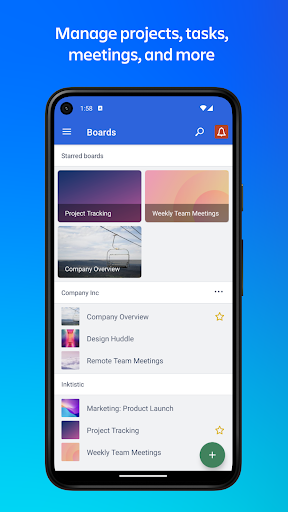
Manage projects, tasks, meetings, and more
* Free your brain from remembering all the to-dos with Trello’s customizable-yet-simple boards, lists, and cards.
* Easily see what work you have to do today and what's coming up with Calendar view.
* Quickly size up project status and team progress with Timeline view.
* No matter where work gets done, at events or in the field, visualize your tasks with Map view.
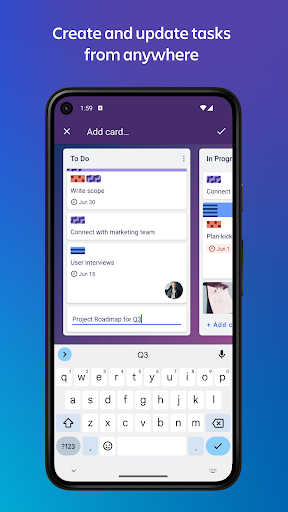
Create and update tasks from anywhere
* Go from idea to action in seconds–create cards for tasks and follow their progress to completion.
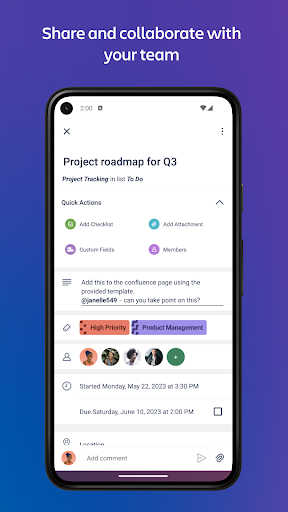
* Add checklists, labels, and due dates, and always have the most up-to-date view on project progress.
* Upload images and documents, or quickly add website links to cards to contextualize your work.
Share and collaborate with your team
* Assign tasks and keep everyone in the loop as work is handed off.
* Break down big tasks with oh-so-satisfying checklists: Check things off the list, and watch that status bar go to 100% complete.
* Collaborate and track feedback of your work with comments—emoji reactions included!
* Share files by attaching them onto a card so the right attachments stay with the right tasks.
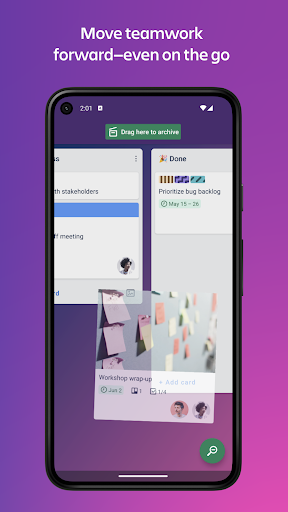
Move work forward—even on the go
* To stay up-to-date no matter where you are, turn on push notifications and stay informed when cards are assigned, updated, and completed.
* Trello works offline! Add information to your boards and cards at any time and it will be saved for when you need it.
* Easily access your boards and create cards from your phone's main screen with a Trello widget.
No more going back and forth through endless email chains or looking for that spreadsheet link to update the status of a project on your phone. Sign up for Trello today—it's free!
For more ideas on how to use Trello, visit: www.trello.com/guide
We value transparency and will ask for permissions to access: Camera, Microphone, Contacts and Photo Library Usage.
Tunjukkan Lagi

1. Muat turun pemasang MEmu dan selesaikan persediaan

2. Mulakan MEnu kemudian buka Google Play di desktop

3. Cari Trello: Manage Team Projects di Google Play
Install
4. Muat turun dan Pasang Trello: Manage Team Projects
5. Apabila selesai pemasangan, menekan ikon itu untuk memulakan

6. Gunakan MENu untuk mengalami Trello: Manage Team Projects pada komputer anda
MEmu Play ialah emulator Android terbaik, dengan lebih 100 juta pengguna mengalami pengalaman aplikasi Android yang unggul. Teknologi virtualisasi MEmu membolehkan anda menjalankan beribu-ribu aplikasi Android dengan lancar pada komputer anda, walaupun yang paling mencabar.
Skrin lebih besar dengan grafik yang lebih baik; Tempoh yang panjang, tanpa had bateri atau data mudah alih.
Sokongan Keymapping penuh untuk kawalan tepat papan kekunci dan tetikus atau gamepad.
Pelbagai akaun permainan atau tugas pada satu PC sekaligus dengan pengurus pelbagai contoh.
Use Trello: Manage Team Projects on PC by following steps: