La Divina Commedia
Bijgewerkt
Huidige Versie
Aangeboden door

Met al je passie voor het spelen van La Divina Commedia, zouden je handen niet beperkt moeten zijn tot een klein scherm van je telefoon. Speel als een professional en krijg volledige controle over je spel met toetsenbord en muis. MEmu biedt je alles wat je verwacht. Download en speel La Divina Commedia op PC. Speel zo lang als je wilt, geen beperkingen meer van batterij, mobiele data en storende oproepen. De gloednieuwe MEmu 9 is de beste keuze om La Divina Commedia op PC te spelen. Voorbereid met onze expertise, maakt het uitmuntende vooraf ingestelde keymapping systeem van La Divina Commedia een echt PC-spel. MEmu multi-instance manager maakt het spelen van 2 of meer accounts op hetzelfde apparaat mogelijk. En het belangrijkste, onze exclusieve emulatie-engine kan het volledige potentieel van je PC benutten, waardoor alles soepel verloopt.
Meer tonen
Download La Divina Commedia on PC with MEmu Android Emulator. Enjoy playing on big screen. La Divina Commedia is a dark fantasy action role-playing game that draws deep inspiration from the timeless masterpiece by Dante Alighieri.
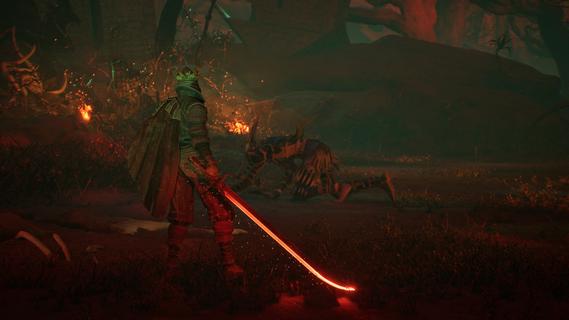

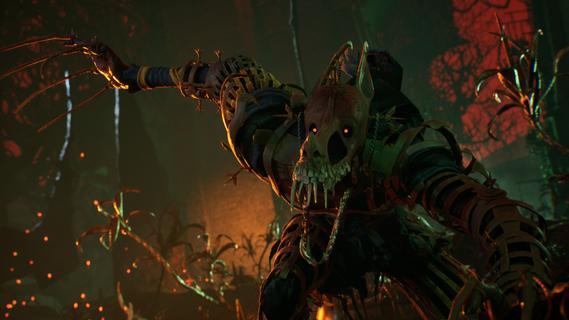
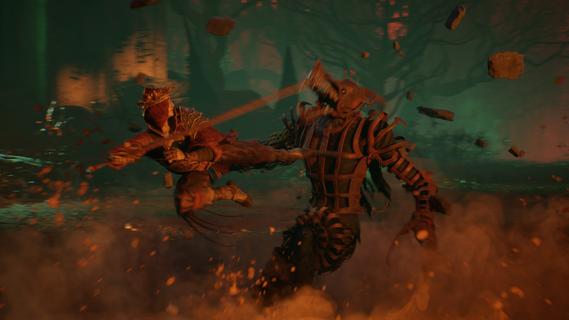
La Divina Commedia is a dark fantasy action role-playing game that draws deep inspiration from the timeless masterpiece by Dante Alighieri. Set in a richly detailed and hauntingly atmospheric world, the game plunges players into a vivid reimagining of the legendary journey through Hell, Purgatory, and Paradise, blending classical literature with gripping gameplay. From the very first moment, the ominous phrase "Abandon all hope, ye who enter here" sets the tone, plunging players into an immersive narrative filled with despair, redemption, and the struggle between light and darkness. One of the game's most innovative features is its "procedural extraction dungeons generation" system, which guarantees that no two playthroughs are ever the same. This dynamic design means the environments, enemy placements, traps, and loot evolve constantly, keeping the experience fresh and challenging. Players must remain vigilant and adapt their strategies as they delve deeper into the infernal labyrinths, uncovering secrets and confronting the horrors lurking within. This system ensures that the game remains unpredictable, maintaining tension and excitement throughout the journey. Gameplay in La Divina Commedia is a masterful balance of fast-paced combat and thoughtful exploration within a dark fantasy setting. Players control a character tasked with navigating through procedurally generated dungeons, facing an array of grotesque creatures and demonic entities inspired by Dante’s vivid descriptions. Combat requires tactical thinking, where players blend skillful weapon strikes, magical abilities, and powerful combos to overcome increasingly difficult foes. The RPG elements allow players to customize their character’s abilities, equipment, and skills, tailoring their playstyle to overcome the unique challenges that arise in each dungeon. The world design captures the unsettling beauty and brutal terror of the original epic. Each level of Hell presents distinct themes and atmospheres, from fiery pits and frozen wastelands to shadowy forests and decaying ruins inhabited by tortured souls. The art direction combines gothic architecture with surreal and nightmarish imagery, reinforcing the oppressive and otherworldly feel. The soundtrack and sound effects enhance the immersion by blending haunting melodies and ambient noises, evoking a sense of dread and foreboding at every turn. Narratively, the game explores themes of sin, justice, and redemption as players move through the circles of Hell. While the core story pays homage to Dante’s journey, it also expands on the lore, presenting new characters, dialogues, and side quests that deepen the player’s understanding of the infernal realm. The narrative choices and moral dilemmas encountered during the voyage add layers of complexity, inviting players to reflect on the nature of hope, despair, and salvation. La Divina Commedia offers a rich, compelling experience that appeals to fans of dark fantasy, challenging RPGs, and literary inspired games alike. Its procedural dungeons, intense combat, and atmospheric storytelling work together to create a haunting adventure that pushes players beyond their limits. Whether you are a lover of classical works or seek a fresh and immersive ARPG, this game invites you to embark on a harrowing journey into the depths of Hell, where every choice and battle shapes your fate. The gates have opened—the infernal voyage awaits. Will you dare to step through and confront the darkness within?
Meer tonen

1. Download de MEmu-installatie en voltooi de setup

2. Start MEmu en open vervolgens Google Play op het bureaublad

3. Zoek La Divina Commedia in Google Play
Install
4. Download en installeer La Divina Commedia
5. Klik op het icoon om te starten na het voltooien van de installatie

6. Geniet van het spelen van La Divina Commedia op PC met MEmu
MEmu Play is de beste Android Emulator en 100 miljoen mensen genieten al van de superieure Android-game-ervaring. De virtualisatietechnologie van MEmu stelt je in staat om duizenden Android-spellen soepel op je PC te spelen, zelfs de meest grafisch intensieve.
Groter scherm met betere graphics; Lange duur, zonder beperking van batterij of mobiele data.
Volledige Keymapping-ondersteuning voor nauwkeurige besturing van toetsenbord en muis of gamepad.
Meerdere game-accounts of taken op één PC tegelijk met Multi-Instance manager.
Speel La Divina Commedia op PC door de volgende stappen te volgen: