Meow's Garden: Tile Match
Bijgewerkt
Huidige Versie
1.0.160
Aangeboden door

Met al je passie voor het spelen van Meow's Garden: Tile Match, zouden je handen niet beperkt moeten zijn tot een klein scherm van je telefoon. Speel als een professional en krijg volledige controle over je spel met toetsenbord en muis. MEmu biedt je alles wat je verwacht. Download en speel Meow's Garden: Tile Match op PC. Speel zo lang als je wilt, geen beperkingen meer van batterij, mobiele data en storende oproepen. De gloednieuwe MEmu 9 is de beste keuze om Meow's Garden: Tile Match op PC te spelen. Voorbereid met onze expertise, maakt het uitmuntende vooraf ingestelde keymapping systeem van Meow's Garden: Tile Match een echt PC-spel. MEmu multi-instance manager maakt het spelen van 2 of meer accounts op hetzelfde apparaat mogelijk. En het belangrijkste, onze exclusieve emulatie-engine kan het volledige potentieel van je PC benutten, waardoor alles soepel verloopt.
Meer tonen
Download Meow's Garden: Tile Match op je pc met de MEmu Android-emulator. Geniet van spelen op een groot scherm. Tegelpuzzel & Drievoudige Puzzel — Gratis Gezellig Puzzelspel.

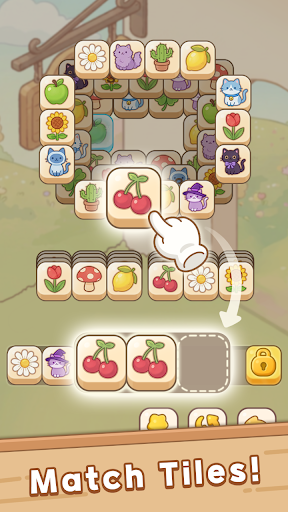
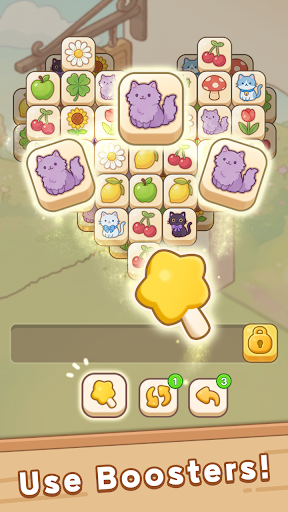
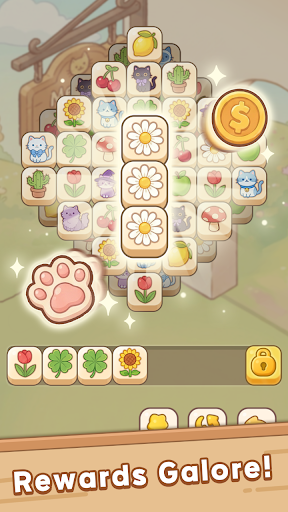
Tegelpuzzel & Drievoudige Puzzel — Gratis Gezellig Puzzelspel
Een gratis gezellig tegelpuzzelspel met drievoudige puzzels — herstel een vergeten tuin met je magische kattenvriendje.
In de wereld van Hello Town begint een gloednieuw verhaal in Meow's Garden.
Flora volgt de laatste wens van haar grootvader en keert terug naar een lang verlaten tuin, verborgen achter de mist. Daar ontmoet ze Meowy, een kleine magische kat en beschermgeest van de tuin.
Gesterkt door Flora's warmte gebruikt Meowy haar kleine roze pootjesmagie om de vervagende wereld om hen heen nieuw leven in te blazen. Samen zoeken ze naar het eeuwige paradijs dat ergens achter de mist zou bloeien.
Los ontspannende tegelpuzzels op, ontgrendel verborgen verhalen en laat je droomtuin groeien — bloem voor bloem.
[Strategische Tegelpuzzel Gameplay]
Een ontspannend maar strategisch tegelpuzzelspel waarbij de gelaagde puzzelborden de manier waarop je speelt constant veranderen.
- Combineer 3 tegels om bevredigende driedubbele combinaties te maken en het bord leeg te spelen
- Tegels zijn over meerdere lagen gestapeld — verwijder de bovenste tegels om de verborgen stukken eronder te onthullen
- Elke zet telt, want blokkades, verborgen tegels en gelaagde lay-outs veranderen je strategie
- Makkelijk te leren, enorm bevredigend om te beheersen
- Gebruik de boosters Ongedaan maken, Hint en Schudden als je vastloopt
- Verslavende tegelpuzzelgameplay die ontspannende momenten combineert met echte puzzeluitdagingen
Of je nu houdt van ontspannende combinatiespellen of uitdagende hersenkrakers, Meow's Garden biedt een bevredigende mix van rustgevende sfeer en slimme strategie.
[13 Creatieve Puzzelgimmicks]
Elk tegelpuzzelniveau introduceert nieuwe mechanismen, strategieën en hersenkrakende wendingen. Geen twee puzzelborden voelen ooit hetzelfde aan.
Naarmate je dieper de tuin in gaat, veranderen nieuwe gimmicks voortdurend je manier van denken en spelen.
Knutselen / IJs / Schakel / Ketting / Sleutel / Gras /
Onbekend / Gordijn / Bom / ⏱ Timer / Puppy / Teleporteren / Stapelen
Sommige trucs verbergen tegels, andere veranderen de beweging, timing of matchregels volledig — waardoor elke puzzelfase fris, strategisch en lonend blijft.
[Versier je droomtuin]
Verander de verlaten tuin in je eigen gezellige, rustgevende oase.
- Verzamel decoraties en creëer een rustgevende, esthetische tuin vol persoonlijkheid
- Ontgrendel prachtige nieuwe gebieden, waaronder zonnige tuinen, parken aan het water, knusse ateliers en verborgen plekjes achter de mist
- Kweek bloemen en planten, schik decoratieve objecten en creëer je perfecte ontspanningsplek
- Verzamel albumkaarten, seizoensgebonden beloningen en charmante decoraties naarmate je tuin groeit
- Een gezellig tuindecoratiespel voor spelers die houden van ontspannende spellen, creatief ontwerp en een rustgevende sfeer
Bouw een vredige plek die echt van jou is.
[Waarom spelers Meow's Garden geweldig vinden]
Of je nu nieuw bent in tegelpuzzelspellen of al jarenlang fan bent van match-3-puzzels, Meow's Garden biedt een unieke mix van gezellige verhalen, ontspannende gameplay en bevredigende puzzelstrategie.
- Gratis tegelmatchspel zonder opdringerige advertenties
- Offline puzzelspel — speel altijd en overal
- Honderden gelaagde match-3 puzzelniveaus om te ontdekken
- Charmante katten, een ontroerend verhaal en een ontspannende tuinsfeer
- Strategische tegelmatchgameplay verborgen onder een warme en gezellige sfeer
- Makkelijk om mee te beginnen, uitdagend om te beheersen
Ontspannend aan de oppervlakte, strategisch in de kern.
[Een gezellig puzzelavontuur voor elke speler]
Casual spelers kunnen genieten van een rustige voortgang, rustgevende beelden en ontspannende puzzelsessies.
Echte puzzelfans kunnen zich verdiepen in de gelaagde tegelmechanieken en steeds uitdagendere levels.
Van snelle matchgamesessies tot lange tuinbouwavonturen, Meow's Garden past bij elke stemming.
Een gezellige wereld van verborgen tuinen, gelaagde puzzels, magische katten en ontspannende match-3 gameplay wacht op je.
Was je fan van Hello Town?
Ontdek een compleet nieuw verhaal in hetzelfde charmante universum met Meow's Garden.
Vragen? Neem contact met ons op via [help@spcomes.com](mailto:help@spcomes.com)
Meer tonen

1. Download de MEmu-installatie en voltooi de setup

2. Start MEmu en open vervolgens Google Play op het bureaublad

3. Zoek Meow's Garden: Tile Match in Google Play
Install
4. Download en installeer Meow's Garden: Tile Match
5. Klik op het icoon om te starten na het voltooien van de installatie

6. Geniet van het spelen van Meow's Garden: Tile Match op PC met MEmu
MEmu Play is de beste Android Emulator en 100 miljoen mensen genieten al van de superieure Android-game-ervaring. De virtualisatietechnologie van MEmu stelt je in staat om duizenden Android-spellen soepel op je PC te spelen, zelfs de meest grafisch intensieve.
Groter scherm met betere graphics; Lange duur, zonder beperking van batterij of mobiele data.
Volledige Keymapping-ondersteuning voor nauwkeurige besturing van toetsenbord en muis of gamepad.
Meerdere game-accounts of taken op één PC tegelijk met Multi-Instance manager.
Speel Meow's Garden: Tile Match op PC door de volgende stappen te volgen: