Nexus Station
Bijgewerkt
Huidige Versie
1734379057
Aangeboden door

Met al je passie voor het spelen van Nexus Station, zouden je handen niet beperkt moeten zijn tot een klein scherm van je telefoon. Speel als een professional en krijg volledige controle over je spel met toetsenbord en muis. MEmu biedt je alles wat je verwacht. Download en speel Nexus Station op PC. Speel zo lang als je wilt, geen beperkingen meer van batterij, mobiele data en storende oproepen. De gloednieuwe MEmu 9 is de beste keuze om Nexus Station op PC te spelen. Voorbereid met onze expertise, maakt het uitmuntende vooraf ingestelde keymapping systeem van Nexus Station een echt PC-spel. MEmu multi-instance manager maakt het spelen van 2 of meer accounts op hetzelfde apparaat mogelijk. En het belangrijkste, onze exclusieve emulatie-engine kan het volledige potentieel van je PC benutten, waardoor alles soepel verloopt.
Meer tonen
Download Nexus Station on PC with MEmu Android Emulator. Enjoy playing on big screen. THIS IS OUR EARLY ACCESS WHICH HAS LIMITED CONTENT.
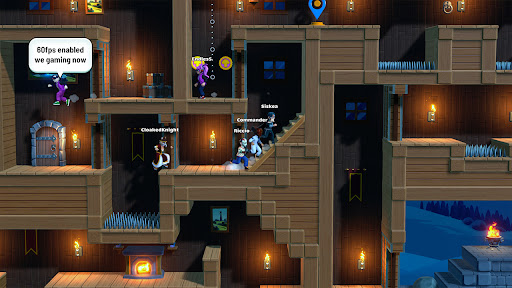
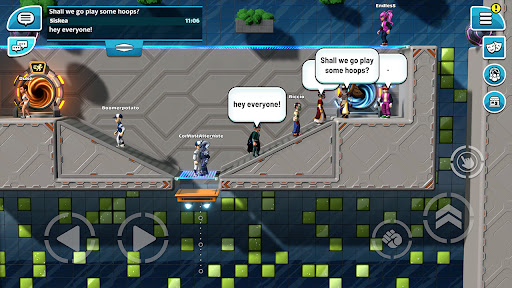
THIS IS OUR EARLY ACCESS WHICH HAS LIMITED CONTENT
Nexus Station is still in early development and not yet feature-complete. We will be adding features and content to the game as we develop it further. By joining our Early Access, you help us as developers to check and validate some technical aspects, and gather feedback on our project.
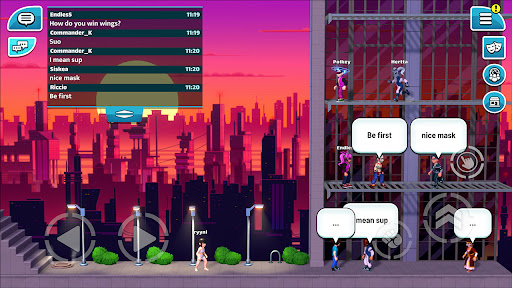
A NEW KIND OF SOCIAL SANDBOX MMO
We are developing a one-of-a-kind cross-platform Social Sandbox MMO with endless possibilities; from crafting, world creation, PvE, PvP, sports and more. You’ll be able to create your own worlds, levels, and even make official playable content for the community. We look forward to sharing more with you as the game develops!
BUILD WORLDS WITH LEVEL EDITOR
Create and edit your own worlds and explore the worlds made by your friends! We will choose player-made worlds to feature as official competitive and co-op features for the wider community.
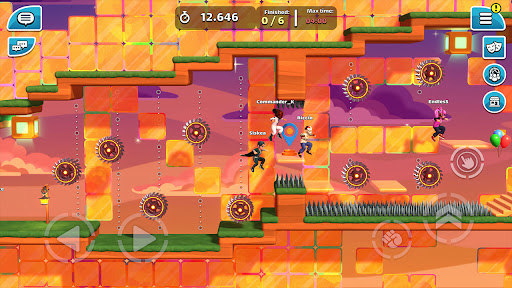
COMPETE FOR YOUR BEST TIME IN PARKOUR
Race in our daily parkour worlds, or create your own parkour worlds for others to compete in.
COLLECT LIMITED ITEMS AND WEARABLES
Progress in Nexus Station with our season pass and get your hands on exclusive items that you won’t get anywhere else! Trade wearables with your friends to get the perfect set and customise your character in our dedicated customisation screen.
SHOOT THE HOOPS WITH YOUR FRIENDS
Work together to score as many points as you can in our shoot the hoops feature. Enter the portals from the Hub World to play the official hoops worlds!
BE A PART OF THE COMMUNITY
Join our online community on Discord and Instagram where you can get the latest updates on the game and hang out with the community.
Meer tonen

1. Download de MEmu-installatie en voltooi de setup

2. Start MEmu en open vervolgens Google Play op het bureaublad

3. Zoek Nexus Station in Google Play
Install
4. Download en installeer Nexus Station
5. Klik op het icoon om te starten na het voltooien van de installatie

6. Geniet van het spelen van Nexus Station op PC met MEmu
MEmu Play is de beste Android Emulator en 100 miljoen mensen genieten al van de superieure Android-game-ervaring. De virtualisatietechnologie van MEmu stelt je in staat om duizenden Android-spellen soepel op je PC te spelen, zelfs de meest grafisch intensieve.
Groter scherm met betere graphics; Lange duur, zonder beperking van batterij of mobiele data.
Volledige Keymapping-ondersteuning voor nauwkeurige besturing van toetsenbord en muis of gamepad.
Meerdere game-accounts of taken op één PC tegelijk met Multi-Instance manager.
Speel Nexus Station op PC door de volgende stappen te volgen: