Zoodoku: Brain Puzzle Games
Bijgewerkt
Huidige Versie
1.1.9
Aangeboden door

Met al je passie voor het spelen van Zoodoku: Brain Puzzle Games, zouden je handen niet beperkt moeten zijn tot een klein scherm van je telefoon. Speel als een professional en krijg volledige controle over je spel met toetsenbord en muis. MEmu biedt je alles wat je verwacht. Download en speel Zoodoku: Brain Puzzle Games op PC. Speel zo lang als je wilt, geen beperkingen meer van batterij, mobiele data en storende oproepen. De gloednieuwe MEmu 9 is de beste keuze om Zoodoku: Brain Puzzle Games op PC te spelen. Voorbereid met onze expertise, maakt het uitmuntende vooraf ingestelde keymapping systeem van Zoodoku: Brain Puzzle Games een echt PC-spel. MEmu multi-instance manager maakt het spelen van 2 of meer accounts op hetzelfde apparaat mogelijk. En het belangrijkste, onze exclusieve emulatie-engine kan het volledige potentieel van je PC benutten, waardoor alles soepel verloopt.
Meer tonen
Download Zoodoku: Brain Puzzle Games op je pc met de MEmu Android-emulator. Geniet van spelen op een groot scherm. Looking for relaxing brain puzzle games with simple rules and satisfying challenges?
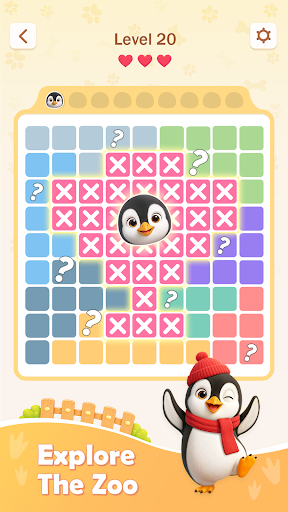
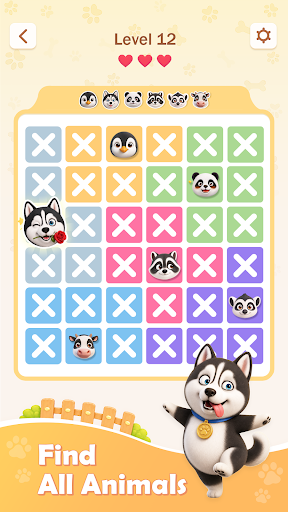
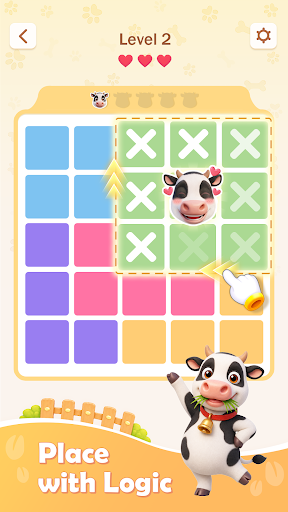
Looking for relaxing brain puzzle games with simple rules and satisfying challenges? Welcome to Zoodoku, an animal Sudoku puzzle that combines clever spatial deduction with adorable animal friends.
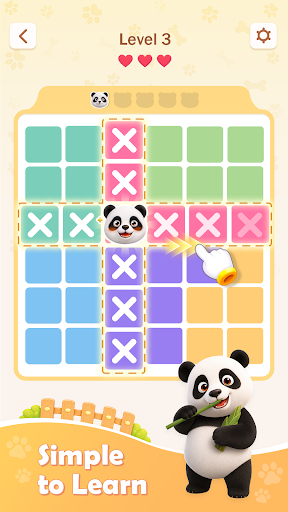
Place exactly one animal in every row, every column, and every colored region. Keep the animals apart because they cannot touch, even diagonally. Every brain puzzle has one unique solution that can be discovered through observation and pure logic.
Simple Rules, Deep Strategy
Zoodoku is easy to learn:
• Place exactly one animal in every colored region.
• Place only one animal in each row and column.
• Never let two animals touch, even diagonally.
• Mark impossible spaces and eliminate wrong positions.
• Use logical deduction to find the unique solution.
The individual rules are simple, but combining them creates rewarding brain puzzles that test your concentration, pattern recognition, and spatial reasoning.
A Fresh Animal Sudoku Puzzle
Zoodoku gives classic Sudoku-style logic a playful new form. Instead of filling a grid with numbers, you must find the perfect territory for every animal.
Study the colored regions, compare possible positions, and eliminate spaces that break the rules. Continue until only one correct arrangement remains. There is no math and no need to guess—every move can be explained through logic.
If you enjoy Sudoku, Queens puzzles, deduction games, or brain teaser games, Zoodoku offers a fresh number-free challenge that is easy to begin and rewarding to master.
From One Meow to a World of Animals
Begin with a playful meow and meet cats, dogs, cows, and many other charming animals as you progress. Each animal theme adds personality to the board while preserving the same thoughtful logic gameplay.
Fans of cat puzzles and cat Sudoku can enjoy familiar Sudoku-style constraints in a colorful animal world. Find the correct territory for every animal and complete the board without letting any two friends touch.
Relaxing Brain Teaser Games
Play a quick puzzle during a break, complete a Daily Puzzle, or take your time with a more challenging board. Zoodoku keeps your mind engaged without rushing you.
Every level is designed to provide the satisfying moment when a difficult solution finally becomes clear. Observe the grid, recognize useful patterns, and solve each challenge at your own pace.
Whether you enjoy brain games, puzzle games, brain puzzles, or relaxing logic challenges, Zoodoku gives you a thoughtful way to exercise your mind.
Why Play Zoodoku?
• Hundreds of handcrafted brain puzzles
• New Daily Puzzles to solve
• Unique solutions with no guessing required
• Cats and other animal themes to discover
• Relaxing brain training for every skill level
• Clean visuals and intuitive controls
• Offline play anytime and anywhere
• No numbers or math required
Train Your Brain at Your Own Pace
Every completed puzzle rewards careful observation and logical thinking. Start with approachable levels, learn useful deduction patterns, and progress to more challenging boards as your skills improve
Zoodoku is made for players searching for brain puzzle games, brain teaser games, animal puzzles, cat puzzles, Daily Puzzles, or a number-free Sudoku alternative.
Can you find the perfect territory for every animal?
Download Zoodoku today and enter a relaxing world of clever brain puzzles, adorable animals, and satisfying daily challenges.
Meer tonen

1. Download de MEmu-installatie en voltooi de setup

2. Start MEmu en open vervolgens Google Play op het bureaublad

3. Zoek Zoodoku: Brain Puzzle Games in Google Play
Install
4. Download en installeer Zoodoku: Brain Puzzle Games
5. Klik op het icoon om te starten na het voltooien van de installatie

6. Geniet van het spelen van Zoodoku: Brain Puzzle Games op PC met MEmu
MEmu Play is de beste Android Emulator en 100 miljoen mensen genieten al van de superieure Android-game-ervaring. De virtualisatietechnologie van MEmu stelt je in staat om duizenden Android-spellen soepel op je PC te spelen, zelfs de meest grafisch intensieve.
Groter scherm met betere graphics; Lange duur, zonder beperking van batterij of mobiele data.
Volledige Keymapping-ondersteuning voor nauwkeurige besturing van toetsenbord en muis of gamepad.
Meerdere game-accounts of taken op één PC tegelijk met Multi-Instance manager.
Speel Zoodoku: Brain Puzzle Games op PC door de volgende stappen te volgen: