AILabTools-AI Photo Editor
Bijgewerkt
Huidige Versie
1.5.0
Aangeboden door

Maak je geen zorgen meer over extra kosten bij het gebruik van AILabTools-AI Photo Editor op je mobiele telefoon, bevrijd jezelf van het kleine scherm en geniet van het gebruik van de app op een veel groter display. Vanaf nu, krijg een volledige schermervaring van je app met toetsenbord en muis. MEmu biedt je alle verrassende functies die je verwachtte: snelle installatie en eenvoudige configuratie, intuïtieve besturing, geen beperkingen meer van batterij, mobiele data en storende oproepen. De gloednieuwe MEmu 9 is de beste keuze voor het gebruik van AILabTools-AI Photo Editor op je computer. MEmu multi-instance manager maakt het mogelijk om tegelijkertijd 2 of meer accounts te openen. En het belangrijkste, onze exclusieve emulatiemotor kan het volledige potentieel van je PC benutten, waardoor alles soepel en plezierig wordt.
Meer tonen
Geniet van een fantastische ervaring met AILabTools-AI Photo Editor op je pc met MEmu Play. Het is een krachtige gratis Android-emulator die je duizenden Android-apps biedt voor de desktopversie. Geniet van contact met vrienden en verbeter je werk met hogere efficiëntie! AILabTools is a provider of AI capabilities and tools, offering a wide range of AI tools for image manipulation.
AILabTools is a provider of AI capabilities and tools, offering a wide range of AI tools for image manipulation.
The APP offers nearly 30 AI image processing tools (with more to be added) in 3 categories - AI images, AI faces and bodies, and AI background removal.
1. AI Image Technology
Image Dehaze - AI algorithms enable the de-fogging of images taken in foggy weather, resulting in unrecognisable details, to restore a clearer and more realistic image.
Image Contrast Enhancement - AI algorithms adjust the contrast of images that are too dark or too light to make them sharper.
Image Upscaler - Use AI technology to enlarge images by 200%-400% without loss of image quality. Applications include photo manipulation, e-commerce, design and more.
Stretched Image Restoration - Automatically identifies over-stretched images and restores the image content to normal proportions using artificial intelligence algorithms.
Image Enhancer - Professional Image Enhancer for Deblurring, Color Correction, and Contrast Adjustment
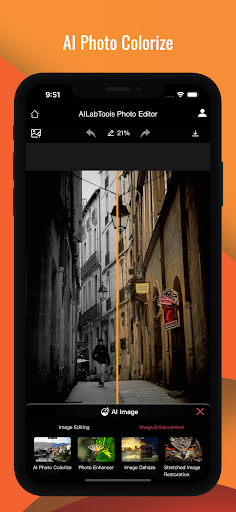
AI Photo Colorize - Artificial intelligence algorithms identify the content of black and white images and fill them with colour to bring them to life.
PhotoPaint- Convert images into cartoon, pencil, coloured pencil, or gothic oil painting, coloured sugar cube oil painting, shouting oil painting, Kanagawa Surf Lane oil painting, whimsical oil painting, lavender oil painting, etc. in a total of 9 styles by using AI algorithms.
Image Erasure - Quickly remove unwanted objects, people and text from your photos with an artificial intelligence algorithm. Clean up your photos and beautify them.
2. AI Face Technology
Retouch Portraits - Automatically evens out face areas, removes blemishes (acne, pimple marks, freckles, etc.) and whitens skin areas all over the body while retaining as much skin texture as possible through AI algorithms. Multi-player image processing is supported.
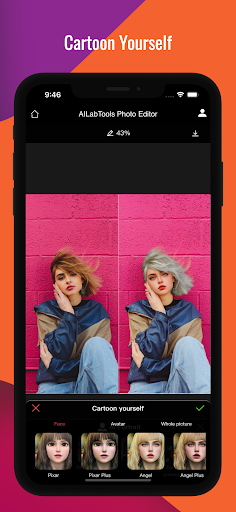
Cartoon yourself - Converts a person image through artificial intelligence algorithms to generate a secondary cartoon image and returns the resultant image after anime. Supports Japanese manga, 3D, hand-drawn, pencil drawing styles and can process up to 5 face photos.
AI Makeup - AI algorithm to simulate realistic make-up effects, adding lipstick, highlighter, make-up and other make-up materials to further enhance the face beautification effect.
Face Filters - Uniformly modify the image style through artificial intelligence algorithm, including sunflower, Kenting, Dali and other effects, and also freely adjust the filter intensity to adjust the filter effect on the overall image style.
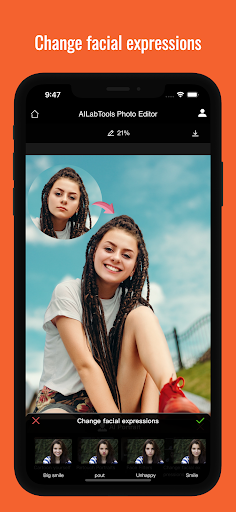
Change facial expressions - Use advanced image processing technology to edit the expressions of human faces in images. Supports application scenarios such as real-time effects and photo editing.
Face Blur - Blurring of faces in images by AI algorithms and output of desensitised images.
Age & Gender swap - Through AI algorithms, face attribute features can be edited to achieve special effects such as gender swapping and age change, generating a variety of special effects photos for users, which can be applied to fun social networking.
3. AI Background Removal
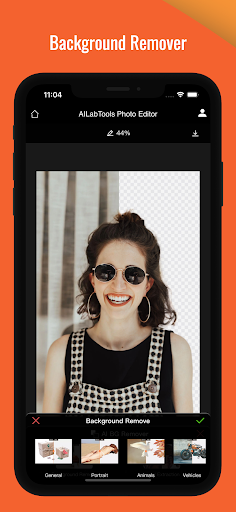
background removal - through AI algorithms, it automatically identifies the outline of the subject in the visual centre of the image and uses the subject as the foreground to erase the background, returning a split foreground subject image, suitable for people, animals, food, objects and other keying scenes.
Meer tonen

1. Download de MEmu-installatie en voltooi de setup

2. Start MEmu en open vervolgens Google Play op het bureaublad

3. Zoek AILabTools-AI Photo Editor in Google Play
Install
4. Download en installeer AILabTools-AI Photo Editor
5. Klik op het icoon om te starten na het voltooien van de installatie

6. Ervaar AILabTools-AI Photo Editor op pc met MEmu
MEmu Play is de beste Android-emulator, met meer dan 100 miljoen gebruikers die genieten van de superieure Android-app-ervaring. Dankzij de virtualisatietechnologie van MEmu kun je duizenden Android-apps soepel op je computer draaien, zelfs de meest veeleisende.
Groter scherm met betere graphics; Lange duur, zonder beperking van batterij of mobiele data.
Volledige Keymapping-ondersteuning voor nauwkeurige besturing van toetsenbord en muis of gamepad.
Meerdere game-accounts of taken op één PC tegelijk met Multi-Instance manager.
Gebruik AILabTools-AI Photo Editor op PC door de volgende stappen te volgen: