BallparkDJ Walkout Intros
Bijgewerkt
Huidige Versie
24.1.4
Aangeboden door

Maak je geen zorgen meer over extra kosten bij het gebruik van BallparkDJ Walkout Intros op je mobiele telefoon, bevrijd jezelf van het kleine scherm en geniet van het gebruik van de app op een veel groter display. Vanaf nu, krijg een volledige schermervaring van je app met toetsenbord en muis. MEmu biedt je alle verrassende functies die je verwachtte: snelle installatie en eenvoudige configuratie, intuïtieve besturing, geen beperkingen meer van batterij, mobiele data en storende oproepen. De gloednieuwe MEmu 9 is de beste keuze voor het gebruik van BallparkDJ Walkout Intros op je computer. MEmu multi-instance manager maakt het mogelijk om tegelijkertijd 2 of meer accounts te openen. En het belangrijkste, onze exclusieve emulatiemotor kan het volledige potentieel van je PC benutten, waardoor alles soepel en plezierig wordt.
Meer tonen
Geniet van een fantastische ervaring met BallparkDJ Walkout Intros op je pc met MEmu Play. Het is een krachtige gratis Android-emulator die je duizenden Android-apps biedt voor de desktopversie. Geniet van contact met vrienden en verbeter je werk met hogere efficiëntie! Looking to take your game introductions and announcements to the next level?
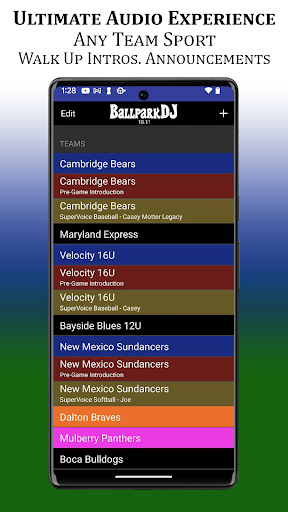
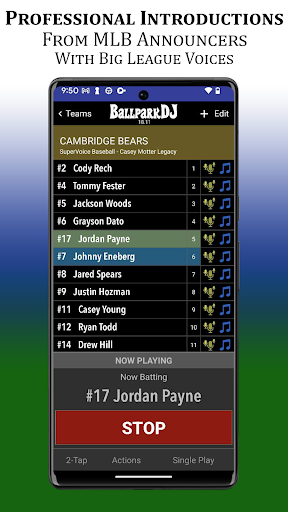
Looking to take your game introductions and announcements to the next level? Look no further than the BallparkDJ mobile app. This complete solution for professional voice and music intro creator app is a great tool for all varieties of youth sports. Infuse these professional intros from major league announcers with music and multiply them with SuperVoice to introduce every possible situation imaginable.
No matter what you call it: walk-up, walk-out, walkup, walkout, intros, introductions, or announcement; BallparkDJ delivers professional introductions and announcements.
BallparkDJ is not just for baseball and softball but for any youth sport: football, soccer, lacrosse, cheerleading, basketball, hockey, and much more.
Players, parents, and coaches absolutely love it! Why?
Three reasons: Sports. Music. Kids. They belong together.
Add a Unique Flare to Youth Sports
Adding professional introductions and music to baseball, softball, or any youth sporting event is finally super-easy and fun AND very inexpensive! Download BallparkDJ and try it for free to produce professional walk-up and walk-out voice and music intros.
Once you're certain it fully serves your needs for athletic audio you can activate the unlimited version from within the app for only 6.99/yr. Unlimited teams. Unlimited Players.
The Only App With Pro Sports Announcers
Order custom voice overs from pro sports announcers like Ryan Cameron of the Atlanta Falcons and Atlanta Hawks! The voices you hear at MLB parks from teams like the Braves, Cubs, Angels, Mets, and Rays can now introduce your youth sporting event through BallparkDJ! Make your team feel just like they are walking out on a major league field in a big league game for a one-time fee of $3.99/player.
Not into the professional introductions? No problem! You can use your own voice for the announcements!
The Only Easy to Use, Complete Walkout App on the Market
Your job as a call announcer has never been easier. The ease of use and rich features of our professional intro app, your team will love your walkup introductions and music.
---------------
SuperVoice is Here!
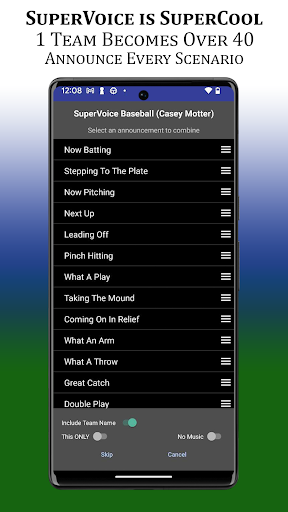
What could be better than professional introductions from major league voices for youth sports? Professional Introductions powered by SuperVoice! SuperVoice will infuse your player introductions with over 60 of the most popular events in your respective sport to empower you to professionally announce every possible situation at your sporting event.
Now, your 1 team operates as over 60 teams! Here’s how it works:
• Tap on a player, then tap on the appropriate action, and SuperVoice takes care of the rest.
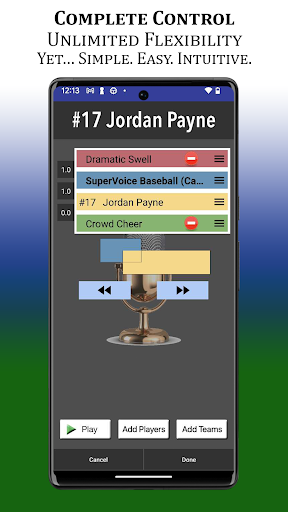
• SuperVoice combines up to 4 different voice components into one seamless introduction opening the door to countless possibilities.
• Insert special effects, team name, team chants (or anything you can imagine) into each introduction, anywhere you wish.
• SuperVoice can be blended with each players favorite song. SuperVoice will bring yet another level of awesome to your BallparkDJ experience.
• Pre-Game Continuous Full-Team Intro created automatically
Team Sharing and Duplication
Going to miss a game? No problem! Share your team with another coach or parent. Even share from iOS to Android or Android to iOS. You can even duplicate your team for multiple sets of walk-up songs, line-up orders, or full-team intros.
Continuous Play
This option makes it easy to create entire team pre-game intros with one song playing behind the entire line-up with a tap of a button.
And So Much More including Team Sorting, Team Subtitles, Team Duplication, Importing Players Between Teams, Tip of the Day, Benched Players, etc.!
Your game day experience will never be the same.
What's your theme song?
Meer tonen

1. Download de MEmu-installatie en voltooi de setup

2. Start MEmu en open vervolgens Google Play op het bureaublad

3. Zoek BallparkDJ Walkout Intros in Google Play
Install
4. Download en installeer BallparkDJ Walkout Intros
5. Klik op het icoon om te starten na het voltooien van de installatie

6. Ervaar BallparkDJ Walkout Intros op pc met MEmu
MEmu Play is de beste Android-emulator, met meer dan 100 miljoen gebruikers die genieten van de superieure Android-app-ervaring. Dankzij de virtualisatietechnologie van MEmu kun je duizenden Android-apps soepel op je computer draaien, zelfs de meest veeleisende.
Groter scherm met betere graphics; Lange duur, zonder beperking van batterij of mobiele data.
Volledige Keymapping-ondersteuning voor nauwkeurige besturing van toetsenbord en muis of gamepad.
Meerdere game-accounts of taken op één PC tegelijk met Multi-Instance manager.
Gebruik BallparkDJ Walkout Intros op PC door de volgende stappen te volgen: