
dynamicSpot - Dynamic Island
Bijgewerkt
Huidige Versie
2.01
Aangeboden door

Maak je geen zorgen meer over extra kosten bij het gebruik van dynamicSpot - Dynamic Island op je mobiele telefoon, bevrijd jezelf van het kleine scherm en geniet van het gebruik van de app op een veel groter display. Vanaf nu, krijg een volledige schermervaring van je app met toetsenbord en muis. MEmu biedt je alle verrassende functies die je verwachtte: snelle installatie en eenvoudige configuratie, intuïtieve besturing, geen beperkingen meer van batterij, mobiele data en storende oproepen. De gloednieuwe MEmu 9 is de beste keuze voor het gebruik van dynamicSpot - Dynamic Island op je computer. MEmu multi-instance manager maakt het mogelijk om tegelijkertijd 2 of meer accounts te openen. En het belangrijkste, onze exclusieve emulatiemotor kan het volledige potentieel van je PC benutten, waardoor alles soepel en plezierig wordt.
Meer tonen
Download dynamicSpot - Dynamic Island on PC with MEmu Android Emulator. Enjoy playing on big screen. Wilt u het Dynamic Notification Island ervaren op uw Android-apparaat?
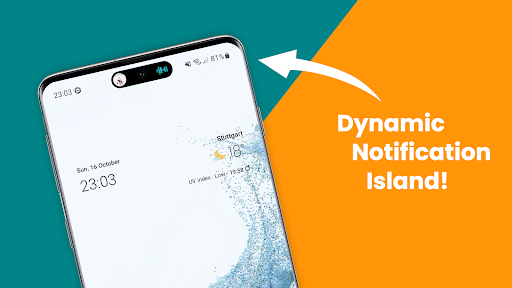
Wilt u het Dynamic Notification Island ervaren op uw Android-apparaat? Met dynamicSpot kunt u dit eenvoudig bereiken!
dynamicSpot brengt Dynamic Notification-pop-ups, geïnspireerd door de allernieuwste meldingssystemen, naar uw Android-apparaat. Krijg naadloos toegang tot recente meldingen of wijzigingen in de telefoonstatus en ontvang meldingen over nieuwe meldingen, bijvoorbeeld met een meldingslampje of LED.
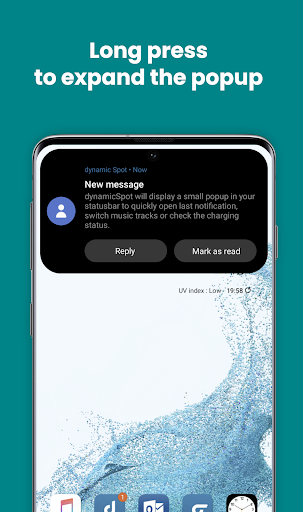
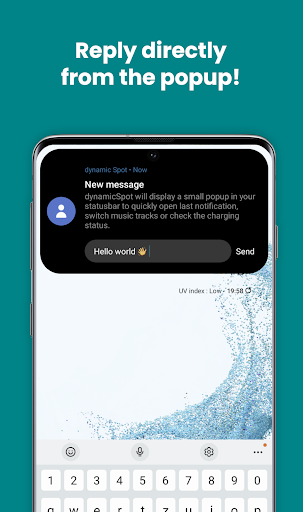
De app vervangt de standaard Android-meldingspop-ups door een strakke, moderne en dynamische versie. Tik op de kleine zwarte Dynamic Notification Island-pop-up om deze uit te breiden met Dynamische animaties en meer meldingsdetails te bekijken, en antwoord rechtstreeks vanuit de pop-up!
Met de functie 'Live-activiteiten' heeft u rechtstreeks toegang tot uw favoriete apps vanuit de pop-up Dynamic Notification Island, allemaal met slechts één tik!
Terwijl andere systemen misschien geen aanpassingsmogelijkheden hebben, kunt u met dynamicSpot het uiterlijk aanpassen, met dynamische kleuren, meerkleurige Music Visualizer en nog veel meer. Kies wanneer u de pop-up Dynamische meldingen wilt weergeven of verbergen en selecteer welke apps of systeemgebeurtenissen moeten verschijnen.
Compatibel met bijna alle apps die het meldingssysteem van Android gebruiken, inclusief berichten- en Dynamic Timer- en muziek-apps!
Dynamische meldingen met dynamicSpot — beter dan enig meldingslampje of pop-ups met systeemmeldingen!
BELANGRIJKSTE KENMERKEN
• Dynamisch meldingseiland
• Live-activiteiten (app-snelkoppelingen)
• Pop-ups met zwevende eilandmeldingen
• Meldingsantwoorden verzenden vanuit een pop-up
• Meldingslampje / LED vervanging
• Dynamisch aftellen van de timer
• Geanimeerde muziekvisualisatie
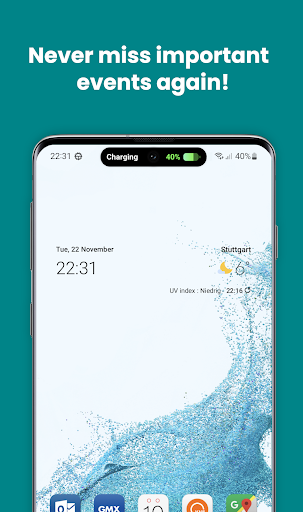
• Batterij opladen of leeg alarm
• Aanpasbare interactie
• Selcet-meldingsapps
MUZIEKEILAND
• Afspelen / Pauzeren
• Volgende / Vorige
• Aanraakbare zoekbalk
• Ondersteuning voor aangepaste acties (zoals favorieten...)
SPECIALE DYNAMISCHE EVENEMENTEN
• Timer aps: Toon lopende timer
• Batterij: percentage weergeven
• Kaarten: Toon afstand
• Muziek-apps: muziekbediening
• Binnenkort meer!
Openbaring:
De app gebruikt de AccessibilityService API om een dynamische pop-up met meldingseiland weer te geven om multitasking mogelijk te maken.
Er worden geen gegevens verzameld of gedeeld met behulp van de AccessibilityService API!
Meer tonen

1. Download de MEmu-installatie en voltooi de setup

2. Start MEmu en open vervolgens Google Play op het bureaublad

3. Zoek dynamicSpot - Dynamic Island in Google Play
Install
4. Download en installeer dynamicSpot - Dynamic Island
5. Klik op het icoon om te starten na het voltooien van de installatie

6. Ervaar dynamicSpot - Dynamic Island op pc met MEmu
MEmu Play is de beste Android-emulator, met meer dan 100 miljoen gebruikers die genieten van de superieure Android-app-ervaring. Dankzij de virtualisatietechnologie van MEmu kun je duizenden Android-apps soepel op je computer draaien, zelfs de meest veeleisende.
Groter scherm met betere graphics; Lange duur, zonder beperking van batterij of mobiele data.
Volledige Keymapping-ondersteuning voor nauwkeurige besturing van toetsenbord en muis of gamepad.
Meerdere game-accounts of taken op één PC tegelijk met Multi-Instance manager.
Gebruik dynamicSpot - Dynamic Island op PC door de volgende stappen te volgen: